

This checklist is for people who want to add practical privacy and security tools to their everyday devices. It covers account sign-ins, laptop screens, stored files, webcams, phones, and home networking, with one product pick for each slot.

Get the latest gadgets delivered free with Prime
- Fast, free delivery on millions of items
- Prime Video, Amazon Music and more included
- Member-only deals all year
The sections follow those use cases, so you can focus on the devices and habits that matter most to you. Each pick has a short guide to what the slot is for, common selection mistakes, and features to check before buying, including fit and compatibility.
Use the list as a starting point: confirm the product details against your own devices and needs before ordering. A security accessory is most useful when it works with your setup and you can use it consistently; check model numbers, dimensions, and supported connections where applicable.
Hardware Security Keys
A hardware security key can add a physical step to account sign-ins, making it a useful checklist item for people who want another way to verify access. The pick here is a FIDO2 security key that also names MIFARE DESFire and NFC, so check which of those functions your intended accounts and devices support before purchase. A feature listed in a product name does not by itself confirm compatibility with every service.
A common mistake is choosing a key based only on a connector or a card feature without checking how it will be used. Review the supported authentication standards, how the key connects to your computer or phone, and whether your devices have the necessary port or NFC capability. Consider whether you want a key that stays with your everyday device or one kept separately for recovery. Follow each service’s setup guidance and keep its recovery options available; don’t assume one key alone is enough for account access. Check service support and connection fit before deciding.
What to look for:
- Confirm the accounts support FIDO2 security keys.
- Check whether NFC works with your intended phone or device.
- Verify the physical connection fits your computer.
- Review setup and account-recovery options for each service.
- Decide where you will keep the key when it is not in use.
FIDO2 Security Key with MIFARE DESFire NFC Smart Card for 2FA MFA

This security key supports FIDO2 v2.1, U2F, and CTAP1 for secure two-factor authentication and passwordless sign-in. It features a MIFARE DESFire EV2 card for physical access control, with AES encryption and a tamper-resistant secure element.
Pros:
- Supports multiple authentication standards for versatile security
- Combines digital and physical access in one card
- Certified secure element with tamper resistance
- Swiss-engineered design with reliable warranty
Cons:
- Requires compatible services and physical access systems
- May be complex for users unfamiliar with smart cards
Best for: People seeking a hardware key for supported account sign-ins
Not ideal for: Anyone whose services or devices do not support its functions
Bottom line: Check service and device compatibility first, then decide whether this key fits your sign-in routine.
Privacy Screen Protectors
A privacy screen filter is intended to limit what people beside you can see on your display, which can matter when you work or browse in shared spaces. This pick is listed for a 14-inch laptop with a 16:10 screen, so those dimensions and aspect ratio should guide your fit check. Screen size alone is not enough: laptops with the same diagonal measurement can have different frame and display shapes.
Before buying, compare the filter’s stated dimensions with the visible display area and confirm how it attaches to your specific laptop. Check whether the screen has a touch layer, unusual bezel shape, or other feature that could affect placement or use. A frequent mistake is treating “14-inch” as a universal fit or overlooking the 16:10 specification. Also consider how often you switch between private viewing and sharing the screen, and review the product details for how the filter is removed or repositioned. Match the aspect ratio and device model as closely as possible, and verify that the filter will not interfere with how you use the display.
What to look for:
- Confirm your laptop has a 14-inch, 16:10 display.
- Compare the filter dimensions with the visible screen area.
- Check the attachment method against your laptop’s bezel.
- Consider any touch-screen or display features that affect use.
- Review how the filter is removed or repositioned.
3M Bright Screen Privacy Filter for 14-Inch Laptop, 16:10 (BP140W1B)

This privacy filter is designed for 14-inch, 16:10 laptop screens and limits side viewing beyond a 60-degree viewing angle. Its reversible glossy and matte surfaces help reduce glare and fingerprints, while the filter also reduces blue light without distorting natural display colors.
Pros:
- Limits side viewing beyond a 60-degree angle.
- Reversible glossy and matte surfaces help reduce glare and fingerprints.
- Reduces blue light without distorting natural display colors.
- Includes attachments for switching between privacy and screen sharing and for securing the filter.
Cons:
- Compatibility is specified for 14-inch, 16:10 screens, limiting fit to matching displays.
- Privacy protection is reduced when viewed within the 60-degree viewing angle.
Best for: People with a compatible 14-inch, 16:10 laptop
Not ideal for: Owners of displays with different dimensions or aspect ratios
Bottom line: Verify the screen shape and attachment fit before choosing this filter.
Encrypted USB Drives
An encrypted portable drive can be a practical option for keeping files on removable storage. This pick is identified as an Apricorn Aegis Padlock with 2TB capacity and hardware encryption. The product name alone does not settle whether it suits your workflow, so check the complete listing for the exact model, connection type, and supported devices before buying.
Think through what you plan to store and how you will move files between computers. Common mistakes include overlooking connector compatibility, assuming the drive will work with every operating system, or failing to understand how its access controls and recovery process work. Check whether the drive’s physical size and cable or adapter needs suit the places you will use it. For important files, also plan a separate backup; a portable drive is still a single storage device. Review the manufacturer’s instructions for setting up access and keeping recovery information safe. Check the exact model and connection details, and make sure its capacity and handling fit your intended use.
What to look for:
- Confirm the complete model name and hardware-encryption details.
- Check the connection type against your computers.
- Review operating-system and device compatibility.
- Understand access setup and recovery instructions.
- Plan a separate backup for important files.
Apricorn Aegis Padlock 2TB Hardware-Encrypted Portable External Hard Drive

This portable 2TB drive uses 256-bit AES XTS hardware encryption and an integrated keypad for PIN-based access. It connects over USB 3.0, requires no software or administrator rights, and supports up to five user PINs plus an administrator PIN.
Pros:
- Hardware encryption with keypad-based PIN access
- Works without software installation or administrator rights
- Compatible with PC, Mac, and USB-enabled operating systems
- Rugged design with epoxy coating and brute-force self-destruct feature
Cons:
- Uses a rotating 5400 rpm hard drive
- Requires PIN entry through the integrated keypad
Best for: People who want portable storage with hardware encryption
Not ideal for: Anyone needing a drive confirmed for an unspecified device or workflow
Bottom line: Check the exact model, connection, and recovery process before storing important files on it.
Webcam Privacy Covers
A sliding webcam cover offers a simple physical way to block a camera when it is not in use. This pick names several Logitech models, including C920 and C930e, so start by confirming your webcam’s exact model. A cover designed for a particular camera may not sit correctly on a different housing, even when the cameras look similar.
Check the cover’s dimensions, adhesive or mounting method, and clearance around the lens before ordering. A common mistake is choosing by brand alone and missing a model-specific shape or a nearby microphone, light, or camera feature. Consider how frequently you open and close the shutter and whether its placement could interfere with the camera’s image or your setup. If your webcam is built into a laptop display, do not assume a cover intended for a Logitech external webcam will fit. Match the webcam model and inspect the mounting details, especially if the camera has a curved or crowded front surface.
What to look for:
- Verify your webcam is one of the listed Logitech models.
- Compare the cover shape with the camera housing.
- Check mounting method and clearance around the lens.
- Consider whether the shutter could obstruct nearby features.
- Avoid assuming a cover for an external webcam fits a laptop camera.
Webcam Privacy Cover Slide Shutter for Logitech C920, C920x, C930e, and C922 Pro

A sliding privacy shutter that fits Logitech C920, C920x, C930e, and C922 Pro Stream webcams, as well as other popular models. The cover slides closed to block the camera lens and protect your privacy when not in use.
Pros:
- Compatible with a wide range of Logitech webcam models
- Simple sliding design for quick privacy control
- Cost-effective alternative to OEM covers
Cons:
- Third-party product not endorsed by Logitech
Best for: Owners of a compatible Logitech webcam model
Not ideal for: People with built-in or unlisted camera models
Bottom line: Confirm the webcam model and mounting clearance before attaching a cover.
Faraday Phone Pouches
A signal-blocking pouch is a specialized accessory for people who want to place a phone inside an enclosure that limits its connections. This pick is a medium SLNT Faraday sleeve. Since the product name does not specify which phone dimensions it fits, check the pouch’s internal measurements against your phone, including any case you plan to leave on.
A common buying mistake is assuming that “medium” guarantees a fit or that the phone remains reachable while enclosed. Consider how you intend to use the pouch, how quickly you need to retrieve the phone, and whether carrying it this way matches your routine. Check the product’s stated coverage and instructions rather than inferring performance from the name. If you rely on your phone for calls or alerts, account for the fact that a signal-blocking sleeve is meant to restrict communication while the phone is inside. Measure your device and understand the intended use before making this a daily-carry item.
What to look for:
- Compare your phone’s dimensions with the pouch’s internal measurements.
- Include the phone case in your fit check.
- Review the product’s stated signal-blocking coverage and instructions.
- Consider how you will access the phone while it is enclosed.
- Make sure restricted connectivity suits your intended use.
SLNT Faraday Phone Sleeve – Signal Blocking Pouch (Black, Medium)
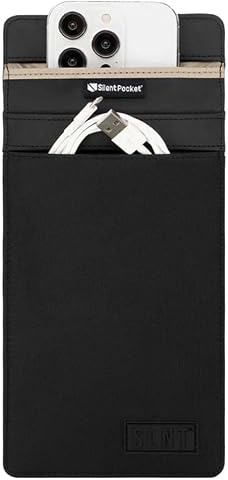
The SLNT Faraday Phone Sleeve features advanced signal-blocking technology to protect devices from cellular, WiFi, Bluetooth, GPS, RFID, NFC, EMF, and satellite signals. Made from durable weatherproof nylon or sleek leather, it offers versatile, discreet protection with dual pockets for organization, suitable for various device sizes.
Pros:
- Effectively blocks multiple signals to protect privacy
- Available in durable weatherproof nylon or sleek leather
- Multiple sizes accommodate various devices
- Compact and lightweight for everyday carry
Cons:
- May be more expensive than basic sleeves
- Requires proper closure to ensure signal blocking
- Limited color options
Best for: People whose phone fits and who want a signal-blocking pouch
Not ideal for: Anyone who needs continuous connectivity while the phone is enclosed
Bottom line: Check device fit and intended use before adding this sleeve to your routine.
Network Security Routers
A router is a central part of a home network, connecting devices and providing the controls offered by its software. The pick is a Synology RT6600ax tri-band Wi-Fi router. Before choosing it, check the full specifications and supported features against your internet service, home layout, and the devices you plan to connect.
Common mistakes include buying for a feature name without checking whether it fits the home’s needs, overlooking modem or service-provider requirements, and assuming a router’s listed bands guarantee coverage in every room. Consider where the router can be placed, how many wired connections you need, and whether your devices support the wireless capabilities you intend to use. Review the setup process and the available network-management features in the product documentation. Check your service setup and placement options before replacing an existing router, and confirm that the model’s ports and wireless support work with your equipment.
What to look for:
- Confirm compatibility with your internet service and modem setup.
- Check wired port needs and connected devices.
- Review wireless support across your existing devices.
- Plan a suitable router location for your home layout.
- Read setup and network-management documentation.
Synology RT6600ax Tri-Band Wi-Fi Router

The Synology RT6600ax is a tri-band Wi-Fi router supporting 4×4 MIMO with 160MHz channels, offering high-speed connectivity with a 2.5Gbps Ethernet port. It features multiple SSIDs, VLAN segmentation, parental controls, threat prevention, and a comprehensive VPN solution for secure remote access.
Pros:
- Supports high-speed Wi-Fi with tri-band and 160MHz channels
- Advanced network segmentation and security features
- Fast 2.5Gbps Ethernet port suitable for high-speed ISPs
- Flexible VPN options for remote connectivity
Cons:
- Complex setup may be challenging for beginners
- Premium price point
- Limited to US version, may not be suitable for international users
Best for: Households checking a tri-band router against their network needs
Not ideal for: Anyone who has not confirmed service and device compatibility
Bottom line: Compare the router’s connections and supported features with your home setup before choosing it.
If you are building a checklist gradually, start with the items tied to your most important accounts and everyday devices, then consider storage, screen privacy, webcam coverage, phone isolation, and network equipment. Confirm compatibility and fit for each purchase before adding it to your setup.
You do not need to adopt every category at once. Choose the tools that match your actual routines, follow their setup instructions, and revisit the list when your devices change. A little careful checking can help you build a more considered setup one step at a time.