
For a smart lock with a rechargeable battery pack, I’d start with the ULTRALOQ Bolt SE for its Matter over Thread connectivity and remote access, then compare it with the myQ Secure View if an extra battery and built-in camera matter more. The GHome fingerprint locks are worth a look for buyers who want a removable-battery design without prioritizing an expansive smart-home setup. The main tradeoff is between convenient charging and backup power versus features such as Wi-Fi access, biometrics, and cameras that can add complexity and drain power. Battery design and charging method vary, so I’d verify exactly what comes in the box before buying. Read on for how these 11 options differ and which buyer each one suits.

Get the latest gadgets delivered free with Prime
- Fast, free delivery on millions of items
- Prime Video, Amazon Music and more included
- Member-only deals all year
Complete the kit



Key Takeaways
- ULTRALOQ Bolt SE stands out for buyers who value Matter over Thread and remote access; its network setup is a different proposition from locks centered on palm or face recognition.
- myQ Secure View is the clearest pick for shoppers specifically interested in an extra battery and a camera, though its added monitoring features may not suit buyers seeking a simpler lock.
- GHome’s fingerprint models put removable-battery convenience at the center of the choice, but buyers should distinguish their listed feature sets rather than assume the two models are identical.
- Palm-vein and face-recognition models offer alternatives to fingerprints, but biometric variety does not replace checking weather protection, power backup, and door fit.
- The lineup mixes explicit rechargeable-battery claims with removable or extra-battery descriptions; confirm the battery type, charging method, and included accessories for the exact model before ordering.
| Wyze Palm Lock, Smart Door Lock with Palm Vein Recognition, Keyless Entry, Wi-Fi, Alexa & Google Compatibility |  | Best for Touch-Free Entry | Biometric technology: Palm vein recognition | Battery: Dual batteries: main battery lasts 6 months; secondary battery lasts 2 weeks | Emergency charging: USB-C emergency port | VIEW ON AMAZON | See Our Full Breakdown |
| Lockly Secure Pro Wi-Fi Smart Lock with Handle |  | Best for Multiple Access Methods | Model: PGD628W | Unlock methods: PIN Genie keypad, fingerprint, mobile app, voice commands, and physical key | Connectivity: Wi-Fi features; optional Wi-Fi hub required for extended remote features | VIEW ON AMAZON | See Our Full Breakdown |
| GHome Smart Fingerprint Door Lock, 4-in-1 Smart Lock with Removable Battery |  | Best for Rechargeable Battery Convenience | Battery: Removable 700mAh rechargeable battery | Charging: USB-C; stated charging time is 2 hours | Stated battery life: Over 300 days | VIEW ON AMAZON | See Our Full Breakdown |
| Smart Lock WiFi Face Recognition Fingerprint with 5 Unlock Methods, Camera, Waterproof, Outdoor, Rechargeable Battery for Office and Home |  | Best for Shared Access | Battery: 2,500mAh rechargeable | Unlock methods: Fingerprint, password, card, physical key, and app | User capacity: 10 administrators and 290 users | VIEW ON AMAZON | See Our Full Breakdown |
| TCL Smart Front Door Lock with Fingerprint Keyless Entry |  | Best for Long Stated Battery Runtime | Battery capacity: 10,000mAh rechargeable | Stated battery life: Up to 8 months | Fingerprint speed: 0.3 seconds | VIEW ON AMAZON | See Our Full Breakdown |
| ULTRALOQ Bolt SE Wi-Fi Smart Lock with Matter over Thread and App Remote Access | 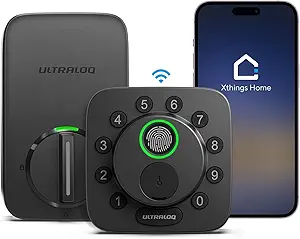 | Best for Flexible Smart-Home Access | Connectivity: 2.4 GHz Wi-Fi and Matter over Thread | Battery life: Up to 18 months | Fingerprint capacity: 50 fingerprints | VIEW ON AMAZON | See Our Full Breakdown |
| Lockin Veno Smart Lock, Palm Vein & Fingerprint Keyless Entry Door Lock |  | Best for Rechargeable Biometric Entry | Unlock methods: Palm vein, fingerprint, PIN code, app, voice assistant, and mechanical key | Connectivity: Built-in Wi-Fi | Battery: Rechargeable; up to 7 months | VIEW ON AMAZON | See Our Full Breakdown |
| GHome Smart WiFi Door Lock, 5-in-1 Fingerprint Keyless Entry |  | Best for Longer Recharge Intervals | Battery capacity: 10,000mAh | Battery life: Up to 10 months | Unlock methods: Fingerprint, app, keypad, physical key, and voice control | VIEW ON AMAZON | See Our Full Breakdown |
| ULTRALOQ U-Bolt WiFi Smart Lock with Door Sensor |  | Best for Door-Status Monitoring | Power source: 4 AA alkaline batteries | Connectivity: 2.4 GHz Wi-Fi | Security grade: ANSI/BHMA Grade 1 | VIEW ON AMAZON | See Our Full Breakdown |
| myQ Secure View 3-in-1 Smart Lock with Extra Battery |  | Best for Built-In Video Security | Model: MYQ-NE0BXAB1 | Access methods: Face recognition, fingerprint, PIN, app, and key | Camera: 2K HDR wide-angle lens | VIEW ON AMAZON | See Our Full Breakdown |
| TCL Smart Lock D2 Pro with Palm Vein Keyless Entry, Wi-Fi, App & Voice Control |  | Best for Long-Lasting Rechargeable Power | Biometric technology: Palm vein | Connectivity: Wi-Fi | Battery: 10,000mAh rechargeable | VIEW ON AMAZON | See Our Full Breakdown |
| smart lock with rechargeable battery pack | Connectivity |
|---|---|
| Wyze Palm Lock | Wi-Fi |
| Lockly Secure Pro Wi-Fi Smart | Wi-Fi features; optional Wi-Fi hub required for extended remote features |
| GHome Smart Fingerprint Door L | — |
| Smart Lock WiFi Face Recogniti | — |
| TCL Smart Front Door Lock with | Wi-Fi 2.4GHz and Matter over Thread |
| ULTRALOQ Bolt SE Wi-Fi Smart L | 2.4 GHz Wi-Fi and Matter over Thread |
| Lockin Veno Smart Lock | Built-in Wi-Fi |
| GHome Smart WiFi Door Lock | — |
| ULTRALOQ U-Bolt WiFi Smart Loc | 2.4 GHz Wi-Fi |
| myQ Secure View 3-in-1 Smart L | — |
| TCL Smart Lock D2 Pro with Pal | Wi-Fi |
More Details on Our Top Picks
Wyze Palm Lock, Smart Door Lock with Palm Vein Recognition, Keyless Entry, Wi-Fi, Alexa & Google Compatibility
I’d choose the Wyze Palm Lock for a household that wants biometric entry without touching a keypad or fingerprint sensor. Its palm-vein reader gives it a distinct approach from the GHome KD03 PRO, which relies on a fingerprint and a removable 700mAh battery. Wyze instead pairs a six-month main battery with a shorter-life secondary battery, plus a USB-C emergency charging port—a useful fallback if the main power runs down. Auto-lock, one-time guest codes, and Alexa and Google Assistant support add flexibility for everyday access.
The tradeoff is that this is a Wi-Fi-dependent option for remote control, and palm recognition can be less consistent when hand conditions vary. Its IP53 rating and BHMA Grade 3 certification add useful context, but buyers seeking a rechargeable pack they can simply remove and charge may prefer GHome. I’d rank Wyze for touch-free access, not battery convenience.
Pros:- Palm-vein recognition enables contactless entry without a fingerprint reader or keypad.
- Dual-battery setup and USB-C emergency charging provide backup options when power is low.
- Supports up to 50 access codes, including one-time guest codes.
- Auto-lock, Wi-Fi, and Alexa and Google Assistant compatibility support remote and routine access.
Cons:- Remote control depends on a Wi-Fi connection.
- Palm recognition may vary with hand conditions.
- The battery setup is less straightforward to recharge than GHome KD03 PRO’s removable pack.
Best for: Households that want contactless biometric unlocking, guest codes, and voice-assistant compatibility for a Wi-Fi-connected entry door.
Not ideal for: Buyers who want a removable battery they can charge indoors, or homes where Wi-Fi is unreliable and remote access matters.
- Biometric technology:Palm vein recognition
- Battery:Dual batteries: main battery lasts 6 months; secondary battery lasts 2 weeks
- Emergency charging:USB-C emergency port
- Access codes:Up to 50, including one-time guest codes
- Connectivity:Wi-Fi
- Voice compatibility:Alexa and Google Assistant
- Weather resistance:IP53
- Certification:BHMA Grade 3
Our verdict“Choose Wyze if touch-free palm access and emergency power options matter more than a removable rechargeable battery.”
Lockly Secure Pro Wi-Fi Smart Lock with Handle
The Lockly Secure Pro suits buyers who want several ways into the home: PIN Genie keypad, fingerprint, app, voice commands, and a physical key. That range gives it a broader set of entry fallbacks than the Wyze Palm Lock, which centers on palm recognition and codes. Real-time activity alerts and remote management are useful for households that share access or want to monitor arrivals, while PIN Genie is intended to make keypad entry harder to observe.
For a roundup focused on rechargeable battery packs, though, the supplied product information does not specify a rechargeable battery, its capacity, or battery life. It also says extended remote features require an optional Wi-Fi hub, so buyers should check what connectivity is included before choosing it over the Wi-Fi-connected TCL lock. Installation may take more work than the GHome KD03 PRO’s stated DIY setup. I’d put Lockly here for access-method flexibility, not battery clarity.
Pros:- Combines PIN Genie keypad, fingerprint sensor, app access, voice commands, and a physical key.
- PIN Genie is designed to make keypad entry harder for others to observe.
- Remote management and real-time activity notifications support shared access oversight.
- Physical-key backup offers an entry method outside the app and biometric sensor.
Cons:- The provided product data does not specify a rechargeable battery pack, capacity, or battery life.
- An optional Wi-Fi hub is required for extended remote features.
- Installation may be complex for some buyers.
Best for: Households or small residential properties that need fingerprint, keypad, app, voice, and physical-key access in one lock.
Not ideal for: Buyers whose main requirement is a documented removable rechargeable battery pack or who want remote features without checking hub requirements.
- Model:PGD628W
- Unlock methods:PIN Genie keypad, fingerprint, mobile app, voice commands, and physical key
- Connectivity:Wi-Fi features; optional Wi-Fi hub required for extended remote features
- Security features:AI-powered PIN Genie technology
- Notifications:Real-time activity alerts
- Recommended use:Residential door lock and home security
Our verdict“Pick Lockly for its range of entry methods, but skip it if a specified rechargeable battery pack is your deciding requirement.”
GHome Smart Fingerprint Door Lock, 4-in-1 Smart Lock with Removable Battery
The GHome KD03 PRO is the clearest fit here for shoppers who specifically want a rechargeable battery pack: its 700mAh battery is removable and charges over USB-C, so it can be brought indoors rather than charging at the door. The stated battery life is over 300 days, though actual runtime can vary with use. Compared with the Wyze Palm Lock, GHome also gives buyers a more conventional fingerprint reader alongside passcodes, Bluetooth app control, and physical keys.
Its access is primarily local: remote control needs a separately purchased gateway, and the product data says storage is local with no cloud backup. That makes it less suited to buyers who expect built-in Wi-Fi remote management, such as the TCL Smart Front Door Lock. For an interior door, home office, or rental, the removable pack, auto-lock timer, and anti-peep keypad make a practical combination. I’d choose it for battery handling, not built-in remote access.
Pros:- Removable 700mAh battery charges over USB-C, so charging does not require keeping the lock at the outlet.
- Offers fingerprint, passcode, Bluetooth app, and physical-key entry.
- Stores up to 100 fingerprints and 100 passcodes.
- Auto-lock timer, low-battery alert, emergency power, and anti-peep keypad add useful access safeguards.
Cons:- Remote access requires a separately purchased gateway.
- Local storage has no cloud backup.
- Battery life varies with usage despite the stated runtime of over 300 days.
Best for: Renters, home-office users, and owners of compatible interior doors who want a removable USB-C rechargeable battery and local fingerprint or passcode entry.
Not ideal for: Buyers who need built-in Wi-Fi remote access, cloud backup, or a lock specifically for a standard exterior deadbolt.
- Battery:Removable 700mAh rechargeable battery
- Charging:USB-C; stated charging time is 2 hours
- Stated battery life:Over 300 days
- Unlock methods:Fingerprint, passcode, Bluetooth app, and physical key
- Storage capacity:Up to 100 fingerprints and 100 passcodes
- Recognition:1.5-second recognition; 360-degree AI self-learning fingerprint sensor
- Auto-lock:Adjustable from 5 to 1,800 seconds
- Door compatibility:Standard doors 1-3/8 to 2-1/8 inches thick
- Remote access:Optional gateway required
Our verdict“Choose GHome if a removable, USB-C rechargeable pack and local access matter more than built-in Wi-Fi or cloud features.”
Smart Lock WiFi Face Recognition Fingerprint with 5 Unlock Methods, Camera, Waterproof, Outdoor, Rechargeable Battery for Office and Home
This TY WiFi lock is aimed at shared spaces where a range of entry methods and a large user list matter more than a refined battery specification. It supports fingerprint, password, card, physical key, and app access, with capacity for 10 administrators and 290 users. That gives it more stated user slots than the TCL Smart Front Door Lock, which lists 50 fingerprints and 100 PIN codes, while TCL provides a much clearer battery-life figure and named smart-home compatibility.
TY lists a 2,500mAh rechargeable battery and waterproof construction, but the supplied data does not give runtime or a weather-resistance rating. Wi-Fi is required for app unlocking, and setup may feel involved for buyers who only need a straightforward home deadbolt. I’d consider it for a home or office with many authorized users, but the lack of battery-runtime detail makes it a less certain pick for anyone choosing primarily by recharge intervals.
Pros:- Five listed entry methods cover fingerprint, password, card, physical key, and app access.
- Capacity for 10 administrators and 290 users suits shared settings.
- Includes a 2,500mAh rechargeable battery.
- Waterproof construction is listed for outdoor use.
Cons:- Battery life and charge duration are not specified in the supplied product data.
- App unlocking requires Wi-Fi.
- Setup may be complex for some users, and the stated 290-user capacity may not suit larger organizations.
Best for: Shared homes, small offices, and other spaces that need several entry methods and access for a large group of users.
Not ideal for: Buyers who need a documented battery runtime, a specified weather rating, or a simple lock for a small household.
- Battery:2,500mAh rechargeable
- Unlock methods:Fingerprint, password, card, physical key, and app
- User capacity:10 administrators and 290 users
- Construction:Plastic and stainless steel
- Water resistance:Waterproof; specific rating not provided
- App access:Wi-Fi required for app unlocking
Our verdict“Choose this TY lock for its broad access options and user capacity, but favor TCL if battery runtime and weather-rating details are priorities.”
TCL Smart Front Door Lock with Fingerprint Keyless Entry
The TCL Smart Front Door Lock makes the strongest battery case in this group: its 10,000mAh rechargeable battery is stated to last up to eight months per charge. That gives buyers a clearer maintenance expectation than the TY WiFi Smart Lock, whose 2,500mAh battery has no listed runtime. TCL also combines a 0.3-second fingerprint sensor with room for 50 fingerprints and 100 PIN codes, giving families and frequent guests multiple ways to enter without leaning on palm recognition like the Wyze Palm Lock.
Its IP55 rating and stated temperature range suit exposed entry doors better than a lock with no quantified weather rating. Matter over Thread and compatibility with Apple Home, Alexa, Google Home, and SmartThings broaden integration choices. The tradeoff is that full remote features require Wi-Fi, and installation may be challenging for some DIYers. I’d rank TCL highest for stated rechargeable runtime and outdoor details, not for simplest setup.
Pros:- 10,000mAh rechargeable battery is stated to last up to eight months per charge.
- 0.3-second fingerprint unlocking supports quick entry.
- Stores up to 50 fingerprints and 100 PIN codes.
- IP55 rating, a broad stated temperature range, and Matter over Thread support add outdoor and integration flexibility.
Cons:- Full remote features require Wi-Fi.
- Installation may be challenging for some DIYers.
- Its battery advantage may be less useful to buyers who prioritize a removable pack over the stated runtime.
Best for: Homeowners seeking a rechargeable front-door lock with a stated multi-month runtime, fast fingerprint access, and broad smart-home compatibility.
Not ideal for: Buyers who want a simpler installation, do not need smart-home integrations, or cannot rely on Wi-Fi for remote features.
- Battery capacity:10,000mAh rechargeable
- Stated battery life:Up to 8 months
- Fingerprint speed:0.3 seconds
- Storage:Up to 50 fingerprints and 100 PIN codes
- Weather resistance:IP55
- Temperature range:-13°F to 158°F
- Connectivity:Wi-Fi 2.4GHz and Matter over Thread
- Smart-home compatibility:Apple Home, Alexa, Google Home, and SmartThings
- Door compatibility:Standard US single-cylinder deadbolts; door thickness 1-3/8 to 2 inches
Our verdict“Choose TCL if a long stated recharge interval, outdoor resistance, and smart-home compatibility matter more than easy installation.”
ULTRALOQ Bolt SE Wi-Fi Smart Lock with Matter over Thread and App Remote Access
I’d choose the ULTRALOQ Bolt SE when I want several ways to enter and the option to connect it to a Matter-based smart home. Fingerprint, passcodes, app control, voice control, and backup keys give household members alternatives without relying on one access method. Its up-to-18-month battery life also means less frequent charging or battery attention than the Lockin Veno’s stated seven-month run time. The tradeoff is that the advertised battery life is not a rechargeable-battery claim, so this is a weaker match for shoppers specifically seeking a rechargeable pack. Matter over Thread remote access also depends on a compatible hub, and its Wi-Fi is limited to 2.4 GHz. I’d pick it over the U-Bolt when biometrics and smart-home flexibility matter more than a door sensor.
Pros:- Fingerprint, passcode, app, voice, and mechanical-key access options
- Stated battery life of up to 18 months
- IP65-rated weather resistance
- Supports Wi-Fi and Matter over Thread
Cons:- Product data does not identify the battery as rechargeable
- Thread remote access requires a compatible hub
- No door sensor is included
Best for: Households wanting fingerprint entry, several backup access methods, and Matter over Thread integration, and that are comfortable checking the battery details before buying.
Not ideal for: Buyers who specifically require a confirmed rechargeable battery pack, or who need Thread remote access without adding a compatible hub.
- Connectivity:2.4 GHz Wi-Fi and Matter over Thread
- Battery life:Up to 18 months
- Fingerprint capacity:50 fingerprints
- Passcode capacity:50 passcodes
- Material:Zinc alloy
- Water resistance:IP65
- Auto lock:Configurable timer
- Included keys:2 emergency keys
Our verdict“Choose the Bolt SE for varied entry methods and Matter support, but skip it if a rechargeable battery pack is a firm requirement.”
Lockin Veno Smart Lock, Palm Vein & Fingerprint Keyless Entry Door Lock
The Lockin Veno is the clearest fit here for shoppers who want a rechargeable power source paired with biometric entry: it specifies a rechargeable battery lasting up to seven months and offers both palm-vein and fingerprint recognition. Palm-vein access adds a contactless alternative to the GHome Smart WiFi Door Lock, which relies on fingerprint recognition among its entry methods. That extra biometric choice comes with a shorter stated battery interval than the GHome’s up-to-10-month claim, so charging needs may be more frequent. The Veno also includes a USB-C emergency charging port, useful if the battery runs down while the lock is installed. I’d favor it for contactless access, but its setup complexity and reliance on Wi-Fi for full smart-home integration make it less appealing to buyers who want a simple, low-maintenance lock.
Pros:- Rechargeable battery with stated life of up to seven months
- Palm-vein and fingerprint biometric entry
- USB-C emergency charging port
- IP65-rated design and BHMA Grade 2 security grade
Cons:- Shorter stated battery life than the GHome Smart WiFi Door Lock
- Full smart-home integration requires Wi-Fi
- Setup may feel complex for less technical users
Best for: Buyers who want a rechargeable smart lock with palm-vein and fingerprint entry, plus a USB-C emergency charging option.
Not ideal for: People who prioritize a longer stated battery interval or want smart-home features without depending on a Wi-Fi connection.
- Unlock methods:Palm vein, fingerprint, PIN code, app, voice assistant, and mechanical key
- Connectivity:Built-in Wi-Fi
- Battery:Rechargeable; up to 7 months
- Emergency charging:USB-C port
- Weather resistance:IP65
- Security grade:BHMA Grade 2
Our verdict“Pick the Veno if rechargeable power and contactless palm-vein entry outweigh more frequent charging and a more involved setup.”
GHome Smart WiFi Door Lock, 5-in-1 Fingerprint Keyless Entry
I’d put the GHome Smart WiFi Door Lock near the top of the list for buyers who want a rechargeable lock but would rather charge it less often than the Lockin Veno. Its 10,000mAh battery is rated for up to 10 months, compared with the Veno’s stated seven months, although real battery life can vary with use. Five access routes—fingerprint, app, keypad, physical key, and voice control—also suit homes where different people prefer different entry methods. The capacity for 100 fingerprints and 100 passcodes gives it more listed user slots than the ULTRALOQ Bolt SE. Those numbers may matter in a shared household, but they do not remove its Wi-Fi dependence for remote control. I’d skip it if you want a lock whose remote functions do not hinge on a stable network.
Pros:- 10,000mAh rechargeable battery rated for up to 10 months
- Supports fingerprint, app, keypad, key, and voice entry
- Stores up to 100 fingerprints and 100 passcodes
- Specified for door thicknesses from 35 to 55 mm
Cons:- Remote control requires a Wi-Fi connection
- Battery life may vary with usage
- Setup instructions may be complex for some buyers
Best for: Shared households that want a rechargeable battery, multiple entry choices, and room for many stored fingerprints and passcodes.
Not ideal for: Buyers without reliable Wi-Fi for remote access, or those who want setup instructions with less potential complexity.
- Battery capacity:10,000mAh
- Battery life:Up to 10 months
- Unlock methods:Fingerprint, app, keypad, physical key, and voice control
- Fingerprint capacity:100
- Passcode capacity:100
- Door thickness:35–55 mm
- Temperature range:-4°F to 140°F
- Installation:Screwdriver required
Our verdict“Choose the GHome for a high-capacity rechargeable lock with a longer stated run time than the Lockin Veno, provided your Wi-Fi is dependable.”
ULTRALOQ U-Bolt WiFi Smart Lock with Door Sensor
The ULTRALOQ U-Bolt WiFi earns its place for buyers who care as much about knowing whether the door is shut as they do about remote locking. Its included door sensor supports door-status alerts, a practical distinction from the Bolt SE, which does not include one. The U-Bolt also lists an ANSI/BHMA Grade 1 security grade and supports passcodes, app control, voice assistants, and a mechanical key. But it runs on four AA alkaline batteries, not a rechargeable pack, so it is a poor match for the roundup’s central rechargeable-battery goal. Compared with the myQ Secure View, it also gives up the camera and video doorbell features in favor of a simpler deadbolt setup. I’d choose it for monitoring and standard-door compatibility, not rechargeable power.
Pros:- Includes a door sensor for door-status alerts
- ANSI/BHMA Grade 1 security grade
- Supports passcodes, app, voice assistants, and mechanical keys
- IP65-rated weather resistance and DIY installation
Cons:- Uses four AA alkaline batteries rather than a rechargeable pack
- Requires a stable 2.4 GHz Wi-Fi connection for optimal performance
- Battery replacement frequency can vary with use
Best for: Rental hosts and homeowners who want door-status alerts, a door sensor, and passcode-based access on a standard U.S. door.
Not ideal for: Anyone specifically shopping for a smart lock with a rechargeable battery pack or an integrated camera.
- Power source:4 AA alkaline batteries
- Connectivity:2.4 GHz Wi-Fi
- Security grade:ANSI/BHMA Grade 1
- Weather resistance:IP65
- Door compatibility:Most standard U.S. doors, 1-3/8 to 1-3/4 inches thick
- Included sensor:Door sensor
- Included keys:2 backup keys
- Warranty:Lifetime mechanical; 18 months electronic
Our verdict“Pick the U-Bolt for included door monitoring and a higher listed security grade, but choose a rechargeable model if avoiding disposable batteries is the priority.”
myQ Secure View 3-in-1 Smart Lock with Extra Battery
The myQ Secure View 3-in-1 is the most feature-heavy option here: it combines a smart deadbolt with a 2K HDR camera, video doorbell functions, color night vision, two-way audio, and motion alerts. Its included rechargeable battery makes it a more direct fit for this roundup than the AA-powered ULTRALOQ U-Bolt, while the added video hardware lets buyers monitor the entrance without installing a separate camera and doorbell. That combination also makes this a different proposition from the GHome, which focuses on rechargeable entry and stored codes rather than video. The tradeoff is that remote features depend on the myQ app and connected devices, and face and fingerprint recognition are unavailable in Illinois, Texas, and outside the U.S. and Canada. I’d choose it for entry monitoring, not for a discreet, simple deadbolt.
Pros:- Rechargeable battery is included
- Combines a smart deadbolt, video doorbell, and security camera
- 2K HDR video, color night vision, two-way audio, and motion alerts
- Offers face, fingerprint, PIN, app, and key access
Cons:- Remote features require app and connected-device use
- Face and fingerprint recognition are unavailable in Illinois, Texas, and outside the U.S. and Canada
- PIN capacity is limited to 16
Best for: Homeowners who want a rechargeable smart lock and integrated video doorbell and camera features in one entry device.
Not ideal for: Buyers seeking a basic deadbolt, those who do not want app-connected features, or people outside the stated face and fingerprint availability regions.
- Model:MYQ-NE0BXAB1
- Access methods:Face recognition, fingerprint, PIN, app, and key
- Camera:2K HDR wide-angle lens
- Night vision:Color night vision
- PIN capacity:Up to 16 PINs
- Included power:Rechargeable battery and charging cable
- Included sensor:Door sensor
- Warranty:1-year limited
Our verdict“Choose the myQ Secure View when integrated video and a rechargeable battery matter more than keeping the lock simple.”
TCL Smart Lock D2 Pro with Palm Vein Keyless Entry, Wi-Fi, App & Voice Control
The TCL Smart Lock D2 Pro is a strong fit for buyers who want a rechargeable battery to go longer between charges without giving up multiple ways to enter. Its 10,000mAh battery is rated for up to eight months, though frequent use can shorten that interval. Palm-vein access offers contactless entry, while passcodes, app and voice control, NFC cards, and a physical key provide alternatives if one method does not suit a household member. Compared with the Lockin Veno Smart Lock, which also pairs palm-vein access with fingerprint entry, the D2 Pro emphasizes a large rechargeable battery and a broad mix of access methods. The tradeoff is fit: installation is limited to listed US door dimensions and backsets, and the lock needs a standard screwdriver. Its IP55 weatherproofing adds flexibility for exposed doors, but does not remove the need to check door compatibility.
Pros:- 10,000mAh rechargeable battery rated for up to eight months of use
- Palm-vein access provides a contactless entry option
- Six entry methods include passcode, app, voice, NFC card, and physical key
- IP55 weatherproofing supports use on exposed exterior doors
Cons:- Battery life may be shorter with heavy usage
- Compatibility is limited to specified door thicknesses and backsets
- DIY installation requires a standard screwdriver
Best for: Households seeking contactless entry, several backup access methods, and a rechargeable lock rated for up to eight months between charges.
Not ideal for: Buyers with doors outside the listed US thickness and backset dimensions, or those who want a battery-life estimate unaffected by frequent use.
- Biometric technology:Palm vein
- Connectivity:Wi-Fi
- Battery:10,000mAh rechargeable
- Stated battery life:Up to 8 months
- Weatherproofing:IP55
- Entry options:Palm vein, passcode, app, voice, NFC card, physical key
- Door thickness:1-3/8″ to 2-1/8″
- Backset:2-3/8″ or 2-3/4″
- Installation:DIY with a standard screwdriver
Our verdict“Choose the D2 Pro if you want palm-vein entry and varied backups alongside a large rechargeable battery, provided your door matches its specified dimensions.”
How We Picked
I compared the 11 listed locks by how clearly their battery setup matches this roundup: rechargeable or removable power, the availability of an extra battery, and how easy it appears to plan for charging without losing access. I also weighed entry methods, remote connectivity, smart-home compatibility, and added features such as cameras or door sensors. A feature only helped the ranking when it addressed a practical buyer need rather than adding complexity for its own sake.
The order favors a balance of battery relevance, usable access options, and connected features. That puts the ULTRALOQ Bolt SE first for its combination of Matter over Thread and remote access, while the myQ Secure View earns a distinct place for its extra battery and camera. Locks with less explicit battery information or feature sets that depend heavily on biometric or camera functions rank behind them; I would check the manufacturer’s current specifications for charging details and compatibility before choosing.
Factors to Consider When Choosing Smart Lock With Rechargeable Battery Pack
A rechargeable or removable battery can make routine upkeep easier, but it does not answer every question about keeping a door accessible. I’d match the battery arrangement to how often the lock is used, how the door is exposed to weather, and what happens if power runs low while you are away.
Check What “Rechargeable” Means for the Exact Model
Product listings can use rechargeable, removable, and extra battery language in different ways. A removable pack may be rechargeable, but the listing should say how it charges and whether a charging cable or spare pack is included. Check whether you can charge the pack outside the lock or need to leave the door without its main battery during charging. That distinction affects how easy it is to keep the lock powered during a busy week. Avoid assuming two models from the same brand share a battery design just because their names are similar.
Plan for Low-Battery Access Before You Need It
Think through the low-power scenario before comparing app features. Look for the maker’s stated low-battery warnings, backup entry method, and any emergency power procedure, then confirm those details in the current product documentation. A spare pack is only useful if it can be kept charged and swapped quickly. If you choose a biometric lock, keep another supported entry method available in case the reader or lock battery is unavailable. Buyers who travel often should give more weight to a backup plan than to adding another way to unlock the door.
Match Connectivity to Your Home Setup
Wi-Fi, Thread, Matter, and app access describe different parts of a connected-lock setup, not interchangeable guarantees of compatibility. Confirm which hub, bridge, phone platform, or network requirements apply to the exact lock and the features you want. Remote control can be useful when you need to manage access away from home, while a local keypad or fingerprint reader may cover everyday entry without opening an app. Before buying, check whether remote access is included directly or depends on another device. This can prevent paying for a connectivity feature that your home cannot currently use.
Choose an Entry Method You Can Rely On
Fingerprint, palm-vein, face recognition, keypad, app, and physical-key access each suit different households. A biometric reader may speed up routine entry, but children, visitors, or residents with changing access needs may prefer a keypad or shared app credentials. Camera-based models can add monitoring, though they may require more setup and raise privacy questions. Decide which one or two methods must work every day, then treat the rest as extras. A lock with several listed methods is not automatically a better fit if the household will use only one and lack a dependable fallback.
Verify Door Fit and Outdoor Conditions
Before choosing a feature-rich model, check door thickness, backset, hole dimensions, handing, and the lock’s installation requirements against your door. Outdoor exposure matters too: a model described as waterproof or outdoor-ready should still be checked against the manufacturer’s stated conditions and installation guidance. A poor fit can turn a battery upgrade into a more involved replacement project. Pay attention to whether the lock includes a handle or replaces only the deadbolt, since those are different installation jobs. When your door is unusual or exposed to harsh weather, fit and protection should outrank extra unlocking modes.
Decide Whether Added Features Earn Their Complexity
Camera, palm recognition, door sensing, and broad smart-home support can each solve a specific problem, but they also add setup and maintenance considerations. Ask whether you need to see who is at the door, confirm that it is closed, or connect the lock to other devices. If the answer is no, a simpler lock may be easier to manage and may avoid features you will not use. If those functions matter, check their network needs and whether they affect battery upkeep. Spending more makes sense when a feature changes how you manage entry, not just when the specification list is longer.
Frequently Asked Questions
Does every lock in this roundup include a rechargeable battery pack?
No. The listed descriptions include rechargeable, removable, and extra-battery language, and those terms do not confirm the same battery arrangement. Check the exact model’s current specifications for whether its battery is rechargeable, removable, or supplied as a spare. Confirm whether a charger or cable is included and how the lock is powered while a pack charges. If rechargeable power is a firm requirement, do not rely on the category name alone.
Should I choose a spare battery or a lock that charges its battery in place?
That depends on whether you can leave the lock unavailable or use a backup entry method while charging. A spare pack can make power changes quicker if it is charged and ready, while in-place charging may avoid handling an extra battery. Check the manufacturer’s procedure and whether the lock remains usable during charging. Frequent use or travel can make a charged spare more valuable. If you prefer fewer accessories, prioritize a clear charging process and a reliable low-battery warning.
Is Matter over Thread a better choice than Wi-Fi for a smart lock?
Neither is universally better; the right fit depends on your network and the features you want. Matter over Thread can suit a home already set up for compatible smart-home devices, while Wi-Fi may be more familiar for direct app-based access. Confirm whether a hub or border router is required and which functions work without it. Also check whether remote access is available through your chosen setup. The Bolt SE’s listed Matter over Thread support makes it distinct, but it is most useful when it fits the rest of your system.
Are palm-vein or face-recognition locks worth choosing over fingerprint models?
They can be a good match if you specifically prefer those ways of entering, but a different biometric method is not automatically more dependable for every household. Think about who will use the lock, how they will enroll, and what alternative entry method remains available. Check whether the manufacturer provides clear guidance for lighting, placement, weather exposure, and recognition limits. A keypad or other fallback can matter more than having several biometric options. Compare the added feature with the simpler fingerprint choices rather than treating a longer feature list as a guarantee of better performance.
What should I verify before installing one on my front door?
Measure the door and compare its thickness, backset, bore hole, and existing hardware with the lock’s installation requirements. Confirm whether the model is a deadbolt replacement or includes a handle, and review any door-handling requirements. For an exposed entrance, check the maker’s environmental guidance and the lock’s stated weather protection. Make sure the chosen connectivity setup works with your home network and that you understand the battery backup procedure. These checks can prevent a mismatch that features alone cannot fix.
Conclusion
My best overall pick is the ULTRALOQ Bolt SE for buyers who want a connected lock with Matter over Thread and remote-access features. For best value, I’d compare the two GHome fingerprint models and choose based on the exact removable-battery and connectivity details you need. The myQ Secure View is my best premium-style fit for someone who wants an extra battery alongside camera features. For beginners, I’d favor the model whose installation, charging, and backup-entry instructions are clearest, rather than choosing by the number of unlocking methods. For specific needs, consider the Lockly Secure Pro with Handle if you want a lock-and-handle package, or a palm-vein or face-recognition option if that access method is your priority. Before ordering any of them, verify the battery type, what comes in the box, door fit, and network requirements.