Strong, unique password habits safeguard not just your accounts but your personal safety too. Using complex passwords that you change regularly prevents hackers from gaining access and reducing risks of identity theft or stalking. Enable multi-factor authentication for added layers of security, making it harder for intruders to succeed even if passwords are compromised. Avoid sharing or writing down your passwords, and stay alert to social engineering tricks. Keep informed on best practices to better protect yourself every day.
Key Takeaways
- Use strong, unique passwords for each account to prevent unauthorized access and protect personal identity.
- Enable multi-factor authentication to add an extra security layer beyond passwords.
- Regularly update passwords and avoid sharing or writing them down to reduce vulnerabilities.
- Employ password managers to create, store, and manage complex passwords securely.
- Stay vigilant against phishing and social engineering to prevent attackers from exploiting password weaknesses.
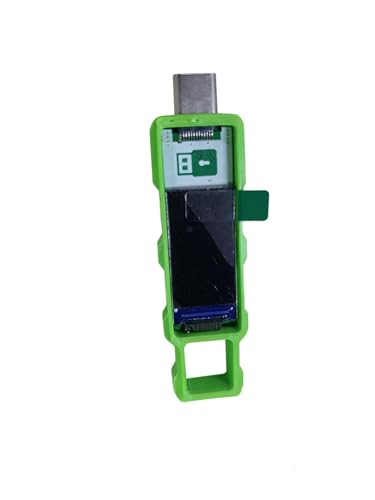
Password Keeper Offline Password Manager for Secure Storage (Green)
100% Offline & Secure Storage: This dedicated electronic device stores all your usernames, passwords, and notes locally. Your…
As an affiliate, we earn on qualifying purchases.
As an affiliate, we earn on qualifying purchases.
Why Your Password Habits Matter for Personal Safety

Your password habits directly impact your personal safety because weak or reused passwords make it easier for hackers to access your accounts. Social engineering attacks often rely on manipulating you into revealing passwords or sensitive information, which can lead to broader security breaches. Poor password practices can also threaten your physical security, especially if hackers gain access to your accounts linked to smart home devices or security systems. Once compromised, they might manipulate or disable your physical security measures. Strong, unique passwords help prevent these threats by making it harder for attackers to succeed through social engineering or bypass your protections. Good habits reduce the risk of unauthorized access, protecting both your digital presence and your physical safety from malicious actors. Additionally, understanding password strength and how to improve it can significantly enhance your overall security. Implementing multi-factor authentication adds an extra layer of protection against potential breaches. Building awareness of security best practices is essential for maintaining comprehensive safety in today’s interconnected environment. Maintaining awareness of password management techniques can further strengthen your defenses against evolving cyber threats, especially when combined with regular updates to your security protocols.

Yubico – YubiKey 5C NFC – Multi-Factor authentication (MFA) Security Key and passkey, Connect via USB-C or NFC, FIDO Certified – Protect Your Online Accounts
POWERFUL SECURITY KEY: The YubiKey 5C NFC is the most versatile physical passkey, protecting your digital life from…
As an affiliate, we earn on qualifying purchases.
As an affiliate, we earn on qualifying purchases.
How to Choose Strong, Unique Passwords That Protect You

Choosing strong, unique passwords is essential to effectively safeguard your accounts. To do this, focus on increasing password complexity by including a mix of uppercase and lowercase letters, numbers, and symbols. This boosts password entropy, making your password harder for hackers to guess or crack. Avoid common words or easily accessible information like your name or birthdate. Instead, craft passwords that are unpredictable and difficult to decipher. Consider using a passphrase—several random words combined—or a random string generated by a password manager. Remember, the more complex and unique your passwords are, the less likely they’ll be compromised. Regularly updating your passwords and avoiding reuse across sites further enhances your personal safety and keeps your online presence secure.

Secure Password Generator Tool: Strengthen Your Online Security with Customized Passwords
As an affiliate, we earn on qualifying purchases.
As an affiliate, we earn on qualifying purchases.
The Best Tools to Manage and Secure Your Passwords
Using a password manager makes it easy to create and store strong, unique passwords for all your accounts. Multi-factor authentication adds an extra layer of security, even if your password gets compromised. Together, these tools substantially boost your personal safety online. Additionally, understanding who makes the tools you use can help ensure you choose reliable and trustworthy security solutions.
Password Managers Simplify Security
Managing multiple complex passwords can feel overwhelming, but password managers make the process much easier. They securely store your passwords and automatically fill them in when needed, so you don’t have to remember every detail. This reduces the temptation to share passwords with others, which can compromise your security. With a password manager, you can create highly complex passwords without worrying about memorization, boosting your overall security. These tools also help you avoid recycling passwords across sites, a common mistake that puts your personal safety at risk. By generating and storing strong, unique passwords for each account, password managers simplify security and make it easier to maintain good password habits without sacrificing convenience. Additionally, using trusted arcade game machines can provide safe entertainment options that don’t compromise your online security.
Multi-Factor Authentication Enhances Protection
While password managers considerably strengthen your security by creating and storing strong, unique passwords, adding multi-factor authentication (MFA) provides an extra layer of protection. MFA requires you to verify your identity through a secondary method, like biometric security or a physical access device, making it harder for hackers to breach your accounts. For example, after entering your password, you might need to scan your fingerprint or enter a code sent to your phone. This way, even if your password is compromised, your account remains secure. Incorporating Free Floating security features can further enhance your protection by seamlessly integrating with your existing setup. Consider the table below to understand different MFA methods: multifactor authentication
Yubico – YubiKey 5C NFC – Multi-Factor authentication (MFA) Security Key and passkey, Connect via USB-C or NFC, FIDO Certified – Protect Your Online Accounts
POWERFUL SECURITY KEY: The YubiKey 5C NFC is the most versatile physical passkey, protecting your digital life from…
As an affiliate, we earn on qualifying purchases.
As an affiliate, we earn on qualifying purchases.
Common Password Mistakes That Compromise Your Security
One of the biggest mistakes you can make is reusing passwords across multiple sites, which puts all your accounts at risk if one gets compromised. Using simple or common words makes it easy for hackers to guess your password quickly. Ignoring two-factor authentication leaves your accounts more vulnerable to unauthorized access. Implementing encryption solutions can help protect your data even if your password is compromised. Additionally, being aware of vetted archives and wind security measures can further bolster your online safety.
Reusing Passwords Everywhere
Reusing passwords across multiple accounts might seem like a convenient shortcut, but it markedly increases your vulnerability to cyberattacks. When you reuse passwords, a breach in one service can expose your other accounts to risk through password sharing. Cybercriminals often use password guessing techniques, exploiting common or reused passwords to access personal information, financial data, or work accounts. This habit makes it easier for attackers to break into multiple platforms once they discover a single password. To protect yourself, always create unique, strong passwords for each account. Consider using a password manager to keep track of them securely. Breaking the cycle of reuse minimizes the damage from a single breach and markedly enhances your overall security.
Using Simple or Common Words
Using simple or common words in your passwords is a major mistake that undermines your security. These passwords are easy for hackers to guess or crack, putting your password privacy at risk. When you choose obvious words like “password,” “123456,” or your pet’s name, you weaken your digital boundaries, making it easier for someone to access your accounts. Strong passwords require complexity and unpredictability, so avoid common phrases and simple words. Instead, create unique combinations that aren’t related to personal details or popular terms. Maintaining strong, complex passwords helps protect your personal safety beyond just your accounts—it preserves your digital boundaries from unwarranted intrusion. Remember, the more predictable your passwords, the more vulnerable your personal information becomes.
Ignoring Two-Factor Authentication
Have you considered how much extra security two-factor authentication (2FA) provides? Ignoring 2FA leaves your accounts vulnerable, even if you use strong passwords. Relying solely on password sharing or simple passwords makes you an easy target. Biometric authentication adds an extra layer, but when neglected, you weaken your defenses. Many underestimate the risk and skip 2FA, leaving personal safety at risk.
| Action | Risk of Ignoring 2FA | Impact on Security |
|---|---|---|
| Sharing passwords | Unauthorized access | Personal info compromised |
| Not enabling biometric auth | Easy hacking attempts | Identity theft |
| Using weak passwords | Brute-force attacks | Financial loss |
| Ignoring 2FA alerts | Missed security breaches | Data theft |
| Avoiding 2FA setup | Increased vulnerability | Personal safety at risk |
How to Keep Your Passwords Updated and Monitored

Keeping your passwords current and under watch is essential for maintaining your online security. Regular password updates reduce the risk of unauthorized access. To stay ahead, incorporate consistent password monitoring by using security alerts and password management tools. Maintaining accessible information about security best practices helps you stay informed and proactive. Here are some tips: – Change passwords every 3-6 months – Use unique passwords for different accounts – Enable alerts for suspicious activity – Use password managers to track updates – Regularly review account activity logs. Understanding the importance of password entropy can help you create more secure passwords that are harder for attackers to guess. Additionally, understanding floating on water concepts can remind you of the importance of stability and balance, even in your digital security practices. Recognizing how security protocols contribute to a safer online environment further reinforces the need for consistent vigilance. Incorporating multi-factor authentication adds an extra layer of protection, making unauthorized access significantly more difficult.
How Password Security Affects Your Offline Personal Safety
Securing your passwords online is just one part of protecting your personal safety; they also play a significant role in your offline security. Strong, unique passwords help prevent unauthorized access to your personal information, which can impact your physical safety if someone gains control of your accounts or devices. For example, hackers could use stolen information to locate or target you in real life, putting your physical safety at risk. Poor password habits, like reusing simple passwords, make it easier for attackers to break in. By maintaining robust password security, you reduce the chance of identity theft, stalking, or physical threats. Additionally, understanding home wiring and ventilation considerations in your home can help protect you from physical hazards related to security systems or home infrastructure. Proper home wiring and ventilation are essential for preventing electrical fires or system malfunctions that could threaten your safety. Being aware of home safety protocols can further enhance your security measures and help mitigate risks associated with home infrastructure failures. Regularly updating your security measures and understanding your home’s electrical and ventilation systems can significantly improve your overall safety. Implementing secure password practices can also safeguard your connected devices from being exploited by cybercriminals, which could lead to offline dangers. Protecting your online credentials isn’t just about digital safety—it’s a critical step in ensuring your offline safety and peace of mind.
Building a Personal Safety Routine That Incorporates Password Best Practices

Incorporating password best practices into your daily routine is essential for strengthening your overall personal safety. Developing habits around password etiquette helps you maintain your online privacy and reduces vulnerability. To build an effective routine, consider these actions:
- Use unique, strong passwords for each account
- Enable two-factor authentication whenever possible
- Regularly update passwords to prevent breaches
- Avoid sharing passwords or writing them down insecurely
- Be cautious of phishing attempts that target your login info
- Stay informed about net worth and fame of public figures to be aware of potential social engineering threats.
Frequently Asked Questions
How Can Weak Passwords Lead to Offline Personal Safety Risks?
Weak passwords can put your offline personal safety at risk by making it easier for criminals to access your identity, leading to identity theft. Once they have your information, they might target your home safety, such as breaking in or stealing valuables. Protect yourself by creating strong, unique passwords, which act as a first line of defense against these threats, keeping both your personal identity and home secure.
What Are Signs My Password Habits Are Unsafe?
Your password habits are unsafe if you find yourself relying on simple, predictable patterns—like common words or personal info—that weaken your password hygiene. Signs include frequently resetting passwords or using the same password across sites. If your passwords lack complexity, it’s like leaving your front door unsecured. Protect your digital fortress by creating complex passwords and avoiding shortcuts, ensuring your personal safety remains guarded like a well-guarded treasure.
Can Password Breaches Impact My Physical Security?
Yes, password breaches can impact your physical security. If hackers access your smart home devices or personal data, they could open doors, disable security systems, or track your location. Weak passwords make it easier for intruders to compromise these systems, putting your safety at risk. Always use strong, unique passwords for smart home accounts to protect your personal data and maintain your physical security.
How Often Should I Change My Most Sensitive Passwords?
You should update your most sensitive passwords every three to six months, depending on your password update schedule and the nature of the account. Regular password rotation frequency helps prevent unauthorized access if your credentials are compromised. Make sure to choose strong, unique passwords each time, and consider using a password manager to keep track. Staying consistent with these habits boosts your overall personal safety beyond just your accounts.
Are There Specific Habits to Prevent Social Engineering Attacks?
You probably think you’re too savvy for social engineering, but don’t let your guard down. To prevent these attacks, practice phishing awareness and verify contacts before sharing sensitive info. Be skeptical of unexpected messages, avoid clicking suspicious links, and double-check identities through separate channels. Ironically, the more confident you are, the more you need to stay cautious—trusting blindly is what attackers want. Stay vigilant, and keep your personal safety intact.
Conclusion
Your password habits are the keys to a fortress safeguarding your personal safety. Think of them as the sturdy locks on your life’s door, keeping unwanted visitors out. By choosing strong passwords, managing them wisely, and staying vigilant, you turn your digital defenses into an unbreakable shield. Remember, every good habit you build is a brick in your personal safety castle—protecting not just your accounts, but your peace of mind and freedom.