
🔍 Read the full analysis: Choosing Among 8 High Refresh Gaming Monitors In 2027 on ThorstenMeyerAI.com

Get the latest gadgets delivered free with Prime
- Fast, free delivery on millions of items
- Prime Video, Amazon Music and more included
- Member-only deals all year
TL;DR
This is a buying guide, not a report of a newly announced product or market development. ThorstenMeyerAI.com compares eight monitors, from the MSI MAG 272URDFA E16’s 4K, 320Hz specification to more GPU-friendly 1080p models; prices, independent test results and availability are not provided.
ThorstenMeyerAI.com compares eight high-refresh gaming monitors, ranging from a 4K, 320Hz MSI model to compact 1080p displays, to help buyers match screen specifications to their PC and games. The guide’s central tradeoff is practical: higher resolution demands more graphics power, while smaller 1080p screens can make high frame rates easier to reach. The source presents buying recommendations, not new product announcements or independently verified test results, as detailed in the original analysis.
The guide names the MSI MAG 272URDFA E16 as its overall pick for buyers seeking an unusually fast 4K display. It lists a 320Hz refresh rate alongside 4K resolution, but cautions that reaching high frame rates at that resolution calls for a capable graphics card. The source does not provide benchmark results showing performance in specific games.
For a more conventional resolution-to-speed balance, it points to the AOC Q27G41ZE, a 27-inch QHD monitor rated at 240Hz native and 260Hz overclocked. The Samsung Odyssey OLED G6 is positioned as the image-quality alternative because it uses a QD-OLED panel. For more OLED options, see this OLED gaming monitor guide. The source does not supply prices or detailed side-by-side image measurements for these models.
The other named options target different setups: ASUS VG259QM5A and Dell SE2426HG are described as 24-inch-class 1080p choices; the Sceptre 34-inch ultrawide and 32-inch SANSUI offer larger formats; and the AOC C27G4ZH combines a 27-inch curved screen with 1080p. The supplied material gives limited specifications for several models, so features not listed cannot be confirmed from this comparison; another high-refresh monitor roundup may help broaden the comparison.
The 8 picks
- 1
 Samsung 27" Odyssey OLED G6 (G61SH) QD-OLED Gaming MonitorView on Amazon →
- 2
 msi MAG 272URDFA E16 27-inch 3840 x 2160 (UHD) Gaming Office Monitor, 320Hz,…View on Amazon →
- 3
 Sceptre C345B-QU240T 34-inch Curved Ultrawide Gaming MonitorView on Amazon →
- 4
 SANSUI 32 Inch Curved 240Hz Gaming Monitor High Refresh Rate, FHD 1080PView on Amazon →
- 5
 AOC 27" Gaming Monitor QHD 240Hz Overclocked IPS NVIDIA G‑Sync Q27G41ZEView on Amazon →
- 6
 AOC C27G4ZH 27-Inch Curved FHD Gaming MonitorView on Amazon →
- 7
 ASUS TUF Gaming VG259QM5A 24.5-Inch 1080p 240Hz Gaming MonitorView on Amazon →
- 8
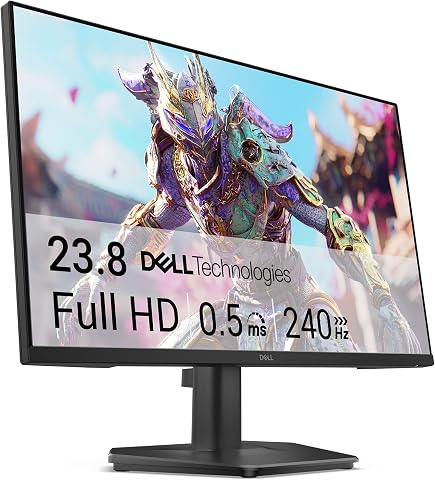 Dell 24 240Hz Gaming Monitor – SE2426HG – 23.8-inch FHD (1920×1080) 240Hz Dis…View on Amazon →
Match Refresh Rate to Your PC
The comparison matters because a monitor’s advertised refresh rate is not the same as the frame rate a computer can deliver. A 4K, 320Hz display offers substantial headroom on paper, but games must run at high frame rates for buyers to make full use of it. That can make the MSI a poor match for a system that struggles at 4K, despite its unusually ambitious specification.
Resolution and screen size also affect everyday clarity. The guide argues that 1080p is a practical fit for smaller competitive displays, while the same resolution can appear less crisp on a larger 27- or 32-inch screen viewed at a desk. Buyers therefore need to weigh motion, detail, viewing distance and GPU capacity, rather than choosing solely by the biggest refresh-rate number.
Panel and shape add separate tradeoffs. The Samsung’s QD-OLED panel distinguishes it from the listed IPS-oriented speed options, while ultrawide and curved formats may suit immersive play but depend on game support and personal preference. These are buying considerations, not evidence that one screen is best for every player.
Products Worth Considering

Sonos Era 100 SL Wireless Speakers, Black, Pack of 2

Kindle Paperwhite Signature Edition Bundle, 32GB, Jade, with Plant-Based Leather Cover and Wireless Charging Dock

LG UltraGear 32-inch QHD Curved Gaming Monitor, 180Hz, 1ms, FreeSync
As an affiliate, we earn on qualifying purchases.
Eight Models, Different Tradeoffs
The source says it ranks monitors by how their refresh rate, resolution and screen format work together, rather than treating maximum refresh as an automatic win. It also says its comparisons consider panel type, adaptive-sync support where specified, connectivity and adjustment details. The supplied text does not include a full specification table for all eight monitors, and explicitly says unspecified features should not be assumed.
Its recommendations span three broad approaches: 4K or QHD for more detail, compact 1080p screens for easier high-frame-rate play, and larger or curved formats for a more expansive view. The article advises checking ultrawide compatibility in the games a buyer actually plays and matching a screen to desk depth and viewing distance. It does not establish that every monitor has the same adaptive-sync or adjustment features.
“I ranked these monitors by how well their refresh rate, resolution, and screen format work together, rather than treating the largest refresh number as an automatic win.”
— ThorstenMeyerAI.com buying guide
Prices and Test Results Missing
The supplied source does not state prices, publication date, retailer availability or warranty terms. It also gives no independent measurements of input lag, brightness, contrast, response times or real-game frame rates. The product rankings and descriptions should therefore be read as the source’s buying judgments, not as conclusions established here through testing.
Specifications are incomplete for some listed models. The source does not identify every panel type, connectivity option or adaptive-sync feature, and it does not provide exact model numbers for the Sceptre ultrawide or 32-inch SANSUI monitor. Whether particular games support ultrawide layouts well is also left to buyers to check.
Check Listings Before Buying
Readers considering one of these displays should confirm the exact model number, current price and full manufacturer specifications before purchase. They should also compare performance in their own games and check whether their graphics card can sustain frame rates that make the chosen refresh rate useful, particularly at 4K.
No product launches, price changes or follow-up tests are announced in the supplied material. The next useful step for shoppers is to verify availability and seek independent measurements for the specific model under consideration; this guide alone does not settle which monitor offers the best value.
Key Questions
Which monitor does the guide name as its overall pick?
It names the MSI MAG 272URDFA E16, citing its combination of 4K resolution and a listed 320Hz refresh rate. The guide says buyers need a capable graphics card to drive high frame rates at 4K.
What is the AOC Q27G41ZE’s listed refresh rate?
The source lists 240Hz native refresh and an overclocked mode of up to 260Hz. It presents the monitor as a QHD option that avoids the higher rendering load associated with 4K.
Which listed monitor uses QD-OLED?
The Samsung Odyssey OLED G6 is identified as the QD-OLED choice. The supplied material does not include independent image-quality measurements or a price comparison.
Are the 1080p models better for every gaming PC?
Not necessarily. The guide says 1080p can make high frame rates easier to reach, especially on a less powerful system, but buyers should also weigh screen size, viewing distance and the games they play. It does not provide test data to establish performance for a particular PC.
Source: ThorstenMeyerAI.com