
This checklist is for smartphone photographers who want to add more control to photos and video with gear that works alongside a phone. It covers add-on lenses, stabilization, sound, lighting, mounting, and printing, with one named pick for each slot.

Get the latest gadgets delivered free with Prime
- Fast, free delivery on millions of items
- Prime Video, Amazon Music and more included
- Member-only deals all year
The sections are organized by what each accessory does: capture distant or close subjects, steady footage, record voices, shape light, hold a phone, and print images. Consider which part of your current setup feels limiting before moving from one category to the next.
Use the notes to check fit and compatibility before buying. Confirm how an accessory attaches to your phone, whether it suits your intended use, and what other equipment it may require. Then prioritize the items that address your most frequent shooting needs.
Smartphone Camera Lens Kit
An add-on lens can give a phone photographer another way to frame a subject. The APEXEL 10X Telephoto and Macro Clip-On Phone Lens combines telephoto and macro in its name, making it a pick to consider if you want to explore distant and close-up compositions. Before choosing any clip-on lens, think about the subjects you photograph most and how often you are willing to attach and remove an accessory.
A common mistake is assuming a clip will align with every phone camera. Check the attachment method and camera placement against your specific phone, including whether the case needs to come off and whether the lens can line up with the camera you intend to use. If your phone has multiple rear cameras, confirm how the accessory is meant to sit over them. Also consider whether carrying and storing a separate lens suits your routine; an accessory that is inconvenient to mount may be left behind.
For close-up work, think about how you will steady the phone and position it near the subject. For telephoto framing, consider whether your usual shooting situations leave room to hold the phone securely. Check the product details for included mounting pieces and any phone fit requirements before purchasing.
What to look for:
- Confirm the clip fits your phone and case setup.
- Check which phone camera the lens should align with.
- Review what mounting parts are included.
- Consider how you will carry and store the lens.
- Match the telephoto and macro uses to your subjects.
APEXEL 10X Telephoto and Macro Clip-On Phone Lens

This dual-purpose clip-on lens combines 10X telephoto magnification with a macro lens that focuses from 8 inches. Its 12-element, multi-coated optical design is intended to reduce glare and distortion, and the lightweight lens is compatible with many iPhone, Samsung Galaxy, and other smartphones.
Pros:
- Combines telephoto and macro lenses in one clip-on design
- Lightweight at 5.12 oz and portable
- Universal clip attaches without tools
- Multi-layer coating is designed to reduce glare and distortion
Cons:
- Does not include image stabilization
- Requires manual focusing
Best for: Phone photographers exploring telephoto and macro framing
Not ideal for: Anyone who wants an accessory-free setup
Bottom line: Check camera alignment and clip fit before adding this lens to your kit.
Smartphone Gimbal Stabilizer
A gimbal is a dedicated tool to consider when you want a more controlled way to move a phone while filming. The Hohem iSteady M7 Smartphone Gimbal Stabilizer with Magnetic AI Tracker is the named pick in this category. Its product name highlights stabilization and a magnetic AI tracker, so review the supplied details to understand how those functions fit the way you record.
One common buying mistake is overlooking the phone itself. Before purchasing, check the gimbal’s supported phone dimensions and weight, including whether your phone case or any attached accessory changes the fit. Confirm how the phone mounts and whether the magnetic tracker setup requires particular placement or components. A secure, compatible fit matters for both setup and comfortable use; do not assume every phone configuration works simply because the product is described as a smartphone gimbal.
Think through the footage you want to make: stationary clips, walking shots, or recordings where tracking is useful. Consider how you will carry the gimbal and whether its controls and setup suit your filming habits. Read the product listing for what is included, how charging works, and any app or phone requirements associated with tracking features. These checks help you choose based on your actual workflow rather than the feature name alone.
What to look for:
- Verify phone size and weight compatibility.
- Check fit with your case and attached accessories.
- Review how the magnetic tracker is positioned and used.
- Confirm included components and charging details.
- Consider carrying and setup needs for your filming routine.
Hohem iSteady M7 Smartphone Gimbal Stabilizer with Magnetic AI Tracker, Fill Lig

The Hohem iSteady M7 is a versatile smartphone gimbal that features magnetic AI tracking for precise subject following, a detachable 1.4" full‑color touchscreen remote with up to 10 m range, and a built‑in aluminum extension rod for high or low angle shots. It also includes a customizable CCT/RGB fill light and three 1/4"‑20 expansion ports for accessories such as microphones and lenses, supportin
Pros:
- Magnetic AI tracker provides accurate subject following without extra hardware.
- Detachable touchscreen remote allows control from up to 10 m away.
- Built‑in extension rod enables creative high and low angle shots.
- Customizable fill light (cool/warm/RGB) enhances low‑light filming.
Cons:
- At 1.1 lb, the gimbal is relatively heavy for handheld use over long periods.
- Multiple accessories and setup steps may be overwhelming for beginners.
Best for: Phone video makers who want stabilized movement and tracking
Not ideal for: People seeking a simple, fixed phone holder
Bottom line: Confirm phone fit and tracker requirements before choosing this gimbal.
Wireless Lavalier Microphone
When video includes a person speaking, microphone placement deserves attention alongside the image. The RØDE Wireless PRO 2-Person Wireless Microphone System with Lavalier Mi is the pick for a wireless lavalier setup. The product name specifies a two-person system, so it may suit recordings where two speakers need microphones; check the listing to confirm exactly which components the abbreviated product name refers to.
A frequent mistake is buying a wireless system without checking how it connects to the phone or camera used to record. Review the output and connector compatibility for your device, including whether an adapter is needed and whether it is included. Check how the system handles two speakers, what microphones are supplied, and how transmitters and receivers are worn or placed. Clothing, distance from the recording device, and the setting can all affect how practical a setup feels, so consider your usual recording environment.
Before buying, read the included-items list and any setup instructions for the specific phone you plan to use. Confirm how the system is powered and what charging accessories come in the box. A wireless kit can involve several pieces, so consider whether you are comfortable keeping track of mics, transmitters, and connectors during a shoot. Prioritize reliable device connection and convenient placement for your intended recordings.
What to look for:
- Confirm compatibility with your phone and recording app or device.
- Check which connectors and adapters are included.
- Verify the microphones and components supplied for two speakers.
- Review how transmitters and receivers are worn or placed.
- Check power and charging details.
RØDE Wireless PRO 2-Person Wireless Microphone System with Lavalier Microphones

This dual-channel wireless microphone system records two people to a camera, smartphone, or computer, with 2.4 GHz transmission, timecode support, and GainAssist input leveling. Its transmitters include 32 GB of storage each for 32-bit float backup recording, and the kit includes two Lavalier II microphones, a charging case, cables, mounting accessories, and microphone cleaner.
Pros:
- Records two speakers simultaneously.
- 32-bit float onboard backup recording can help recover clipped or quiet audio.
- Timecode support and GainAssist help streamline syncing and input-level setup.
- Includes two lavalier microphones, a charging case, cables, and mounting accessories.
Cons:
- The 2.4 GHz wireless system may be affected by interference in congested environments.
- Discreet lavalier use requires connecting the microphones to the transmitters with locking 3.5 mm jacks.
Best for: Phone video creators recording two people
Not ideal for: Solo creators wanting the simplest possible mic setup
Bottom line: Verify the phone connection and included components before choosing this wireless system.
Portable LED Video Light
Lighting is one of the gear categories to consider when your shooting setup needs a controllable light source. The NEEWER 2 Pack Bi Color 660 LED Video Light and Stand Kit is the named pick here, with two lights and stands specified in its product name. Review the listing to understand the included accessories and how the kit can be arranged for your space and projects.
A common mistake is focusing on the lights while overlooking where they will stand and how they will be powered. Check the stand dimensions and setup requirements against the room where you plan to record, including storage space between shoots. Confirm the power method, whether power supplies or batteries are included, and what cables are required. For a bi-color light, consult the product details for its color adjustment range and controls rather than assuming it will match every ambient light source or camera setting.
Consider whether you need one light or a two-light arrangement and where each stand can be placed without obstructing your recording area. Review what comes in the kit, how the lights mount, and any transport or storage pieces. If you intend to film with a phone, think about how the light positions relate to your phone’s mounting and framing. These practical checks make it easier to tell whether a stand kit fits your usual shooting location.
What to look for:
- Check stand height, footprint, and storage needs.
- Confirm the power method and included supplies.
- Review the bi-color adjustment range and controls.
- Verify included mounting and transport accessories.
- Plan where both stands can fit around your phone setup.
NEEWER 2 Pack Bi Color 660 LED Video Light and Stand Kit

This kit includes two dimmable bi-color LED video lights with adjustable color temperature from 3200K to 5600K, CRI 96+, and multiple power options. Each light comes with a U bracket, barndoor, soft diffuser, and is supported by adjustable light stands for versatile studio or outdoor use.
Pros:
- High CRI for true color reproduction
- Dimmable with adjustable color temperature
- Includes durable metal stand and accessories
- Dual power options for indoor and outdoor use
Cons:
- Battery not included for portable use
- Some users find setup slightly complex
- Light stands may require additional stability for outdoor use
Best for: Creators setting up a dedicated phone video space
Not ideal for: Travelers who need a compact pocket light
Bottom line: Check stand space and power requirements to see whether this kit fits your setup.
Smartphone Tripod Mount
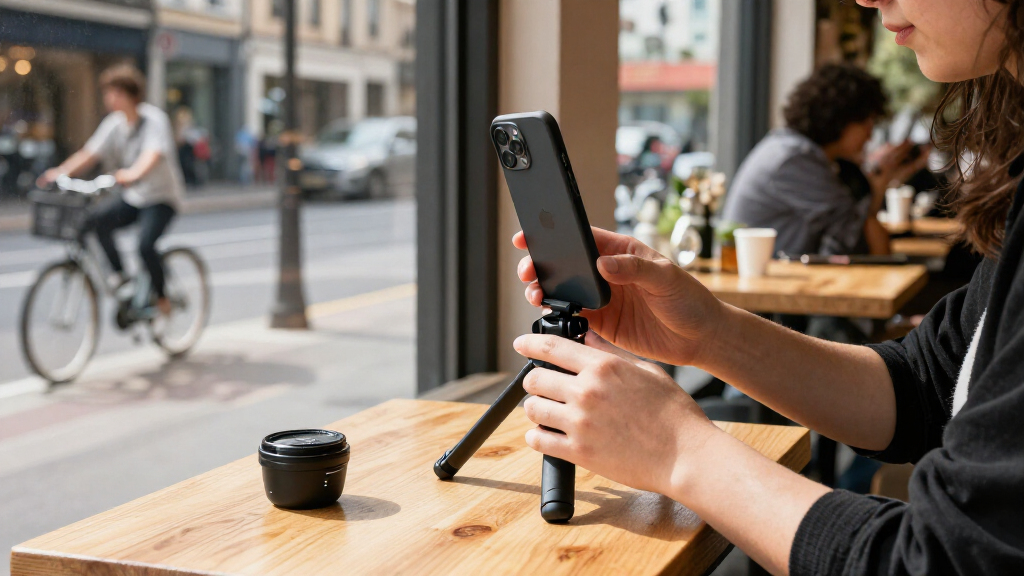
A phone tripod adapter is a small but important link between your smartphone and a tripod. The Cell Phone Tripod Mount, ULANZI ST-14 Smartphone Tripod Adapter Alumin is the named pick for this slot; check the full listing to confirm the exact model details indicated by the abbreviated name. A secure mount can help when you want to frame a shot and keep the phone in place.
One buying mistake is assuming the adapter fits both the phone and tripod without checking either connection. Confirm the phone width range and grip design, accounting for your case and any buttons or camera areas that must remain clear. Check the tripod connection type against the tripod or support you already own. If you plan to switch between portrait and landscape orientation, verify how the mount rotates and locks, and whether it can hold the phone in the angles you use.
Consider the material and handling details listed by the manufacturer, along with the adapter’s dimensions and how it stores in your bag. If you attach a light or microphone elsewhere on the mount, verify whether the product supports that arrangement rather than assuming extra attachment points are available. For a simple phone-on-tripod setup, fit and stable adjustment are the central checks. Make sure the adapter suits your existing tripod before adding it to your kit.
What to look for:
- Check phone width compatibility with your case installed.
- Match the tripod connection to your existing support.
- Verify portrait and landscape adjustment options.
- Review grip clearance around buttons and cameras.
- Confirm whether extra accessories can attach to the mount.
Cell Phone Tripod Mount, ULANZI ST-14 Smartphone Tripod Adapter Aluminum with Co
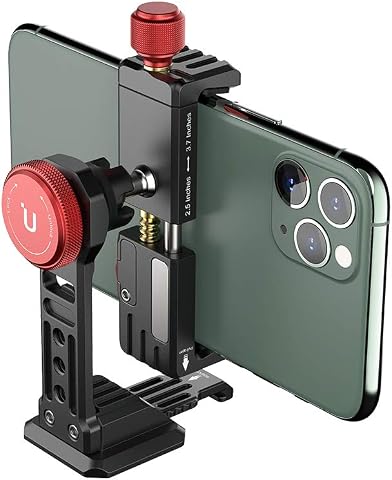
The ULANZI ST-14 is an aluminum smartphone tripod mount with a cold shoe, featuring a 360° ballhead for flexible orientation and a magnetic desktop support for hands-free use. It is compatible with a wide range of smartphones, including various iPhone models, Samsung, Huawei, and more, making it ideal for photography, video recording, and live streaming.
Pros:
- 360° adjustable ballhead for versatile shooting angles
- Compatible with a wide range of smartphones and accessories
- Includes cold shoe mount for microphones or lights
- Magnetic support legs for convenient desktop use
Cons:
- Some users may find the mounting clamp tight for larger cases
- Limited to smartphones up to 3.93 inches wide
- No included tripod or additional accessories
Best for: Phone photographers who already use a tripod
Not ideal for: Anyone without a compatible tripod or support
Bottom line: Match both the phone grip and tripod connection before buying.
Mobile Photo Printer
A compact photo printer can bring selected phone images into physical form. The Canon SELPHY CP1500 Wireless Compact Photo Printer Bundle with RP-108 is the named pick in this category. Check the product listing for the bundle contents and confirm that the paper and ink supplies described there match how you plan to print.
A common mistake is choosing a printer without checking the complete printing workflow. Review how your phone connects, what app or wireless setup is needed, and whether your device is supported. Confirm what paper and ink are included in the bundle, how many prints the supplied materials are intended to cover according to the listing, and what replacements are compatible. Do not assume a bundle label alone tells you every consumable or accessory inside; read the included-items section.
Think about where you will use and store the printer, and how you will select images to print from your phone. Check the printer’s dimensions, power requirements, and supported media sizes in the product details. If you expect to print away from a desk, confirm whether the power setup suits that use. The practical fit comes down to a straightforward phone-to-print process, the image sizes you want, and having compatible paper and ink available when you need them.
What to look for:
- Confirm phone and wireless compatibility.
- Review the bundle’s paper, ink, and accessory contents.
- Check compatible replacement paper and ink.
- Match supported print sizes to your intended use.
- Consider dimensions and power needs for your printing location.
Canon SELPHY CP1500 Wireless Compact Photo Printer Bundle with RP-108 Ink and Pa

The Canon SELPHY CP1500 is a compact wireless photo printer that prints color photos from compatible smartphones, tablets, memory cards, USB drives, and computers. This bundle includes an RP-108 set with 108 sheets of 4 x 6-inch paper and two ink cartridges, plus a power supply, screen protectors, memory card wallet, and cleaning cloth.
Pros:
- Wireless printing from compatible mobile devices and computers
- Bundle includes supplies for up to 108 prints
- Supports several paper sizes and glossy, semi-gloss, and satin-style finishes
- Compact design for desks and countertops
Cons:
- Memory card is not included
- Optional battery pack and additional paper sizes are sold separately
Best for: Phone photographers who want physical copies of selected images
Not ideal for: People who keep all photos digital
Bottom line: Check phone support and the bundle’s consumables before choosing this printer.
Build your kit in need-first order: start with the accessory that addresses your most frequent frustration, then confirm it works with your phone and gear. If you record people speaking, review microphone compatibility; if steadier footage matters most, check the gimbal fit; if you make prints, verify the paper and ink workflow. Add lenses, lights, and mounts as your shooting habits call for them.
You do not need every category to make a useful setup. Begin with one compatible addition, learn how it fits into your routine, and expand when another need becomes clear. Careful checks for fit, connections, and included pieces make it easier to choose gear you will actually use.
Black Friday Picks

Sonos One (Gen 2) Two-Room Set Voice-Controlled Smart Speaker with Alexa (2-Pack, Black)
As an affiliate, we earn on qualifying purchases.