The XGIMI Elfin Flip 4K is my best overall pick for buyers who want a portable design with smart TV features, while the Epson EpiqVision Flex CO-W01 stands out for presentations and the HAPPRUN H1 for native 1080p viewing on a tighter budget. Portable projectors range from small, easy-to-carry models to powerful home-theater units that are portable mainly by comparison with a fixed installation. The main tradeoffs are brightness, image resolution, built-in streaming, and physical size; no single model leads in every area. I weigh those differences against setup and intended use so you can match a projector to your room, travel plans, and source devices. Continue reading for the full breakdown of all 15 picks and guidance on choosing the right type.

Get the latest gadgets delivered free with Prime
- Fast, free delivery on millions of items
- Prime Video, Amazon Music and more included
- Member-only deals all year
Complete the kit



Key Takeaways
- The Elfin Flip 4K leads the roundup for balanced portability and smart viewing, while the Epson CO-W01 is a more presentation-focused alternative.
- Native resolution and supported resolution are not the same: the HAPPRUN H1 is listed as native 1080p, while several mini models advertise 4K support without that claim.
- Built-in streaming can simplify casual viewing, but smart features do not replace checking app availability, network needs, or the option to connect an external streaming device.
- Compact mini projectors prioritize easy placement and carrying; the larger Epson and XGIMI home-theater models suit buyers who can give up some portability for a more permanent setup.
- The LS11000 and HORIZON 20 serve a different kind of buyer: they offer premium home projection features, but are less convenient to move around than the roundup’s genuinely compact picks.
| XGIMI Elfin Flip 4K Portable Projector with Google TV |  | Best Premium Portable Projector | Native resolution: 3840 × 2160 | Display type: DLP | Light source: RGB triple laser | VIEW LATEST PRICE | See Our Full Breakdown |
| ClokoWe HY300 Pro+ Portable Mini Projector with Wi-Fi and Bluetooth |  | Best for Ceiling and Bedroom Projection | Native resolution: 1280 × 720 | Maximum supported resolution: 1920 × 1080 | Display type: LCD | VIEW LATEST PRICE | See Our Full Breakdown |
| Philoent Mini Projector with Wi-Fi 6, Bluetooth 5.4, and Built-In Apps |  | Best Compact Short-Throw Pick | Native resolution: 1280 × 720 | Maximum display resolution: 1920 × 1080 | Brightness: 200 ANSI lumens | VIEW LATEST PRICE | See Our Full Breakdown |
| Aurzen Roku TV D1R Air Portable Smart Projector |  | Best Portable Roku Setup | Resolution: Native 1080p | Brightness: Up to 300 ANSI lumens | Smart TV platform: Roku TV | VIEW LATEST PRICE | See Our Full Breakdown |
| HAPPRUN H1 Native 1080p Portable Bluetooth Projector |  | Best Simple Full HD Pick | Native resolution: 1920 × 1080 | Display type: LCD | Maximum brightness: 300 ANSI lumens | VIEW LATEST PRICE | See Our Full Breakdown |
| Soundcore Nebula P1i Portable Projector with Flippable Speakers |  | Best for Built-In Audio | Native resolution: 1920 x 1080 | Brightness: 380 ANSI lumens | Audio: 20W (2 x 10W) Dolby Audio speakers | VIEW LATEST PRICE | See Our Full Breakdown |
| Aurzen Roku TV E1R Portable Mini Projector with Wi-Fi and Bluetooth |  | Best for Roku Streaming | Native resolution: 1280 x 720 | Brightness: 160 lm | Operating system: Roku TV | VIEW LATEST PRICE | See Our Full Breakdown |
| Epson EpiqVision Flex CO-W01 Portable Projector |  | Best for Bright Rooms and Large Images | Projection technology: 3-chip 3LCD | Native resolution: 1280 x 800 | Brightness: 3,000 lumens | VIEW LATEST PRICE | See Our Full Breakdown |
| Magcubic Portable Mini Projector with Wi-Fi 6, Bluetooth 5.4, 4K Support and 180° Rotation |  | Best for Ultralight Carrying | Native resolution: 1280 × 720 | Maximum supported resolution: 3840 × 2160 | Brightness: 200 ANSI | VIEW LATEST PRICE | See Our Full Breakdown |
| HY300Pro Portable Mini Projector with Android 14, Wi-Fi 6, Bluetooth 5.4, and Auto Keystone |  | Best for Small Rooms | Native resolution: 1280 x 720 | Maximum supported resolution: 3840 x 2160 | Brightness: 200 ANSI lumens | VIEW LATEST PRICE | See Our Full Breakdown |
| YGSKK Mini Projector with Wi-Fi 6, Bluetooth 5.3, Built-In Streaming Apps, and Electric Focus |  | Best Compact Streaming Pick | Native resolution: 1080p | Brightness: 300 ANSI lumens | Projected image size: 50–200 inches | VIEW LATEST PRICE | See Our Full Breakdown |
| XGIMI HORIZON 20 4K RGB Triple-Laser Home Projector |  | Best for Bright, Feature-Rich 4K Viewing | Native resolution: 3840 × 2160 | Projection engine: RGB triple-laser | Brightness: 3200 ISO lumens | VIEW LATEST PRICE | See Our Full Breakdown |
| Epson Home Cinema 980 1080p 3LCD Projector | 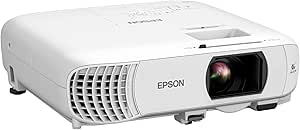 | Best for Bright Full HD Viewing | Native resolution: 1920 × 1080 | Brightness: 4,000 lumens, color and white | Display technology: 3-chip 3LCD | VIEW LATEST PRICE | See Our Full Breakdown |
| Epson EpiqVision Flex CO-FH02 Full HD 1080p Smart Streaming Projector |  | Best Portable Projector for Built-In Streaming | Native resolution: 1920 × 1080 | Brightness: 3,000 lumens, color and white | Display technology: 3LCD | VIEW LATEST PRICE | See Our Full Breakdown |
| Epson Home Cinema LS11000 4K PRO-UHD Laser Projector with HDR10+ |  | Best Premium Fixed-Installation Pick | Native resolution: 3840 × 2160 | Display technology: 4K PRO-UHD, 3-chip 3LCD | Light source: Laser array | VIEW LATEST PRICE | See Our Full Breakdown |
| portable projector | Native resolution | Brightness | Connectivity | Image size |
|---|---|---|---|---|
| XGIMI Elfin Flip 4K Portable P | 3840 × 2160 | 1600 ISO lumens | — | — |
| ClokoWe HY300 Pro+ Portable Mi | 1280 × 720 | 500 lm | Bluetooth 5.2, HDMI, USB, 2.4 GHz and 5 GHz Wi-Fi | — |
| Philoent Mini Projector with W | 1280 × 720 | 200 ANSI lumens | Wi-Fi 6, Bluetooth 5.4, HDMI and USB | — |
| Aurzen Roku TV D1R Air Portabl | — | Up to 300 ANSI lumens | — | — |
| HAPPRUN H1 Native 1080p Portab | 1920 × 1080 | — | HDMI, USB, Bluetooth 5.3, 3.5 mm audio and IR | 40–200 inches |
| Soundcore Nebula P1i Portable | 1920 x 1080 | 380 ANSI lumens | Wi-Fi, Bluetooth 5 | 40–150 inches |
| Aurzen Roku TV E1R Portable Mi | 1280 x 720 | 160 lm | Wi-Fi (2.4 GHz/5 GHz), Bluetooth 5.2, HDMI, USB | — |
| Epson EpiqVision Flex CO-W01 P | 1280 x 800 | 3,000 lumens | HDMI, USB | 33–300 inches |
| Magcubic Portable Mini Project | 1280 × 720 | 200 ANSI | Wi-Fi 6, Bluetooth 5.4, HDMI, USB | 35–135 inches |
| HY300Pro Portable Mini Project | 1280 x 720 | 200 ANSI lumens | — | 35–135 inches |
| YGSKK Mini Projector with Wi-F | 1080p | 300 ANSI lumens | — | — |
| XGIMI HORIZON 20 4K RGB Triple | 3840 × 2160 | 3200 ISO lumens | — | 40–300 inches |
| Epson Home Cinema 980 1080p 3L | 1920 × 1080 | 4,000 lumens, color and white | — | 34–337 inches |
| Epson EpiqVision Flex CO-FH02 | 1920 × 1080 | 3,000 lumens, color and white | Wi-Fi, Bluetooth, HDMI, USB | 34–300 inches |
| Epson Home Cinema LS11000 4K P | 3840 × 2160 | 2,500 lumens, color and white | — | — |
More Details on Our Top Picks
XGIMI Elfin Flip 4K Portable Projector with Google TV
The XGIMI Elfin Flip is the premium pick for buyers who want portable placement without giving up 4K detail. Its RGB triple-laser light source, native UHD resolution and optical zoom give it a more flexible image setup than the HAPPRUN H1, which is native 1080p and relies on moving the projector to change image size. Google TV and dual Harman Kardon speakers also reduce the gear needed for a movie night, while 1 ms latency, VRR and ALLM make it the strongest gaming option in this group. The tradeoff is that 1600 ISO lumens may not overcome a bright room, and its 5.7-meter maximum throw distance can limit placement in larger spaces. I would skip it if portability means the smallest, lightest device or a projector meant for daylight viewing.
Pros:- Native 4K UHD resolution with an RGB triple-laser light source.
- Optical zoom changes image size without digital scaling.
- Google TV and dual Harman Kardon speakers are built in.
- 1 ms latency, VRR and ALLM support responsive gaming.
Cons:- 1600 ISO lumens may be limiting in bright viewing environments.
- Maximum throw distance of 5.7 meters may restrict placement in larger rooms.
Best for: Buyers who want a portable 4K setup with built-in streaming, capable speakers and gaming features for dim rooms.
Not ideal for: People who need a pocket-sized projector or expect a bright, watchable image in rooms with substantial ambient light.
- Native resolution:3840 × 2160
- Display type:DLP
- Light source:RGB triple laser
- Brightness:1600 ISO lumens
- Optical zoom:0.98–1.3:1
- Maximum image size:200 inches
- Smart TV platform:Google TV
- Audio:Dual Harman Kardon speakers
- Gaming features:1 ms latency, VRR and ALLM
Our verdict“Choose the XGIMI Elfin Flip if you want the most feature-rich portable 4K option here and can watch in a dim room.”
ClokoWe HY300 Pro+ Portable Mini Projector with Wi-Fi and Bluetooth
The ClokoWe HY300 Pro+ earns its place for flexible, casual viewing in tight spaces. Its 180° rotation makes aiming at a bedroom ceiling easier than with the HAPPRUN H1, which offers more conventional desktop, tripod or ceiling-mount placement. Built-in apps and dual-band Wi-Fi let viewers stream without adding a stick, and Bluetooth 5.2 can route sound to headphones or an external speaker. The small 0.77-pound body is also easier to move around than the larger Aurzen Roku TV D1R Air. The tradeoff is picture definition: native resolution is 720p, even though it accepts higher-resolution video, and the recommended image range is narrower than the stated 200-inch maximum suggests. I would treat the star scenes as a bedroom extra, not a substitute for sharper movie playback.
Pros:- Very light 0.77-pound design is easy to carry between rooms.
- 180° rotation supports wall and ceiling projection.
- Built-in apps and dual-band Wi-Fi enable streaming without a separate device.
- Bluetooth 5.2 supports wireless headphones or external speakers.
Cons:- Native resolution is 1280 × 720, below native Full HD models such as the HAPPRUN H1.
- Recommended image size is 40–100 inches, despite a stated maximum of 200 inches.
- The listed 500-lumen brightness is best treated as a dark-room specification.
Best for: Bedroom viewers and travelers who value a very light projector, built-in streaming and easy ceiling aiming over Full HD detail.
Not ideal for: Buyers who want native 1080p or a reliably sharp, large-screen image for movies and sports.
- Native resolution:1280 × 720
- Maximum supported resolution:1920 × 1080
- Display type:LCD
- Brightness:500 lm
- Weight:0.77 lb
- Rotation:180°
- Recommended image size:40–100 inches
- Connectivity:Bluetooth 5.2, HDMI, USB, 2.4 GHz and 5 GHz Wi-Fi
- Built-in apps:YouTube, Prime Video and more
Our verdict“Pick the ClokoWe for lightweight bedroom or travel viewing when flexible ceiling projection matters more than native 1080p sharpness.”
Philoent Mini Projector with Wi-Fi 6, Bluetooth 5.4, and Built-In Apps
The Philoent Mini Projector suits buyers who need a lightweight device for a small room and want a shorter placement distance. Its 0.8:1 throw ratio can produce a useful image without placing the projector far back, unlike the HAPPRUN H1, whose minimum throw distance is 1.2 meters. At 0.85 pounds, it is also easy to carry between rooms, while autofocus, automatic vertical keystone correction and 180° rotation reduce setup effort. Built-in apps and Wi-Fi 6 help keep a casual streaming setup compact. The limits are clear: native resolution is 720p, maximum image size is 86 inches, and 200 ANSI lumens favors a dark viewing space. Compared with the ClokoWe HY300 Pro+, this model has a shorter stated maximum image size but a shorter throw ratio.
Pros:- 0.8:1 throw ratio suits compact rooms with limited projector placement distance.
- Light 0.85-pound body is convenient for room-to-room use.
- Autofocus, automatic vertical keystone correction and 180° rotation simplify setup.
- Built-in apps and Wi-Fi 6 support a compact streaming setup.
Cons:- Native resolution is 1280 × 720, not 1080p.
- Maximum image size is 86 inches, smaller than the ClokoWe HY300 Pro+’s stated maximum.
- Brightness is 200 ANSI lumens, making dark-room viewing the practical fit.
Best for: People in small bedrooms or dorm rooms who need a lightweight projector that can sit close to the wall.
Not ideal for: Viewers seeking native 1080p, a large projected image or enough brightness for daytime use.
- Native resolution:1280 × 720
- Maximum display resolution:1920 × 1080
- Brightness:200 ANSI lumens
- Throw ratio:0.8:1
- Maximum image size:86 inches
- Weight:0.85 lb (387 g)
- Connectivity:Wi-Fi 6, Bluetooth 5.4, HDMI and USB
- Projection features:Autofocus, automatic vertical keystone correction and 180° rotation
Our verdict“Choose the Philoent for close-range projection in a small, dim room, but skip it if you need a large Full HD picture.”
Aurzen Roku TV D1R Air Portable Smart Projector
The Aurzen Roku TV D1R Air is the straightforward choice for buyers who want familiar streaming built into a portable projector. Roku TV avoids the extra streaming stick needed with the HAPPRUN H1, and its native 1080p resolution gives it a sharper baseline than the 720p Philoent Mini Projector. The adjustable gimbal, TOF autofocus and automatic keystone correction help when moving between surfaces, while USB-C PD power gives it more portable-power flexibility than a projector tied only to a conventional outlet. That flexibility has conditions: it needs a compatible 65W-or-higher USB-C PD source and the specified 5A E-Marker cable. At up to 300 ANSI lumens, it is also best reserved for dim rooms, and listed fan noise can reach 35 dB. Roku activation requires internet and an account.
Pros:- Built-in Roku TV avoids the separate streaming stick required by the HAPPRUN H1.
- Native 1080p resolution provides Full HD output.
- Adjustable gimbal, TOF autofocus and automatic keystone correction ease repositioning.
- USB-C PD input supports portable use with compatible power equipment.
Cons:- Up to 300 ANSI lumens is suited to dark or low-light viewing.
- Portable power requires a compatible 65W-or-higher USB-C PD source and specified cable.
- Fan noise is listed at 29–35 dB, depending on mode.
Best for: Streaming-focused viewers who want native 1080p and Roku access in a compact projector they can reposition easily.
Not ideal for: People who need bright-room viewing, quiet operation or a portable power setup without a compatible USB-C PD source and cable.
- Resolution:Native 1080p
- Brightness:Up to 300 ANSI lumens
- Smart TV platform:Roku TV
- Speakers:Dual 5W with Dolby Audio
- Power input:65W+ USB-C PD; 20V/3.25A
- Weight:2.60 lb (1.18 kg)
- Ports:HDMI, USB, audio out and USB-C
- Focus and correction:TOF autofocus and automatic keystone correction
- Fan noise:29–35 dB at 1 m, depending on mode
Our verdict“Choose the D1R Air if built-in Roku and easy repositioning matter more than bright-room performance or a simple power setup.”
HAPPRUN H1 Native 1080p Portable Bluetooth Projector
The HAPPRUN H1 is the practical choice for buyers who want native Full HD without depending on built-in smart apps. Its 1920 × 1080 resolution is a clear step up from the 720p ClokoWe HY300 Pro+ and Philoent Mini Projector, and its stated image range reaches 200 inches. That makes it a better fit for a larger screen when the room and placement allow, though its 300 ANSI lumens still point toward dim-room use. HDMI supports a laptop, console or streaming stick; Bluetooth 5.3 handles audio, not video casting. Unlike the Aurzen Roku TV D1R Air, this model does not include a streaming platform, so buyers need an external source for apps. Desktop, tripod and ceiling-mount options add placement flexibility, but do not remove the need for compatible cables and devices.
Pros:- Native 1920 × 1080 resolution delivers Full HD rather than the 720p native output of the ClokoWe and Philoent.
- Adjustable image size is listed up to 200 inches.
- Desktop, tripod and ceiling-mount setups support different placements.
- Bluetooth 5.3 can send audio to wireless speakers or headphones.
Cons:- Streaming stick or another HDMI source must be supplied separately, unlike the Aurzen Roku TV D1R Air.
- Bluetooth supports audio only, not video casting.
- Maximum brightness of 300 ANSI lumens favors dim-room viewing.
Best for: Buyers who want native 1080p for movie or console viewing and already have an HDMI source or streaming stick.
Not ideal for: People who want built-in streaming, wireless phone video casting or a projector intended for bright-room use.
- Native resolution:1920 × 1080
- Display type:LCD
- Maximum brightness:300 ANSI lumens
- Image size:40–200 inches
- Maximum throw distance:7 meters
- Connectivity:HDMI, USB, Bluetooth 5.3, 3.5 mm audio and IR
- Audio:Built-in stereo speakers and Bluetooth audio output
- Mounting options:Desktop, tripod or ceiling mount
- Light source operating life:100,000 hours
Our verdict“Pick the HAPPRUN H1 for native Full HD and flexible mounting if you already have an HDMI source and can watch in low light.”
Soundcore Nebula P1i Portable Projector with Flippable Speakers
The Nebula P1i is the strongest fit here for buyers who want a portable setup without adding separate speakers. Its 20W Dolby Audio speakers rotate to aim sound toward the seating area, a useful difference from the smaller built-in audio on the Magcubic and HY300Pro. Native 1080p resolution also gives it a sharper picture than those 720p mini projectors, though its 380 ANSI lumens still call for a dim room rather than daylight viewing. Google TV and the autofocus, keystone correction, obstacle avoidance, and screen-fit tools reduce setup work, but streaming setup requires internet access and a Google account. At 7.3 pounds, it is portable between rooms, not the lightest pick to carry outdoors.
Pros:- Native 1080p resolution is sharper than the 720p Magcubic and HY300Pro.
- Rotating 20W Dolby Audio speakers let users direct sound toward their seating position.
- Autofocus, auto keystone, obstacle avoidance, and screen fit simplify placement.
- Google TV and Wi-Fi support streaming without a separate streaming device.
Cons:- 380 ANSI lumens limits its usefulness in rooms with substantial ambient light.
- At 7.3 pounds, it is heavier than the compact Magcubic and HY300Pro.
- Google TV setup requires an internet connection and Google account.
Best for: Movie watchers who move a projector between rooms and want stronger built-in sound with automatic setup aids.
Not ideal for: Backpack travelers or daytime viewers who need a very light projector or a brighter image.
- Native resolution:1920 x 1080
- Brightness:380 ANSI lumens
- Audio:20W (2 x 10W) Dolby Audio speakers
- Speaker rotation:90° side to side; 200° up and down
- Smart features:Google TV, autofocus, auto keystone correction, obstacle avoidance, screen fit
- Image size:40–150 inches
- Weight:7.3 lb (3.3 kg)
- Connectivity:Wi-Fi, Bluetooth 5
Our verdict“Choose the Nebula P1i if built-in sound and native 1080p matter more than low weight or bright-room performance.”
Aurzen Roku TV E1R Portable Mini Projector with Wi-Fi and Bluetooth
The Aurzen Roku TV E1R makes sense for viewers who want a familiar streaming interface in a compact projector. Built-in Roku TV avoids the extra streaming stick required by the Epson CO-W01, and Apple AirPlay adds a direct casting option. Its 180° rotating stand helps aim the picture at a wall or ceiling, while automatic vertical keystone correction handles one common placement issue. The tradeoff is a 720p native resolution and 160-lumen brightness, both below the Nebula P1i; this is better for casual viewing in a dark room than for a large, detailed movie image. Despite the portable form, it needs a wall outlet and does not accept USB-C power, so it is not suited to truly cordless use.
Pros:- Roku TV provides streaming apps without a separate streaming stick.
- 180° rotating stand makes it easier to point the image at different surfaces.
- Apple AirPlay and two-way Bluetooth 5.2 add flexible casting and audio options.
- Automatic vertical keystone correction reduces manual image adjustment.
Cons:- Native resolution is 1280 x 720, below the Nebula P1i’s 1080p.
- 160-lumen brightness suits dark rooms better than spaces with ambient light.
- Requires a wall outlet and included DC cable; USB-C power and a built-in battery are absent.
Best for: Roku users who want a simple, compact projector for streaming in a bedroom or other dark room near an outlet.
Not ideal for: Campers and travelers who need battery or USB-C power, or viewers seeking sharper detail and higher brightness.
- Native resolution:1280 x 720
- Brightness:160 lm
- Operating system:Roku TV
- Supported image size:40–120 inches
- Stand:Built-in 180° rotating stand
- Connectivity:Wi-Fi (2.4 GHz/5 GHz), Bluetooth 5.2, HDMI, USB
- Power:45 watts; wall outlet and included DC power cable required
- Casting:Apple AirPlay
Our verdict“Pick the E1R for convenient Roku streaming in a dark, outlet-equipped room, not for cordless trips or high-detail viewing.”
Epson EpiqVision Flex CO-W01 Portable Projector
The Epson EpiqVision Flex CO-W01 is the outlier in this group: it prioritizes brightness and a very large image over built-in streaming and pocketable size. Its 3,000 lumens and 3-chip 3LCD system make it a more practical choice for presentations or viewing where the room cannot be fully darkened than the 200-lumen Magcubic and HY300Pro. It can also project up to 300 inches, far beyond the E1R’s 120-inch limit. That scale comes with a resolution compromise: its native 1280 x 800 image is not Full HD, unlike the Nebula P1i. An HDMI port and built-in speaker cover basic connections, but streaming devices must be supplied separately. This is portable for moving between rooms, not a battery-powered travel projector.
Pros:- 3,000 lumens outshine the low-brightness Magcubic and HY300Pro for less controlled lighting.
- 3-chip 3LCD displays the full RGB color signal per frame.
- Supports image sizes up to 300 inches, larger than the other listed portable models.
- HDMI and a built-in speaker support straightforward connections to compatible devices.
Cons:- Native 1280 x 800 resolution is below the Nebula P1i’s native 1080p.
- No built-in streaming platform is listed, so streaming may require an external device.
- A built-in speaker is included, but the product data does not specify an output rating or battery power.
Best for: Presenters and households needing a brighter image, flexible projection size, and a projector they can carry between rooms.
Not ideal for: Travelers who need a battery-powered unit or buyers who expect native 1080p and built-in streaming apps.
- Projection technology:3-chip 3LCD
- Native resolution:1280 x 800
- Brightness:3,000 lumens
- Image size:33–300 inches
- Throw distance:2.11–34.1 feet
- Connectivity:HDMI, USB
- Built-in speaker:Yes
- Light source operating life:5,000 hours
Our verdict“Choose the CO-W01 when brightness and a very large image matter more than native Full HD, smart streaming, or cordless portability.”
Magcubic Portable Mini Projector with Wi-Fi 6, Bluetooth 5.4, 4K Support and 180° Rotation
At 0.88 pounds, the Magcubic is the easiest model here to pack for casual viewing away from home. Its 180° rotation and several mounting options give it more placement flexibility than the outlet-bound Aurzen E1R, while built-in apps and an Air Mouse remote reduce the need to bring extra controls or a streaming stick. But the 720p native resolution is the image ceiling that matters: 4K input support does not make projected detail equivalent to native 4K or the Nebula P1i’s 1080p. With 200 ANSI lumens and a 5W speaker, it is aimed at dark-room viewing rather than a bright outdoor gathering. Buyers should also plan around its recommended 5.2-foot distance for an 80-inch image.
Pros:- At 0.88 pounds, it is lighter than the other projectors in this group.
- 180° rotation and tabletop, floor, or ceiling mounting options allow flexible placement.
- Built-in apps and an Air Mouse remote with voice commands reduce accessory needs.
- Wi-Fi 6, Bluetooth 5.4, HDMI, and USB provide several connection options.
Cons:- Native resolution is 1280 x 720; 4K describes supported input, not projected resolution.
- 200 ANSI brightness is best suited to dark viewing conditions.
- The recommended distance for an 80-inch image is 5.2 feet, which may constrain placement.
Best for: Travelers and casual viewers who value very low weight, flexible aiming, and built-in apps for dark-room use.
Not ideal for: Viewers who want native 1080p, bright-room performance, or a large image from a very short distance.
- Native resolution:1280 × 720
- Maximum supported resolution:3840 × 2160
- Brightness:200 ANSI
- Contrast ratio:8000:1
- Image size:35–135 inches
- Weight:0.88 lb
- Connectivity:Wi-Fi 6, Bluetooth 5.4, HDMI, USB
- Rotation:180°
Our verdict“Choose the Magcubic for easy carrying and casual dark-room viewing, but not for sharp Full HD detail or bright environments.”
HY300Pro Portable Mini Projector with Android 14, Wi-Fi 6, Bluetooth 5.4, and Auto Keystone
The HY300Pro is the most room-friendly mini option in this group: its 0.9:1 throw ratio and listed 0.75–2.65-meter range support a sizable image without requiring a deep room. The 180° swiveling lens and automatic vertical keystone also make it easier to redirect the picture than a fixed-position projector. Android 14, Wi-Fi 6, and Bluetooth 5.4 give it broad built-in connectivity, while the Magcubic offers a similar lightweight, rotating design with a voice-control remote. The HY300Pro is slightly lighter at 0.77 pounds, but its 720p native resolution and 200 ANSI lumens limit detail and bright-room use. Manual focus is another hands-on step that autofocus-equipped Nebula P1i buyers can avoid.
Pros:- Short 0.9:1 throw ratio suits smaller rooms where the projector cannot sit far from the wall.
- At 0.77 pounds, it is the lightest projector in this group.
- 180° lens rotation and multiple mounting options support flexible positioning.
- Android 14, Wi-Fi 6, Bluetooth 5.4, HDMI, and USB offer varied connection paths.
Cons:- Native resolution is 1280 x 720; 4K input support does not provide native 4K projection.
- 200 ANSI lumens is limiting when room lights or outdoor ambient light are present.
- Focus is manual, unlike the Nebula P1i’s autofocus system.
Best for: People in bedrooms or compact living spaces who need a lightweight projector with flexible aiming and short-throw placement.
Not ideal for: Viewers who prioritize native 1080p, bright-room projection, or autofocus instead of manual focusing.
- Native resolution:1280 x 720
- Maximum supported resolution:3840 x 2160
- Brightness:200 ANSI lumens
- Throw ratio:0.9:1
- Throw distance:0.75–2.65 meters
- Image size:35–135 inches
- Weight:0.77 lb
- Focus and correction:Manual focus; auto vertical keystone
Our verdict“Choose the HY300Pro for lightweight, short-throw use in a small, dim room, and skip it if sharpness or automatic focus is a priority.”
YGSKK Mini Projector with Wi-Fi 6, Bluetooth 5.3, Built-In Streaming Apps, and Electric Focus
The YGSKK makes the most sense for buyers who want a small, self-contained projector rather than a bright room-filling setup. Native 1080p resolution keeps the image sharp at everyday sizes, while built-in Prime Video, YouTube, and Hulu mean fewer accessories to pack. Its electric focus and 210° rotating base also make aiming less fiddly than on simpler mini models such as the ClokoWe HY300 Pro+.
The tradeoff is its 300 ANSI lumens: this is better suited to dim rooms than daylight viewing, especially as the image grows. Android phone mirroring also needs an app, and Bluetooth connects audio devices but not smartphones. I’d choose it for flexible placement and easy streaming, not for a bright living room or a large-screen picture that needs to stay vivid.
Pros:- Native 1080p resolution for clear Full HD viewing
- Built-in streaming apps reduce the need to bring a separate player
- Electric focus and a 210° rotating base simplify positioning
- HDMI, USB, and 3.5 mm audio support several wired sources
Cons:- 300 ANSI lumens limits performance in rooms with substantial ambient light
- Android phone mirroring requires an app, and Bluetooth does not connect to smartphones
- The 200-inch maximum image is less practical when brightness is limited
Best for: Travelers and apartment dwellers who want built-in streaming, remote electric focus, and flexible placement for dim-room viewing.
Not ideal for: Buyers planning daytime viewing, large bright-room images, or direct Bluetooth connections from a smartphone.
- Native resolution:1080p
- Brightness:300 ANSI lumens
- Projected image size:50–200 inches
- Wireless:Wi-Fi 6; wireless screen mirroring
- Bluetooth:Bluetooth 5.3; audio devices supported, smartphones not supported
- Connections:HDMI, USB, 3.5 mm audio
- Adjustment:Electric focus; 210° rotating base
- Built-in apps:Prime Video, YouTube, Hulu, and app store
Our verdict“Choose the YGSKK for compact, app-based viewing in dim rooms, but pick a brighter Epson model for ambient-light use.”
XGIMI HORIZON 20 4K RGB Triple-Laser Home Projector
The HORIZON 20 is the strongest choice here for buyers who want a projector that can handle a bright, flexible home setup without giving up high-end picture and gaming features. Its 4K RGB triple-laser engine, stated 3200 ISO lumens, and support for Dolby Vision, HDR10+, and IMAX Enhanced make it a more capable all-around viewing option than the portable YGSKK mini projector. Google TV, licensed Netflix, and Harman Kardon speakers also reduce the number of separate devices needed.
It is portable only by comparison with a fixed installation: the floor-mount design, 180-watt power use, and throw distances up to 5.31 meters call for room to spare. The 240Hz, 1ms, VRR, and ALLM gaming features are unusually extensive, but matter most to players with compatible systems. I’d rank it above the Epson Home Cinema 980 for feature breadth, while the Epson is the more straightforward Full HD option.
Pros:- 4K RGB triple-laser engine with 3200 ISO lumens
- Supports IMAX Enhanced, Dolby Vision, HDR10+, and Filmmaker Mode
- Google TV with licensed Netflix and Harman Kardon speakers are built in
- Optical zoom, lens shift, and advanced gaming features aid setup and play
Cons:- Large-screen placement can require a throw distance of up to 5.31 meters
- At 180 watts, it uses more power than a small portable projector
- Its floor-mount form and feature set are excessive for casual travel use
Best for: Home theater and gaming buyers who want bright 4K projection, built-in Google TV, and flexible floor placement in a roomy space.
Not ideal for: Travelers or small-room buyers who need a genuinely compact projector, short placement distances, or low power consumption.
- Native resolution:3840 × 2160
- Projection engine:RGB triple-laser
- Brightness:3200 ISO lumens
- Contrast ratio:100,000:1
- Image size:40–300 inches
- Throw distance:1.06–5.31 meters
- Smart platform:Google TV with licensed Netflix
- Gaming:240Hz, 1ms response time, VRR, and ALLM
- Optics and audio:Optical zoom, flexible lens shift, Harman Kardon speakers
Our verdict“Pick the HORIZON 20 for a bright, feature-packed 4K home setup, not for frequent travel or space-constrained rooms.”
Epson Home Cinema 980 1080p 3LCD Projector
The Home Cinema 980 is the practical pick for viewers who value bright Full HD projection over built-in streaming or advanced gaming. Its 4,000 lumens of color and white brightness give it a clear advantage over the YGSKK mini projector when there is some room light, while 3-chip 3LCD produces color without the rainbow effects associated with some other projection technologies. Dual HDMI ports make it easy to leave more than one source connected.
Compared with the EpiqVision Flex CO-FH02, the 980 offers higher stated brightness but lacks its included Android TV platform and wireless connectivity. It is portable in the room-to-room sense, not a pocket-sized travel projector, and the stated throw distance tops out at nine feet. I’d choose it for sports, films, or casual gaming from nearby seating; buyers who want streaming without extra hardware should favor the CO-FH02.
Pros:- 4,000 lumens of color and white brightness suit rooms with some ambient light
- 3-chip 3LCD delivers Full HD color without rainbow effects
- Dual HDMI ports let multiple sources stay connected
- Built-in speaker and USB power support simpler room-to-room setups
Cons:- Maximum stated throw distance is nine feet, limiting placement flexibility
- No built-in wireless network connection or smart streaming platform is listed
- 349-watt power use is high for a projector intended to be moved around
Best for: Households that need bright Full HD for sports, films, or casual gaming and can use HDMI sources or a separate streaming device.
Not ideal for: Travelers who need a tiny projector, buyers who want built-in wireless streaming, or rooms requiring long-distance placement.
- Native resolution:1920 × 1080
- Brightness:4,000 lumens, color and white
- Display technology:3-chip 3LCD
- Contrast ratio:16,000:1
- Image size:34–337 inches
- Throw distance:1–9 feet
- Connections:Dual HDMI, USB
- Light source operating life:6,000 hours
- Power:349 watts
Our verdict“Choose the Home Cinema 980 for bright Full HD with wired sources, while the CO-FH02 is a better fit if built-in streaming matters more.”
Epson EpiqVision Flex CO-FH02 Full HD 1080p Smart Streaming Projector
The CO-FH02 is the more convenient all-in-one alternative to the Epson Home Cinema 980: Android TV, Wi-Fi, Bluetooth, and a built-in 5W speaker make it easier to take from a living room to a presentation or a weekend away. It keeps Full HD resolution and 3LCD color, while its stated 3,000 lumens of color and white brightness offer a useful balance for varied home use. Its image can reach 300 inches, though that maximum depends on having enough room and a suitable surface.
Compared with the YGSKK, this Epson trades the YGSKK’s rotating base and electric focus for higher stated brightness and a built-in smart platform. Streaming still depends on a wireless network of at least 5 Mbps, and some apps need paid subscriptions. I’d pick it for buyers who want fewer accessories to pack; the Home Cinema 980 is preferable if higher listed brightness and dual HDMI matter more than wireless convenience.
Pros:- Android TV and wireless connectivity reduce reliance on external streaming hardware
- 3,000 lumens of color and white brightness support varied home settings
- 3LCD technology displays full RGB color and avoids rainbow effects
- Full HD image sizes reach up to 300 inches
Cons:- Streaming requires a wireless network with at least 5 Mbps, and some apps require subscriptions
- The built-in 5W speaker may not suit viewers seeking room-filling sound
- Large-screen projection needs sufficient space and a suitable projection surface
Best for: Families, presenters, and occasional travelers who want Full HD projection with Android TV and wireless connections built in.
Not ideal for: People without reliable Wi-Fi, buyers seeking a very small travel projector, or viewers who need a bright image in strong daylight.
- Native resolution:1920 × 1080
- Brightness:3,000 lumens, color and white
- Display technology:3LCD
- Image size:34–300 inches
- Throw distance:2.11–34.1 feet
- Smart platform:Android TV
- Connectivity:Wi-Fi, Bluetooth, HDMI, USB
- Speaker:Built-in 5W
- Light source operating life:30,000 hours
Our verdict“Choose the CO-FH02 if built-in Android TV makes portable setup easier; choose the Home Cinema 980 for higher listed brightness and more HDMI inputs.”
Epson Home Cinema LS11000 4K PRO-UHD Laser Projector with HDR10+
The LS11000 is the roundup’s premium choice for a dedicated home theater, not a projector to toss into a bag. Its 4K PRO-UHD, 3-chip 3LCD laser system supports several HDR formats, and motorized shift, zoom, and focus let owners position the image without moving the projector. Ten lens memories are useful for switching between stored screen formats, while refresh rates up to 120Hz and input lag below 20 ms add gaming flexibility.
Compared with the more portable XGIMI HORIZON 20, the LS11000 is built around installation: it offers extensive motorized lens control and a 300-inch maximum screen size, but needs a separate screen or suitable surface and a more involved setup. Its 2,500 lumens are lower than the XGIMI’s stated 3200 ISO lumens. I’d place it here for theater-focused buyers, not anyone prioritizing portability or quick setup.
Pros:- 4K PRO-UHD laser projection with 3-chip 3LCD technology
- Motorized shift, zoom, and focus support precise installation
- Ten preset lens memories accommodate different screen formats
- Up to 120Hz refresh rate and below-20ms input lag suit gaming
Cons:- Designed for a home theater installation rather than frequent portable use
- Requires a separate screen or suitable projection surface
- Its 2,500-lumen brightness is below the HORIZON 20’s stated 3200 ISO lumens
Best for: Home theater owners who want motorized lens positioning, multiple HDR formats, and responsive gaming in a permanent or semi-permanent setup.
Not ideal for: Frequent travelers, renters who need fast room-to-room setup, or buyers who want a screen and easy streaming included.
- Native resolution:3840 × 2160
- Display technology:4K PRO-UHD, 3-chip 3LCD
- Light source:Laser array
- Brightness:2,500 lumens, color and white
- Dynamic contrast ratio:1,200,000:1
- HDR formats:HDR, HDR10, HDR10+, HLG
- Lens adjustment:Motorized shift, zoom, and focus; ±47% horizontal and ±96% vertical lens shift
- Lens memories:10 preset memories
- Gaming:Up to 120Hz refresh rate; below 20 ms input lag
Our verdict“Choose the LS11000 for a carefully installed theater with motorized lens control; choose the HORIZON 20 for a more flexible, brighter setup.”
How We Picked
I compared the 15 models through the needs implied by portable projector: how easily a buyer can carry, place, connect, and use each one in different viewing spaces. I weighed stated resolution, smart-TV or built-in app features, wireless connectivity, focus and keystone tools, speaker design, and whether the product appears aimed at casual viewing, presentations, or a more permanent home theater. I also distinguished native resolution claims from compatibility claims such as 4K support, since those describe different things.
The ranking favors models with a clear use case and a practical balance of image capability, setup convenience, and portability. Compact models rank well for travel and flexible placement but cannot automatically match larger home-oriented projectors; premium home theater options rank lower for this specific category when their size and fixed-room focus reduce carry-anywhere appeal. Because listed specifications do not establish real-world brightness, battery runtime, or app support, I avoid treating those as verified advantages and recommend checking the exact configuration before purchase.
Factors to Consider When Choosing Portable Projectors
Choosing a portable projector starts with deciding what “portable” means for your plans. A model you can move between rooms is not necessarily convenient for a backpack, and a feature-rich home projector may be portable only compared with a permanent installation. These factors help separate genuine travel convenience from flexible home use.
Match Portability to How You Will Carry It
Think about the full trip from storage to viewing spot, not just the projector’s advertised category. A compact mini model may be easier to pack, but you may also need to carry a power adapter, streaming device, cables, and a stable stand. Larger units can be reasonable for moving between rooms yet awkward for frequent travel. Check the product’s dimensions, weight, power arrangement, and whether a carrying case is included or available. A common mistake is buying the smallest unit without checking how you will position it or connect it. For occasional vacations, a simple setup may matter more than advanced home-theater features.
Separate Native Resolution From Compatibility Claims
Projector listings may describe native resolution alongside support for higher-resolution input, and those claims are not interchangeable. Native resolution describes the image grid the projector displays; compatibility means it can accept a signal in another format, often scaling it for display. If small text, detailed slides, or sharp movie imagery matter, prioritize a clearly stated native resolution. For casual video in a dark room, a lower-resolution model may still fit your expectations, but check the source material and screen size you plan to use. Avoid choosing based on a “4K support” label alone. Compare the full specification sheet and confirm whether the feature refers to native output or input compatibility.
Plan for Room Light and Screen Size
Ambient light and projected image size affect perceived picture quality, so a projector that works in a dark bedroom may look washed out in a bright living room. Larger images spread the available light over more area, which can make the picture appear less vivid. Before choosing a model, think about whether you can close curtains, dim lamps, or use a smaller image. Buyers often focus on resolution while overlooking where the projector will be used. If daytime presentations or lights-on viewing are regular needs, compare brightness specifications carefully and look for independent guidance rather than assuming a compact design will suit every room. A dedicated screen can help with consistency, but it cannot compensate for a mismatch between projector output and room conditions.
Decide Whether Built-In Streaming Is Worth Depending On
Built-in apps can cut down on cables and make casual viewing easier, especially when the projector moves between rooms. They also depend on the projector’s software, network connection, and the availability of the services you use. Some buyers may prefer a separate streaming stick because it can be replaced or updated independently; that adds another device and power connection. Before relying on built-in streaming, check the exact model’s supported apps and whether accounts or external devices are needed. Wireless connectivity is useful for some sources, but it is not a guarantee that every phone or service will mirror smoothly. Choose the arrangement that creates the fewest setup steps for your usual viewing routine.
Check Setup Controls and Placement Flexibility
Focus and keystone correction affect how quickly you can get a usable image, but automatic correction is not a substitute for good placement. Keystone adjustments can alter the image geometry and may affect usable detail, so a projector placed near the center of the screen usually needs less correction. Features such as electric focus, automatic keystone, or a rotating body can help when projecting onto different surfaces, though they do not remove the need for a stable position. Check the available projection direction and throw distance before buying, particularly for small rooms. Buyers sometimes assume a projector can sit anywhere and still fill a particular screen. Measure the space and review the manufacturer’s placement guidance first.
Treat Speakers, Power, and Accessories as Part of the Setup
A built-in speaker can make a projector easier to carry and set up, but sound may be less satisfying in a large room or outdoors. Bluetooth audio can offer another option, though pairing and audio delay may vary by source and device. Check whether the model needs to stay connected to mains power; “portable” does not automatically mean battery-powered. Include cables, stands, adapters, and any external streaming hardware in your setup plan. A small projector may still require several accessories before it is ready for a movie night. Paying for a more integrated model can make sense when fewer separate pieces are worth more to you than maximum flexibility.
Frequently Asked Questions
Does a portable projector need a battery to count as portable?
No. Portable can mean a projector is compact enough to move or pack, even if it needs an outlet during use. If you plan to watch movies outdoors or away from power, check for a built-in battery and the manufacturer’s stated runtime rather than inferring either from the product name. Also consider how brightness and speaker use may affect runtime. If you will mainly move between rooms with power nearby, a plug-in model may be the more practical choice.
Is a projector that supports 4K the same as a native 4K projector?
No. A projector can accept a 4K signal and scale it to a lower native display resolution. Native resolution is the more direct guide to the detail the projector can show, so check the specification wording before choosing. This distinction matters most for large images, detailed text, and buyers comparing premium home-theater models. If a listing only says “4K support,” look for a separate native resolution specification.
Can I use a portable projector in a bright living room?
Possibly, but the image may look less vivid than it does in a dark room, especially at a large screen size. Closing curtains, reducing nearby lights, or projecting a smaller image can help. Compare stated brightness figures, but remember that measurement methods and viewing conditions can affect how useful a number is. If bright-room use is a regular requirement, prioritize models intended for that setting rather than assuming any portable projector will perform well there.
Should I choose built-in streaming apps or use a streaming stick?
Built-in apps reduce the number of devices and cables, which can make a portable setup quicker to use. A streaming stick may be a better fit if you want to choose your own platform or replace the streaming hardware separately from the projector. Check which services the exact projector model supports and whether it needs a reliable Wi-Fi connection. A stick also needs a compatible connection and may need its own power, so include those pieces when comparing convenience. The best choice depends on whether simplicity or device flexibility matters more to you.
Can a premium home-theater projector still be a good portable choice?
It can be if “portable” means moving the projector occasionally between rooms, rather than carrying it on trips. Larger home-oriented models in this roundup target buyers who value a more capable fixed-room setup over easy packing. Before choosing one, check its dimensions, weight, mounting needs, and power requirements against the spaces where you will use it. If frequent travel is the priority, a compact model is likely to be less cumbersome. If home theater performance comes first, the portability tradeoff may be acceptable.
Conclusion
For the broadest mix of portable design and smart viewing, I recommend the XGIMI Elfin Flip 4K as the best overall fit in this lineup. The Epson EpiqVision Flex CO-W01 is my pick for presentation-minded buyers, while the HAPPRUN H1 is a sensible choice for shoppers seeking a clearly stated native 1080p option. Beginners who want built-in streaming and fewer setup steps should compare the Elfin Flip 4K with the Aurzen Roku TV D1R Air, then verify app support and connections for their exact needs. For a compact, flexible-placement option, look at the rotation-focused Magcubic; for premium home theater, consider the XGIMI HORIZON 20 or Epson LS11000 only if carrying convenience is secondary. The right choice comes down to whether you will carry it often, use it in a bright room, or leave it set up at home.