
Shopping for portable external hard drives in 2026 means balancing three things: how much storage you get per dollar, how fast the drive moves files, and how well it survives life in a bag. The WD 4TB My Passport earns my best overall pick for hitting the sweet spot between price, capacity, backup software, and hardware encryption. If raw speed matters more than capacity, the SanDisk 2TB Extreme Portable SSD is dramatically faster than any spinning drive here, while budget hunters will find the Seagate Portable 4TB hard to beat on cost per terabyte. The main tradeoff in this category is mechanical drives versus SSDs — hard drives win on price, SSDs win on speed and durability. Read on for the full breakdown of all 15 models and which one fits your setup.

Get the latest gadgets delivered free — and shop member deals
- Fast, free delivery on millions of items
- Access to Prime Big Deal Days deals on October 6–7
- Prime Video, Amazon Music and more included
Complete the kit



Key Takeaways
- The WD 4TB My Passport is the best all-around pick because it is the only budget drive in the lineup that bundles automatic backup software plus 256-bit hardware encryption — features that matter far more than a few dollars saved.
- Cost per terabyte favored the larger mechanical drives: the Seagate Portable 4TB, WD 6TB Elements, and WD 5TB Elements all undercut the 1TB and 500GB models, making small-capacity hard drives the worst value unless portability at any price is the goal.
- The two SanDisk SSDs (2TB Extreme and 1TB Portable) were the only drives in this roundup without moving parts, roughly 4-6x faster than the USB 3.0 hard drives — but you pay about double per gigabyte for that speed.
- 500GB models from UnionSine and Aiolo were among the cheapest options but carry the highest cost per gigabyte; they only make sense as cheap console-expansion or occasional-transfer drives.
- Console gamers (PS4, PS5, Xbox) are well served across the board here, but the YOTUO 1TB stands out with dual USB-A and USB-C cabling, which removes the adapter headache most single-cable drives create.
| YOTUO 1TB External Hard Drive |  | Best for Multi-Device Use | Capacity: 1TB | Connection: USB 3.0 & USB-C | Transfer Speed: Up to 5Gbps | VIEW LATEST PRICE | See Our Full Breakdown |
| Seagate 2TB Portable Hard Drive USB 3.0 |  | Best Budget Pick | Storage Capacity: 2TB | Connection: USB 3.0 | Compatibility: Windows and Mac | VIEW LATEST PRICE | See Our Full Breakdown |
| Seagate Portable 4TB External Hard Drive |  | Best Capacity per Dollar | Capacity: 4TB | Connectivity: USB 3.0 | Compatibility: PC, Mac, Xbox, PlayStation | VIEW LATEST PRICE | See Our Full Breakdown |
| WD 6TB Elements Portable External Hard Drive |  | Best High-Capacity HDD | Capacity: 6TB | Interface: USB 3.2 Gen 1 / USB 3.0 | Compatibility: Windows, Mac | VIEW LATEST PRICE | See Our Full Breakdown |
| WD 4TB My Passport Portable External Hard Drive |  | Best Overall | Capacity: 4TB | Connection: USB 3.1 / USB 3.0 | Color: Black | VIEW LATEST PRICE | See Our Full Breakdown |
| WD 4TB Elements Portable External Hard Drive |  | Best Capacity per Dollar | Capacity: 4TB | Interface: USB 3.2 Gen 1 / USB 3.0 | Compatibility: Windows, Mac (reformat required) | VIEW LATEST PRICE | See Our Full Breakdown |
| WD 2TB My Passport Portable External Hard Drive |  | Best for Security-Minded Buyers | Capacity: 2TB | Color: Black | Interface: USB 3.1 / USB 3.0 | VIEW LATEST PRICE | See Our Full Breakdown |
| 500 GB External Hard Drive, Portable USB 3.0 Slim HDD |  | Best Budget Console Companion | Capacity: 500 GB | Interface: USB 3.0 | Transfer Speed: 110–133MB/s read, 103MB/s write | VIEW LATEST PRICE | See Our Full Breakdown |
| Western Digital 5TB Elements Portable External Hard Drive | | Best Big-Capacity Travel Drive | Capacity: 5TB | Interface: USB 3.2 Gen 1 / USB 3.0 (5Gbps) | Compatibility: Windows, Mac (reformat required) | VIEW LATEST PRICE | See Our Full Breakdown |
| Seagate Portable 1TB External Hard Drive HDD | | Best Starter Drive | Storage Capacity: 1TB | Interface: USB 3.0 | Compatibility: PC, Mac, PlayStation, Xbox | VIEW LATEST PRICE | See Our Full Breakdown |
| UnionSine 500GB Ultra Slim Portable External Hard Drive HDD-USB 3.0 | 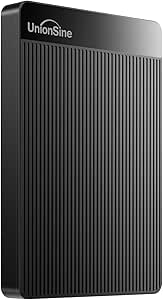 | Best Budget Slim Drive | Capacity: 500GB | Interface: USB 3.0 | Read Speed: Up to 125MB/s | VIEW LATEST PRICE | See Our Full Breakdown |
| Aiolo Innovation 500GB External Hard Drive Ultra Slim Portable HDD – USB 3.0 |  | Best for Console Gamers on a Budget | Capacity: 500GB | Interface: USB 3.0 | Read Speed: 110–133MB/s | VIEW LATEST PRICE | See Our Full Breakdown |
| SanDisk 2TB Extreme Portable SSD |  | Best Premium Speed and Durability | Capacity: 2TB | Read Speed: Up to 1050MB/s | Write Speed: Up to 1000MB/s | VIEW LATEST PRICE | See Our Full Breakdown |
| WD 2TB Elements Portable External Hard Drive |  | Best Value Workhorse | Capacity: 2TB | Interface: USB 3.2 Gen 1 / USB 3.0 | Compatibility: Windows, Mac (reformat required for Time Machine) | VIEW LATEST PRICE | See Our Full Breakdown |
| SanDisk 1TB Portable SSD – Up to 800MB/s, USB-C, USB 3.2 Gen 2 |  | Best Compact SSD Value | Capacity: 1TB | Read Speed: Up to 800MB/s | Interface: USB-C, USB 3.2 Gen 2 | VIEW LATEST PRICE | See Our Full Breakdown |
| portable external hard drife | Capacity | Compatibility | Interface |
|---|---|---|---|
| YOTUO 1TB External Hard Drive | 1TB | PC, Mac, Linux, PS4, PS5, Xbox One, Xbox Series X/S, Smartphone | — |
| Seagate 2TB Portable Hard Driv | — | Windows and Mac | — |
| Seagate Portable 4TB External | 4TB | PC, Mac, Xbox, PlayStation | — |
| WD 6TB Elements Portable Exter | 6TB | Windows, Mac | USB 3.2 Gen 1 / USB 3.0 |
| WD 4TB My Passport Portable Ex | 4TB | — | — |
| WD 4TB Elements Portable Exter | 4TB | Windows, Mac (reformat required) | USB 3.2 Gen 1 / USB 3.0 |
| WD 2TB My Passport Portable Ex | 2TB | — | USB 3.1 / USB 3.0 |
| 500 GB External Hard Drive | 500 GB | Windows, Mac, Linux, PS4, Xbox One, Xbox 360 | USB 3.0 |
| Western Digital 5TB Elements P | 5TB | Windows, Mac (reformat required) | USB 3.2 Gen 1 / USB 3.0 (5Gbps) |
| Seagate Portable 1TB External | — | PC, Mac, PlayStation, Xbox | USB 3.0 |
| UnionSine 500GB Ultra Slim Por | 500GB | — | USB 3.0 |
| Aiolo Innovation 500GB Externa | 500GB | PC, Mac, Linux, Android, PS4, Xbox One, Xbox 360 | USB 3.0 |
| SanDisk 2TB Extreme Portable S | 2TB | — | — |
| WD 2TB Elements Portable Exter | 2TB | Windows, Mac (reformat required for Time Machine) | USB 3.2 Gen 1 / USB 3.0 |
| SanDisk 1TB Portable SSD | 1TB | — | USB-C, USB 3.2 Gen 2 |
More Details on Our Top Picks
YOTUO 1TB External Hard Drive
Most drives in this lineup stick to computers and consoles separately, but the YOTUO 1TB stands out for covering nearly everything at once: PC, Mac, Linux, PlayStation, Xbox, and even smartphones via its dual USB 3.0 and USB-C connections. That flexibility is rare at this price — the Seagate 2TB Portable costs a similar amount but skips phone support entirely. The shock-absorbing silicone sleeve also gives it a durability edge over bare-metal drives like the Seagate units, which makes sense if the drive lives in a backpack. The tradeoff is capacity: 1TB fills up fast with modern game libraries, and unlike an SSD such as the SanDisk 2TB Extreme, it can’t run PS5 or Series X/S titles directly. This pick makes the most sense for people juggling devices rather than hoarding data.
Pros:- Works with phones, consoles, and computers through USB-C and USB 3.0
- Shock-absorbing silicone sleeve protects against drops
- Lightweight at 160 grams for genuine pocket portability
- Transfer speeds up to 5Gbps for a budget HDD
Cons:- 1TB fills quickly for game libraries or video projects
- Cannot run or store PS5/Xbox Series X/S games directly
Best for: Students and commuters who shuttle files between a laptop, phone, and game console
Not ideal for: Gamers wanting to play PS5 or Xbox Series X/S games directly from the drive — it’s archive-only for next-gen titles
- Capacity:1TB
- Connection:USB 3.0 & USB-C
- Transfer Speed:Up to 5Gbps
- Compatibility:PC, Mac, Linux, PS4, PS5, Xbox One, Xbox Series X/S, Smartphone
- Protection:Shock-absorbing silicone sleeve
- Weight:0.16 kg
Our verdict“Buy this if you need one affordable drive that talks to every device you own; skip it if capacity is the priority.”
Seagate 2TB Portable Hard Drive USB 3.0
When the goal is reliable storage for the least money, this 2TB Seagate is the straightforward choice. It shares the same plug-and-play simplicity as its 4TB sibling but at a noticeably lower price, and compared with the WD 2TB Elements it holds its own on drag-and-drop simplicity for both Windows and Mac. Setup genuinely takes seconds — no software, no formatting hurdles for most users, just plug in the 18-inch cable and copy files. Where it falls behind is refinement: there’s no bundled backup software, no encryption, and no durability housing like the YOTUO’s silicone sleeve. It’s a bare-bones workhorse. Anyone whose data matters enough to want automatic backups or password protection should step up to the WD My Passport instead. For everyone else just moving files around, this is the value benchmark.
Pros:- Very low cost per terabyte for a name-brand drive
- Plug-and-play with no software installation on Windows or Mac
- Familiar Seagate reliability with wide OS support
Cons:- No backup software or encryption features
- Performance drops noticeably on older USB 2.0 ports
Best for: Budget-conscious buyers who need dependable extra storage for documents, photos, and media backups
Not ideal for: Users handling sensitive files — there’s no encryption or backup software included
- Storage Capacity:2TB
- Connection:USB 3.0
- Compatibility:Windows and Mac
- Setup:Plug-and-play, no software required
- Cable Length:18 inches
Our verdict“The cheapest trustworthy way to add 2TB of storage — just don’t expect extras.”
Seagate Portable 4TB External Hard Drive
This 4TB Seagate sits in the sweet spot of the lineup: double the space of the 2TB model for far less than double the price, with the same plug-and-play operation. Compared with the WD 6TB Elements, you give up some raw capacity but get a drive that’s easier to toss in a bag, and compared with the WD 4TB My Passport you save real money — you just lose the security features. Console owners get a genuine benefit here, since 4TB holds roughly 40 to 80 modern games, and the drive works with Xbox and PlayStation out of the box for archiving titles. The compromises mirror its cheaper 2TB sibling: no backup software, no encryption, and no included utilities of any kind. What you’re buying is honest, high-capacity storage and nothing else — which, for archiving media libraries, is exactly the point.
Pros:- Excellent price-to-capacity ratio for a 4TB drive
- Works with PC, Mac, Xbox, and PlayStation without setup
- Drag-and-drop simplicity with no software required
Cons:- No backup software or encryption included
- Capacity ceiling of 4TB may not suit heavy video archives
Best for: Console gamers and media collectors who want maximum game and video storage for minimal spend
Not ideal for: Professionals needing encryption or automated backups — this drive ships completely bare of utilities
- Capacity:4TB
- Connectivity:USB 3.0
- Compatibility:PC, Mac, Xbox, PlayStation
- Setup:Plug-and-play, no software needed
- Included Cable:18-inch USB 3.0
Our verdict“The smartest value if you want lots of console-friendly storage without paying for features you won’t use.”
WD 6TB Elements Portable External Hard Drive
For pure space, the 6TB Elements is the ceiling of this HDD group — 50% more capacity than the 4TB Seagate Portable for buyers whose photo and video libraries have outgrown smaller drives. It matches the Seagate on plug-and-play convenience and adds USB 3.2 Gen 1 support, which in practice means the same real-world speeds since both interfaces top out identically on spinning disks. What you trade is agility: this model is bulkier and heavier than the slimmer WD My Passport, so ‘portable’ here means laptop-bag portable rather than jacket-pocket portable. Like the Seagate units, it ships with no backup software, so anyone wanting scheduled backups or encryption should pay the premium for the My Passport instead. The 6TB Elements earns its place for one reason that needs no qualification: when your alternative is buying two smaller drives, one big drive is simply less to manage.
Pros:- Largest capacity among the portable HDDs in this roundup
- USB 3.2 Gen 1 support for fast transfers
- Plug-and-play on both Windows and Mac
Cons:- Bulkier than slimmer rivals like the My Passport
- No backup software or security features included
Best for: Photographers and video editors with large archives who need maximum space in a single drive
Not ideal for: Daily commuters wanting a pocket-sized drive — the larger chassis is noticeably less travel-friendly
- Capacity:6TB
- Interface:USB 3.2 Gen 1 / USB 3.0
- Compatibility:Windows, Mac
- Plug-and-Play:Yes
- Power:USB bus-powered
Our verdict“The obvious choice when 4TB isn’t enough and you’d rather carry one bigger drive than two smaller ones.”
WD 4TB My Passport Portable External Hard Drive
The My Passport earns the top spot because it’s the only drive in this batch that treats your data as worth protecting. Hardware encryption, password protection, bundled backup software, and ransomware protection put it a class above the bare Seagate Portable 4TB at the same capacity — that Seagate is cheaper, but you’re giving up every security feature that matters if the drive ever leaves your desk. Compared with the WD 6TB Elements, the My Passport is slimmer and easier to carry despite holding less, and its 3-year warranty is the strongest backing in this group, signalling WD’s confidence in the hardware. The tradeoffs are real: it costs more per terabyte than any Elements or Seagate option here, and the included software is Windows-focused, so Mac users get less from the bundle. For anyone storing tax records, client work, or irreplaceable family photos, those premiums buy genuine peace of mind.
Pros:- Hardware encryption and password protection built in
- Includes backup software with ransomware protection
- Slim, durable body that’s genuinely pocketable
- 3-year warranty, the longest in this lineup
Cons:- Higher cost per terabyte than the Seagate and Elements drives
- Bundled software is Windows-centric, limiting its value for Mac users
Best for: Professionals and anyone carrying sensitive or irreplaceable files who needs encryption and automated backups
Not ideal for: Buyers who just want cheap space for game archives — the security features add cost they’ll never use
- Capacity:4TB
- Connection:USB 3.1 / USB 3.0
- Color:Black
- Security:256-bit hardware encryption, password protection
- Software:WD Backup with ransomware protection
- Warranty:3 years
Our verdict“The best all-around pick if your files deserve protection, not just storage — pay the premium and don’t look back.”
WD 4TB Elements Portable External Hard Drive
This WD Elements 4TB model is where price per gigabyte starts working in the buyer’s favor without a bulky desktop drive. Compared with the WD 2TB My Passport, you get double the space in a nearly identical footprint, though you give up the My Passport’s password protection and bundled backup software. That trade defines the Elements line: raw, no-frills storage at a lower cost.
Transfer speeds over USB 3.2 Gen 1 are solid for a spinning-disk drive, but anyone copying large video projects daily may prefer spending more on a SanDisk Portable SSD instead. This option makes the most sense for people who need dependable bulk storage — photo libraries, system backups, media archives — rather than speed-critical work. Formatting is required for Mac use, so it is a slightly better fit for Windows households out of the box.
Pros:- Excellent price per terabyte for a name-brand drive
- 4TB capacity in a genuinely pocketable chassis
- Fast USB 3.2 Gen 1 transfer speeds for an HDD
- Plug-and-play setup on Windows with no drivers needed
Cons:- No included backup or security software
- Stuck on USB 3.2 Gen 1 — no USB-C connector without an adapter
Best for: Windows users and students who want to archive large photo and video libraries cheaply without needing encryption
Not ideal for: Buyers carrying sensitive client files — the lack of password protection makes the My Passport a safer choice
- Capacity:4TB
- Interface:USB 3.2 Gen 1 / USB 3.0
- Compatibility:Windows, Mac (reformat required)
- Design:Portable, lightweight
- Setup:Plug-and-play
- Software Included:None
Our verdict“The smart pick when maximum affordable capacity matters more than security features or cutting-edge speed.”
WD 2TB My Passport Portable External Hard Drive
Where the WD Elements line is bare-bones, the My Passport is the fully loaded option: 256-bit hardware encryption, password protection, and backup software with ransomware defense all ship in the box. For anyone carrying tax documents, client work, or personal records between home and office, that software bundle is the difference between a storage device and a safeguarded one.
The tradeoff is capacity and price. Against the WD 4TB Elements, this 2TB model costs more per gigabyte and holds half as much, so archivists should look elsewhere. Compared with a SanDisk Extreme Portable SSD, its spinning platters are far slower — but also far cheaper per terabyte, and the 3-year warranty is longer than most budget rivals offer. This pick makes the most sense for professionals who value protection over raw space.
Pros:- Hardware encryption and password protection included
- Backup software with ransomware defense in the box
- 3-year limited warranty — longer than typical budget drives
- Slim, durable body built for travel
Cons:- Higher cost per terabyte than the WD Elements line
- Only 2TB of capacity at this price point
Best for: Freelancers and small-business owners transporting sensitive files who need encryption and automated backups
Not ideal for: Media hoarders — 2TB fills up fast if the goal is a large video or photo archive
- Capacity:2TB
- Color:Black
- Interface:USB 3.1 / USB 3.0
- Security:Password protection, hardware encryption
- Software:WD Backup with ransomware defense
- Warranty:3-year limited
Our verdict“The one to buy when file security and automated backup matter more than maximum storage space.”
500 GB External Hard Drive, Portable USB 3.0 Slim HDD
At 0.35 pounds and 500GB, this generic-brand slim drive carves out a niche the big names mostly ignore: a cheap, featherweight storage expansion for older consoles and everyday computers. Its compatibility list is unusually broad — PS4, Xbox One, even Xbox 360 — which the Seagate Portable 1TB only partially matches on the console side.
Realistic speeds of roughly 110MB/s read put it in line with other 2.5-inch spinning drives, so there’s no performance penalty versus the WD Elements line. The catches are real, though: it cannot run current-gen games directly, Mac users must reformat, and 500GB disappears quickly under modern game installs. Compared with the UnionSine 500GB, the deciding factor will be price on the day — this one earns its spot on the widest device support and included quick-start guide.
Pros:- Works across Windows, Mac, Linux, PS4, Xbox One, and Xbox 360
- Very light at 0.35 lbs — easy to toss in a bag
- Respectable 110MB/s+ read speeds for a budget HDD
- Includes quick start guide and USB cable
Cons:- 500GB fills up quickly with modern games and media
- Requires formatting before Mac use
- Unknown long-term brand support compared with WD or Seagate
Best for: Casual gamers on PS4 or Xbox One who need extra space for older titles and saves without spending much
Not ideal for: PS5 or Xbox Series X owners — the drive can store current-gen games but cannot play them directly
- Capacity:500 GB
- Interface:USB 3.0
- Transfer Speed:110–133MB/s read, 103MB/s write
- Weight:0.35 lbs
- Compatibility:Windows, Mac, Linux, PS4, Xbox One, Xbox 360
- Included:USB cable, quick start guide
Our verdict“A low-risk, low-cost expansion drive for legacy consoles and light-duty storage, not for serious archives.”
Western Digital 5TB Elements Portable External Hard Drive
Sitting between the 4TB Elements and the larger WD 6TB Elements, this 5TB model hits a sweet spot for people whose media libraries have outgrown smaller drives but who refuse to lug around desktop storage. It delivers plug-and-play simplicity and the same 5Gbps USB 3.2 Gen 1 interface as its siblings — same chassis, same speeds, just more room.
What that extra terabyte buys over the 4TB version is breathing room: roughly 250,000 more photos or a season’s worth of 4K footage. What it doesn’t buy is software — like the rest of the Elements line, there’s no backup utility or encryption, so the WD My Passport remains the choice for protected data. Spinning-disk speeds also mean file transfers take noticeably longer than a SanDisk SSD. This pick suits archivists and travelers who need one drive to hold everything.
Pros:- 5TB of space in the same compact Elements chassis
- Simple plug-and-play operation on Windows
- Fast USB 3.2 Gen 1 transfers for a mechanical drive
- Bus-powered — no external power supply needed
Cons:- No bundled backup or security software
- Mechanical drive speeds lag well behind portable SSDs
Best for: Travelers and content creators with large photo and video libraries who want everything on one bus-powered drive
Not ideal for: Anyone who needs scheduled backups or encryption built in — the Elements line omits both
- Capacity:5TB
- Interface:USB 3.2 Gen 1 / USB 3.0 (5Gbps)
- Compatibility:Windows, Mac (reformat required)
- Setup:Plug-and-play
- Power:Bus-powered via USB
- Software Included:None
Our verdict“The best single-drive answer for hauling a huge library, as long as you bring your own backup software.”
Seagate Portable 1TB External Hard Drive HDD
The Seagate Portable 1TB is the easiest on-ramp into external storage: plug it in, it works, and 1TB is enough for a first backup routine without overwhelming a newcomer. It undercuts larger options like the Seagate 4TB Portable on price while offering the same plug-and-play behavior, and unlike the 500GB slim HDD in this roundup, it comes from an established brand with a track record for support.
Console compatibility with PlayStation and Xbox is a genuine plus at this price, and the included 18-inch cable is long enough for lounge use. The compromises are predictable: Mac owners must reformat, there’s no bundled backup software (Seagate’s utility requires a separate download), and 1TB can feel tight within a couple of years of photo and game growth. Compared with the YOTUO 1TB, the brand recognition and warranty backing justify any small premium.
Pros:- Genuine plug-and-play setup on Windows and consoles
- Trusted brand with better long-term support than generic rivals
- Works with PC, Mac, PlayStation, and Xbox
- Includes an 18-inch USB 3.0 cable
Cons:- Reformatting required for Mac use
- No backup software included in the box
- 1TB capacity may be outgrown quickly
Best for: First-time buyers and students setting up their initial backup drive or light console storage
Not ideal for: Owners of large media libraries — 1TB fills quickly if archives keep growing
- Storage Capacity:1TB
- Interface:USB 3.0
- Compatibility:PC, Mac, PlayStation, Xbox
- Setup:Plug-and-play (reformat for Mac)
- Included Cable:18-inch USB 3.0 cable
- Software Included:None
Our verdict“The dependable, no-drama first drive for anyone who just wants extra space that works out of the box.”
UnionSine 500GB Ultra Slim Portable External Hard Drive HDD-USB 3.0
The UnionSine 500GB earns its spot as the cheapest way to add genuinely portable spinning-disk storage. Its claim to fame is the ultra-slim chassis with heat dissipation strips, which keeps transfer speeds from throttling during long copy sessions — a real advantage over the generic 500 GB Portable USB 3.0 Slim HDD elsewhere in this roundup, which lacks any thermal management. At up to 125MB/s read and 103MB/s write, it handles photo libraries and game installs without feeling sluggish. The tradeoff is obvious: 500GB fills up fast, so compared with the WD 2TB Elements, you are trading capacity for a lighter wallet and a thinner pocket footprint. There’s also no bundled backup software, so you’ll rely on your OS tools.
Pros:- Fast USB 3.0 transfer speeds of up to 125MB/s read
- Ultra-slim, lightweight design that genuinely fits in a pocket
- Heat dissipation strips maintain stable performance
- Plug-and-play with no software installation required
Cons:- Only 500GB of capacity limits long-term usefulness
- No included backup or encryption software
Best for: Students and light users who need basic portable storage for documents, photos, or a few games on a tight budget
Not ideal for: Anyone with a large media library — 500GB disappears quickly if you shoot video or archive games
- Capacity:500GB
- Interface:USB 3.0
- Read Speed:Up to 125MB/s
- Write Speed:Up to 103MB/s
- Design:Ultra-slim, portable with heat dissipation strips
- Setup:Plug and play, no software needed
Our verdict“A solid pick if you want the thinnest, cheapest dependable drive for light storage needs — just don’t expect room to grow.”
Aiolo Innovation 500GB External Hard Drive Ultra Slim Portable HDD – USB 3.0
What separates the Aiolo 500GB from the similarly sized UnionSine 500GB is versatility: Aiolo includes a USB Type-C adapter in the box, so it plugs straight into modern laptops, Android phones, and consoles without hunting for a dongle. Its compatibility list — PC, Mac, Linux, Android, PS4, Xbox One, and even Xbox 360 — is broader than anything else at this price point, which is why this model makes the most sense for gamers juggling multiple devices. Transfer speeds sit in the same 110–133MB/s read range as the UnionSine, so performance is a wash. The downside mirrors its rival: 500GB holds only a handful of modern games, so the Seagate Portable 4TB is the smarter call if your console library is expanding.
Pros:- Works with an unusually wide range of devices including PS4 and Xbox consoles
- USB Type-C adapter included for modern devices
- Quiet, lightweight design with heat dissipation
- Fast USB 3.0 transfer speeds
Cons:- 500GB capacity is limiting for game storage
- No bundled software or encryption features
Best for: Console and multi-device users who want one cheap drive that works across PS4, Xbox, PC, Mac, and Android phones
Not ideal for: Owners of large game libraries — modern AAA titles alone can consume most of the 500GB
- Capacity:500GB
- Interface:USB 3.0
- Read Speed:110–133MB/s
- Write Speed:Up to 103MB/s
- Included Accessory:USB Type-C adapter
- Compatibility:PC, Mac, Linux, Android, PS4, Xbox One, Xbox 360
- Design:Ultra-thin and portable
Our verdict“The most flexible budget drive here for multi-platform households, provided 500GB covers your actual library.”
SanDisk 2TB Extreme Portable SSD
This is where the roundup shifts from hard drives to a genuine NVMe SSD, and the difference is dramatic: 1050MB/s read and 1000MB/s write is roughly eight times the throughput of the WD 2TB Elements, turning multi-gigabyte video transfers from a coffee break into a blink. The Extreme also brings IP65 water and dust resistance, 2-meter-plus drop protection, and 256-bit AES hardware encryption — none of which the budget HDDs here can claim. That combination makes it the pick for photographers and videographers working outdoors. The honest tradeoff: real-world speeds depend on your host device’s USB support, and this is an older revision with firmware that lags newer SanDisk models. Compared with the SanDisk 1TB Portable SSD below, you get double the capacity and faster speeds at a notably higher price.
Pros:- NVMe-class speeds up to 1050MB/s read and 1000MB/s write
- IP65 water and dust resistance with up to 3m drop protection
- 256-bit AES hardware encryption with password protection
- Carabiner loop for attaching to a bag
Cons:- Actual speeds depend heavily on the host device’s USB capability
- Older model that may ship with dated firmware
Best for: Content creators and travelers who need rugged, encrypted, high-speed storage for large photo and video files
Not ideal for: Casual users backing up documents — the speed premium is wasted money when a WD Elements does the job for far less
- Capacity:2TB
- Read Speed:Up to 1050MB/s
- Write Speed:Up to 1000MB/s
- Water/Dust Resistance:IP65 rated
- Drop Protection:Up to 3 meters
- Encryption:256-bit AES hardware encryption
- Operating Temperature:-20°C to 85°C
Our verdict“The performance and durability leader of this batch — worth the premium only if speed and ruggedness genuinely matter to your workflow.”
WD 2TB Elements Portable External Hard Drive
The WD 2TB Elements is the no-nonsense middle of this lineup: four times the capacity of the UnionSine or Aiolo 500GB drives for only a modest price bump, with the reliability reputation WD has earned over years of Elements and My Passport releases. It’s strictly utilitarian — plug-and-play over USB 3.2 Gen 1, no encryption, no backup suite, no rugged casing — but that simplicity is exactly why it works as a dependable backup target or media archive. Compared with the WD 2TB My Passport, you give up bundled backup software and hardware encryption in exchange for a lower sticker price. If you need more room still, the WD 6TB Elements offers triple the capacity, but at a noticeably heavier, bulkier form factor that’s less pleasant to carry daily.
Pros:- 2TB of capacity in a compact, lightweight body
- Plug-and-play on both Windows and Mac
- USB 3.2 Gen 1 speeds for quick file transfers
- Backed by WD’s strong reliability track record
Cons:- No included backup or encryption software
- Requires a USB connection for power, like all 2.5-inch HDDs
Best for: Everyday users who want trustworthy 2TB backup and media storage at the lowest sensible price per gigabyte
Not ideal for: Users carrying sensitive data — there’s no encryption, unlike the SanDisk Extreme SSD
- Capacity:2TB
- Interface:USB 3.2 Gen 1 / USB 3.0
- Compatibility:Windows, Mac (reformat required for Time Machine)
- Setup:Plug and play
- Design:Compact and lightweight
- Power:USB bus-powered
Our verdict“The safest default choice in this roundup — maximum dependable storage per dollar with zero fuss.”
SanDisk 1TB Portable SSD – Up to 800MB/s, USB-C, USB 3.2 Gen 2
This SanDisk 1TB Portable SSD occupies a smart middle ground: it delivers up to 800MB/s reads over USB-C — several times faster than any hard drive in this roundup — at a price well below the SanDisk 2TB Extreme. You sacrifice the Extreme’s IP65 rating, hardware encryption, and roughly 250MB/s of peak read speed, but you keep 2-meter drop protection and a rubber hook for clipping it to a backpack. For students or professionals who shuttle files between a laptop and desktop daily, the transfer-speed difference versus the WD 2TB Elements will be immediately obvious on large folders. The main caveat is honest but real: performance varies with the host device, so an older USB-A-only computer will cap speeds far below the headline figure.
Pros:- Fast 800MB/s read speeds over USB-C
- Drop protection up to 2 meters
- Rubber hook for secure attachment to bags
- Compact SSD form factor with no moving parts
Cons:- Real-world speeds depend heavily on host device and port
- Lower capacity per dollar than comparable hard drives
Best for: Laptop users who want SSD speed and pocketability at a mid-range price for daily file shuttling
Not ideal for: Buyers who need maximum capacity — 1TB costs more per gigabyte than the 4TB and 6TB WD hard drives here
- Capacity:1TB
- Read Speed:Up to 800MB/s
- Interface:USB-C, USB 3.2 Gen 2
- Drop Protection:Up to 2 meters
- Carrying Feature:Rubber hook for attachment
- Form Factor:Compact portable SSD
Our verdict“The most sensible entry point into portable SSD speed — pick it over the Extreme if encryption and IP65 durability aren’t dealbreakers.”

How We Picked
I evaluated each drive against the factors that actually decide a purchase: real-world transfer speeds for large files, cost per terabyte, build and durability, software and security features, and compatibility across Windows, Mac, and consoles. Because most drives in this category use similar 5,400rpm mechanisms behind USB 3.0, the differentiators came down to bundling — included cables, backup utilities, encryption, and warranty length — rather than raw throughput alone.
The ranking logic follows buyer value. Drives that deliver more usable capacity per dollar rank above smaller drives with identical hardware, and models with genuinely different capabilities (the SanDisk SSDs) are judged on their own terms rather than penalized for higher pricing. Budget 500GB drives land lower because their cost per gigabyte is objectively worse, even when the sticker price is attractive. Every pick includes its tradeoffs, because no single drive wins on speed, capacity, price, and durability at once.
| portable external hard drife | Interface |
|---|---|
| YOTUO 1TB External Hard Drive | — |
| Seagate 2TB Portable Hard Driv | — |
| Seagate Portable 4TB External | — |
| WD 6TB Elements Portable Exter | USB 3.2 Gen 1 / USB 3.0 |
| WD 4TB My Passport Portable Ex | — |
| WD 4TB Elements Portable Exter | USB 3.2 Gen 1 / USB 3.0 |
| WD 2TB My Passport Portable Ex | USB 3.1 / USB 3.0 |
| 500 GB External Hard Drive | USB 3.0 |
| Western Digital 5TB Elements P | USB 3.2 Gen 1 / USB 3.0 (5Gbps) |
| Seagate Portable 1TB External | USB 3.0 |
| UnionSine 500GB Ultra Slim Por | USB 3.0 |
| Aiolo Innovation 500GB Externa | USB 3.0 |
| SanDisk 2TB Extreme Portable S | — |
| WD 2TB Elements Portable Exter | USB 3.2 Gen 1 / USB 3.0 |
| SanDisk 1TB Portable SSD | USB-C, USB 3.2 Gen 2 |
Factors to Consider When Choosing Portable External Hard Drives
Before settling on a specific model, it helps to understand the bigger picture — the portable hard drive market is full of near-identical products, and a few decisions made up front will narrow your choices faster than any spec sheet.Hard Drive or SSD: The Decision That Shapes Everything
The single biggest fork in the road is whether you actually need a mechanical hard drive or would be better served by a solid-state drive. Mechanical drives like the WD Elements and Seagate Portable lines offer 4-6TB for the price of a 1TB SSD, which is why they still dominate for backups and media libraries. SSDs such as the SanDisk models have no moving parts, so they survive drops that would kill a spinning drive, and they load games and large project files several times faster. A common mistake is buying an SSD for static storage — paying a speed premium for files you write once and rarely read. The reverse mistake is buying a hard drive for a working drive you edit video from, then wondering why playback stutters. My rule of thumb: archive and back up on a hard drive, work and travel on an SSD.
Cost Per Terabyte Beats Sticker Price
The most frequent trap in this category is grabbing the cheapest drive on the shelf. A 500GB drive at $40 costs more per gigabyte than a 4TB drive at $90, and you will outgrow the small one far sooner than you expect. Across this lineup, the larger mechanical drives consistently delivered the best cost per terabyte, while sub-1TB models were the worst value despite their low prices. The exception is when you genuinely need a cheap, small, expendable drive — say, for moving files between machines or expanding an aging console. Otherwise, buy more capacity than you currently need, because storage demand grows faster than most people plan for. A good habit is to double whatever size you think you require.
USB Versions and Ports: What Actually Matters
Marketing around USB 3.0, 3.2 Gen 1, and USB-C confuses a lot of buyers, so here is the plain version: USB 3.0 and USB 3.2 Gen 1 are the same speed, and any mechanical hard drive in this roundup will never come close to saturating either. That means paying extra for a faster USB standard on a spinning drive buys you nothing. Where ports do matter is physical compatibility — if your laptop only has USB-C, a drive that ships with only a USB-A cable forces you to carry an adapter, which is exactly why dual-cable bundles like the YOTUO’s are quietly convenient. SSDs are the one case where the USB version genuinely changes performance, since the SanDisk 800MB/s drives need USB 3.2 Gen 2 to hit their rated speeds. Check your computer’s ports before buying, not after.
Backup Software and Encryption: The Features People Skip and Regret
A hard drive without backup software is just an empty box — the drive does nothing until you manually copy files to it, and manual backups are the ones people stop doing after a month. This is a real differentiator between otherwise similar drives: the WD My Passport includes WD Discovery with scheduled automatic backups and 256-bit hardware encryption, while the WD Elements line omits both at a lower price. Encryption matters most if the drive leaves your house; a lost unencrypted drive containing tax documents or family photos is a genuine privacy problem. Console users can ignore all of this, since the PS4, PS5, and Xbox handle formatting and game installation themselves. Decide up front whether you will actually configure backup software, and if the honest answer is no, buy the drive that automates it for you.
Power Draw and Console Compatibility
Portable drives run on bus power — the electricity supplied through the USB cable — and that has consequences buyers often discover late. Older consoles and some USB hubs supply limited power, which is why certain 2.5-inch drives click, disconnect, or fail to mount when plugged into front-panel ports. Drives at or under 2TB tend to be the safest bet for aging hardware, while high-capacity 5-6TB models draw slightly more and occasionally need a rear USB port to stay stable. Console players should also confirm whether their platform supports external storage for game storage versus just media: the PS5, for example, stores PS5 games only on internal or very fast external SSDs, while PS4 titles run fine from any of these drives. Matching the drive to the port it will actually live in prevents a lot of avoidable frustration.
Warranty, Reliability, and Realistic Expectations
Every mechanical portable drive will eventually fail — the question is whether your data exists somewhere else when it does. Treat any single external drive as one copy, never the only copy, of anything you care about. Warranty length is a useful proxy for manufacturer confidence: Western Digital and Seagate typically back their mainstream drives with two to three years, while some ultra-budget brands offer one year or vaguely stated coverage, which tells you something about expected failure rates. Budget brands also tend to swap the internal mechanism between production runs, so reviews from a year ago may describe different hardware than what ships today. That uncertainty is fine for a $40 throwaway drive and unacceptable for your only backup. Spend according to how much the data on the drive would hurt to lose.
Frequently Asked Questions
Is a 4TB portable hard drive overkill if I mostly store documents and photos?
Probably not, and the math explains why. Photo libraries grow relentlessly once you shoot in RAW or record phone video, with a single 4K home video eating several gigabytes on its own. The price gap between a 2TB and 4TB drive in this category is usually $15-25, which is far cheaper than buying a second drive in a year when the small one fills. Documents alone would fit on a 500GB drive with room to spare, but very few buyers stay in that category for long. If the budget difference matters, a 2TB drive like the WD My Passport or Seagate Portable is a reasonable middle ground. Buy 4TB when the per-terabyte price is clearly better, which it typically is in this lineup.
Can I use one of these drives on both a Windows PC and a Mac?
Yes, but not without one extra step. Most drives ship formatted as NTFS for Windows, which macOS can read but not write to, so out of the box a Mac user can copy files off the drive but not onto it. The cleanest fix for cross-platform use is reformatting to exFAT, which both systems handle natively and which supports large files. The catch is that reformatting erases everything, so do it on day one before loading data. WD’s My Passport models also include software that can handle the formatting for you, which saves hunting through Disk Utility. Console players face a different wrinkle: a PS4 or Xbox will insist on its own format, so a console drive becomes console-only.
Will a portable hard drive actually make my PS4 or Xbox games load faster?
Slightly, and sometimes. The 5,400rpm mechanisms in these portable drives are roughly on par with the stock drives inside older PS4 and Xbox One consoles, so load times stay about the same, with USB 3.0 occasionally nudging things a touch quicker. What these drives genuinely solve is storage capacity — fitting dozens more games without deleting anything. The real speed jump comes from SSDs: the SanDisk models in this roundup will cut load times noticeably on a PS4 or Xbox One. PS5 owners should temper expectations, since that console only runs PS5 games from its internal SSD or a very fast external SSD, meaning portable hard drives are limited to PS4 titles and media. Match the drive to what your console can actually exploit before spending for speed.
Why are the SanDisk SSDs so much more expensive than hard drives of the same size?
You are paying for a fundamentally different technology. SSDs store data on flash memory chips with no moving parts, which makes them faster, silent, cooler, and far more resistant to drops and vibration than any mechanical drive. That flash memory costs several times more per gigabyte to manufacture than spinning platters, and that cost flows straight to the sticker price. A 2TB hard drive might cost $70 while the 2TB SanDisk Extreme sits closer to $150-170, but it transfers files several times faster and survives a bag’s rough handling without complaint. The value question is entirely about how you use the drive: for archival backups, the hard drive’s cheap capacity wins; for a working drive you carry daily, the SSD premium pays for itself in speed and survivability. Neither is a ripoff — they solve different problems.
Are the budget 500GB drives like UnionSine and Aiolo worth the savings?
Only for narrow, low-stakes uses. These drives make sense as a cheap expansion for a kid’s console, a sneaker-net drive for moving files between machines, or scratch storage you would not mourn if it died. Where they fall apart is value and trust: their cost per gigabyte is the worst in this roundup — often 40-60% higher than the 4TB drives — and the brands offer short warranties with less predictable quality control than WD or Seagate. When a 1TB drive from a major brand costs only a little more, the 500GB tier stops making sense for primary storage. I would also hesitate to trust any ultra-budget drive as the only home for irreplaceable files. Treat them as convenience purchases, not backbone storage.
Conclusion
After comparing all 15 drives, the right choice depends less on spec sheets and more on what you plan to do with the drive. For most buyers, the WD 4TB My Passport is the best overall pick — it pairs massive capacity with automatic backup software and hardware encryption, all at a hard-drive price. If pure value is the priority, the Seagate Portable 4TB and WD 5TB Elements deliver the most storage per dollar in the entire lineup, ideal for backups and media archives where software extras go unused. On the premium end, the SanDisk 2TB Extreme Portable SSD justifies its price with several-times-faster transfers and drop resistance that no mechanical drive can match.
Beginners and anyone who wants backup to “just work” should lean toward the My Passport family rather than the Elements line, since the included software removes the guesswork. Console owners get the most convenient experience from the YOTUO 1TB with its dual USB-A/USB-C cables, while the 500GB UnionSine and Aiolo drives fill a niche as cheap, expendable transfer drives. Whatever you choose, remember the one rule that outlasts any purchase: a single external drive is one copy, not a backup plan.
Halloween Picks
halloween
As an affiliate, we earn on qualifying purchases.