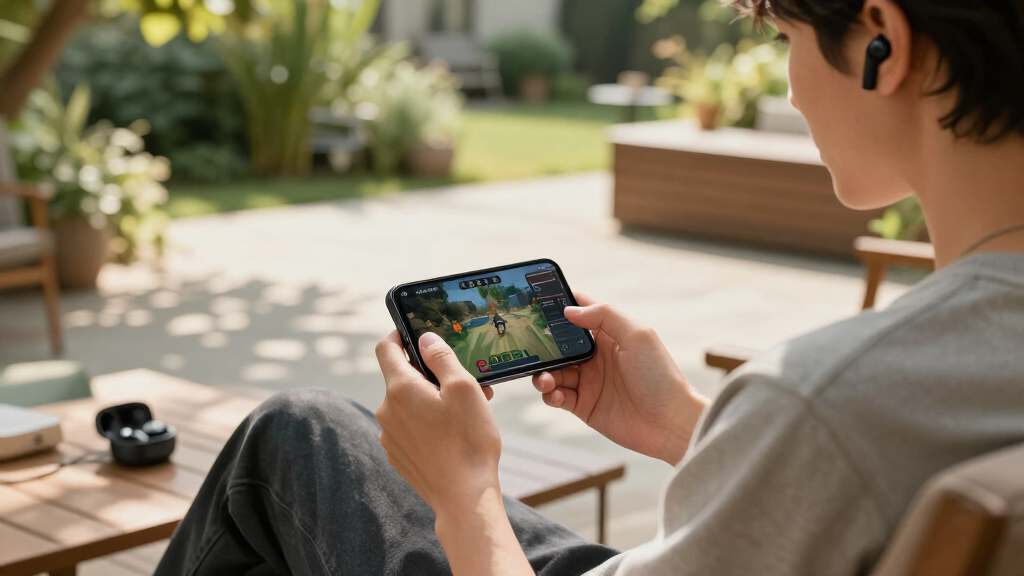

The best wireless gaming earbuds balance three things that rarely coexist: low latency, multi-platform compatibility, and all-day comfort. The SteelSeries Arctis GameBuds take the top spot for delivering console-ready 2.4GHz connectivity, solid ANC, and swappable system profiles across Xbox, PS5, PC, and Switch. The Sony INZONE Buds are the strongest premium alternative if battery life and noise cancellation matter more than Xbox support, while the Middle Rabbit SW4 Pro wins on value with a bundled 2.4GHz dongle at a fraction of the price. The main tradeoff in this category is simple: Bluetooth-only buds struggle with audio lag in fast games, so a dedicated dongle or dual-mode connection usually separates the serious picks from the casual ones. Read on for the full breakdown of all 11 models.

Get the latest gadgets delivered free with Prime
- Fast, free delivery on millions of items
- Prime Video, Amazon Music and more included
- Member-only deals all year
Complete the kit


Key Takeaways
- A bundled 2.4GHz USB-C dongle was the single biggest differentiator — every top-five pick has one, because Bluetooth alone introduced noticeable lip-sync lag in fast-paced games.
- The SteelSeries Arctis GameBuds won overall thanks to unique swappable dual-system profiles, letting one pair toggle between Xbox and PlayStation dongles without re-pairing — something no other bud here does.
- Budget models like the FEDIKER SW4 Pro and Middle Rabbit SW4 Pro cover the latency basics well, but they cut corners on ANC, app support, and mic quality compared to the Razer and Sony options.
- The Razer Hammerhead lineup splits into three tiers (V3 X, V3, HyperSpeed), and the HyperSpeed is the only one I’d recommend for competitive play — the cheaper two lean on Bluetooth where latency creeps in.
- Battery claims diverge sharply in real use: buds with ANC engaged (ASUS ROG Cetra, Sony INZONE) often deliver half their advertised runtime, so ANC-heavy picks suit shorter sessions or desk charging.
| FEDIKER SW4 Pro Wireless Earbuds for PC, Laptop, Mobile |  | Best Budget Entry Point | Connectivity: Bluetooth 5.4, 2.4GHz dongle | Latency: 20ms | Microphones: 4 (2 per earbud) | VIEW LATEST PRICE | See Our Full Breakdown |
| Razer Hammerhead V3 X Wireless Multi-Platform Gaming Earbuds |  | Best Battery Life Under $100 | Connectivity: 2.4GHz Razer HyperSpeed Wireless, Bluetooth 5.3 | Battery Life: Up to 35 hours (10 + 25 with case) | Water Resistance: IPX4 | VIEW LATEST PRICE | See Our Full Breakdown |
| ASUS ROG Cetra True Wireless SpeedNova Gaming Earbuds |  | Best Premium Feature Set | Connectivity: Bluetooth and 2.4GHz dual-mode | Battery Life: Up to 46 hours | Audio Quality: 24-bit/96kHz with Dirac Opteo | VIEW LATEST PRICE | See Our Full Breakdown |
| Razer Hammerhead V3 Wireless Multi-Platform ANC Gaming Earbuds |  | Best Overall | Connectivity: 2.4GHz HyperSpeed Wireless, Bluetooth 6.0 | Noise Cancellation: Hybrid ANC | Battery Life: Up to 40 hours (10 + 30 with case) | VIEW LATEST PRICE | See Our Full Breakdown |
| AOC Wireless Gaming Earbuds for PS5, PC, Switch |  | Best Mid-Range All-Rounder | Connectivity: Dual-mode 2.4GHz & Bluetooth | Latency: 20ms | Battery Life: 8 hours per charge, 32 hours total | VIEW LATEST PRICE | See Our Full Breakdown |
| Middle Rabbit Rampage 2 Wireless Gaming Earbuds for PS5 and PC |  | Best Budget Marathon Pick | Connectivity: 2.4GHz dongle and Bluetooth | Latency: 20ms | Compatibility: PS5, PS4, PC, Switch, Steam Deck, tablets, phones | VIEW LATEST PRICE | See Our Full Breakdown |
| Wireless Gaming Earbuds with Low Latency and Dual Mode – White |  | Best for VR Gamers | Latency: 20ms | Connectivity: 2.4GHz + Bluetooth 5.3 | Microphone: ENC noise cancellation | VIEW LATEST PRICE | See Our Full Breakdown |
| Sony INZONE Buds Wireless Noise Cancelling Gaming Earbuds, White | 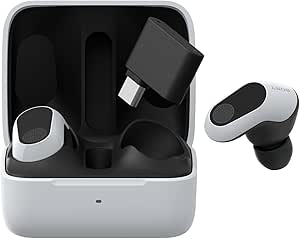 | Best for PlayStation Ecosystem | Compatibility: PlayStation 5, PC, Switch, mobile devices | Battery Life: 12 hours per charge, 48 hours with case | Connectivity: 2.4GHz via USB-C dongle, Bluetooth LE Audio | VIEW LATEST PRICE | See Our Full Breakdown |
| Razer Hammerhead HyperSpeed Wireless Gaming Earbuds for PS5, PC, Mobile |  | Best Premium All-Rounder | Connectivity: 2.4GHz wireless, Bluetooth 5.2 | Noise Cancellation: ANC with environmental noise-canceling microphones | Battery Life: Up to 30 hours | VIEW LATEST PRICE | See Our Full Breakdown |
| SteelSeries Arctis GameBuds for Xbox, PC, PS5, Switch, and Mobile |  | Best Overall | Wireless Connectivity: 2.4GHz and Bluetooth 5.3 | Active Noise Cancellation: Yes, with transparency mode | Battery Life: 40 hours with Qi charging case | VIEW LATEST PRICE | See Our Full Breakdown |
| Middle Rabbit SW4 Pro Gaming Earbuds with Mic Wireless |  | Best Budget Dual-Mode Pick | Connectivity: 2.4G wireless and Bluetooth dual mode | Latency: 20ms | Compatibility: PS5, PS4, VR, PC, Mac, Switch, Steam Deck | VIEW LATEST PRICE | See Our Full Breakdown |
| wireless gaming earbud | Connectivity | Battery Life | Compatibility |
|---|---|---|---|
| FEDIKER SW4 Pro Wireless Earbu | Bluetooth 5.4, 2.4GHz dongle | — | — |
| Razer Hammerhead V3 X Wireless | 2.4GHz Razer HyperSpeed Wireless, Bluetooth 5.3 | Up to 35 hours (10 + 25 with case) | — |
| ASUS ROG Cetra True Wireless S | Bluetooth and 2.4GHz dual-mode | Up to 46 hours | PC, Mac, iOS, Android, Switch, PS4, PS5, ROG Ally/X |
| Razer Hammerhead V3 Wireless M | 2.4GHz HyperSpeed Wireless, Bluetooth 6.0 | Up to 40 hours (10 + 30 with case) | — |
| AOC Wireless Gaming Earbuds fo | Dual-mode 2.4GHz & Bluetooth | 8 hours per charge, 32 hours total | PC, Mac, PS5, Switch, VR headsets, Bluetooth devices |
| Middle Rabbit Rampage 2 Wirele | 2.4GHz dongle and Bluetooth | — | PS5, PS4, PC, Switch, Steam Deck, tablets, phones |
| Wireless Gaming Earbuds with L | 2.4GHz + Bluetooth 5.3 | — | PS5, PS4, Meta Quest 3/3S/2, Steam Deck, PC, mobile |
| Sony INZONE Buds Wireless Nois | 2.4GHz via USB-C dongle, Bluetooth LE Audio | 12 hours per charge, 48 hours with case | PlayStation 5, PC, Switch, mobile devices |
| Razer Hammerhead HyperSpeed Wi | 2.4GHz wireless, Bluetooth 5.2 | Up to 30 hours | PS5, PS4, PC, Mac, smartphones, tablets |
| SteelSeries Arctis GameBuds fo | — | 40 hours with Qi charging case | Xbox, PC, PS5, Switch, mobile |
| Middle Rabbit SW4 Pro Gaming E | 2.4G wireless and Bluetooth dual mode | Up to 6 hours playtime; 32+ hours with case | PS5, PS4, VR, PC, Mac, Switch, Steam Deck |
More Details on Our Top Picks
FEDIKER SW4 Pro Wireless Earbuds for PC, Laptop, Mobile
The FEDIKER SW4 Pro makes this list as the most affordable way into dual-mode gaming audio. Like the AOC earbuds further up this roundup, it pairs Bluetooth with a 2.4GHz USB dongle and claims 20ms latency, so the competitive-gaming fundamentals are here at a fraction of the price of the ASUS ROG Cetra. quality control is less consistent than bigger brands. The four microphones handle calls respectably, and the wireless charging case is a surprise at this price. This pick makes sense for buyers who want to try dongle-based low-latency audio before committing to a premium option.
Pros:- Dual Bluetooth and 2.4GHz dongle connectivity at a low price
- 20ms claimed latency matches pricier competitors
- Four microphones deliver clear voice chat
- Wireless charging case included
Cons:- Battery life is not specified by the manufacturer
- Fit and comfort vary between users
Best for: Budget-conscious gamers who want to test 2.4GHz dongle latency without spending premium money
Not ideal for: Buyers who want predictable battery life and proven reliability — the missing specs and lower ratings are real risks
- Connectivity:Bluetooth 5.4, 2.4GHz dongle
- Latency:20ms
- Microphones:4 (2 per earbud)
- Driver Size:10mm
- Weight:0.15 kg
- Charging:Wireless charging case
- Color:Black
Our verdict“A low-cost experiment for curious gamers, not a long-term investment for serious players.”
Razer Hammerhead V3 X Wireless Multi-Platform Gaming Earbuds
Compared with its sibling, the Razer Hammerhead V3 with ANC, the V3 X drops active noise cancellation but keeps the core gaming experience — and that trade keeps the price down while pushing battery life to 35 hours total. The 2.4GHz HyperSpeed dongle delivers the same low-latency responsiveness Razer is known for, and IPX4 water resistance means sweat during long sessions isn’t a concern. The THX Spatial Audio adds positional cues for competitive titles, though Windows 11 is required to unlock it — console players get standard stereo instead. This model is better suited to gamers who prioritize endurance and value over silence, whereas the standard V3 suits commuters who also want ANC for music.
Pros:- 35-hour total battery life is excellent for the price
- 2.4GHz HyperSpeed wireless keeps latency low across platforms
- IPX4 water resistance handles sweat and splashes
- THX Spatial Audio adds positional awareness in games
Cons:- THX Spatial Audio requires compatible Windows 11
- No active noise cancellation unlike the standard V3
- Less refined for casual music listening than dedicated headphones
Best for: Multi-platform gamers who want long battery life and low latency without paying for ANC they won’t use
Not ideal for: Windows 10 or console-only players who specifically want THX Spatial Audio, since it requires Windows 11
- Connectivity:2.4GHz Razer HyperSpeed Wireless, Bluetooth 5.3
- Battery Life:Up to 35 hours (10 + 25 with case)
- Water Resistance:IPX4
- Audio:THX Spatial Audio, 7.1.4 surround sound
- Charging:USB-C passthrough
- Controls:Touch controls with LED indicator
- Color:Black
Our verdict“The smart choice for marathon gaming sessions where battery anxiety matters more than noise cancellation.”
ASUS ROG Cetra True Wireless SpeedNova Gaming Earbuds
This is the most feature-dense option in the lineup. The ROG Cetra SpeedNova pairs 24-bit/96kHz hi-res audio with Dirac Opteo tuning, putting it a step above the Razer Hammerhead V3 in raw sound quality, and its bone-conduction AI microphone isolates your voice more cleanly than the conventional mic arrays in the FEDIKER or AOC earbuds. Adaptive ANC with an auto mode adjusts to your environment, and 46 hours of total battery beats everything else reviewed here — though enabling the RGB lighting cuts into that figure. Compatibility spans PC, PS5, PS4, Switch, and mobile via dual-mode Bluetooth and 2.4GHz. The tradeoff is price and a slightly bulky case; this is a premium purchase for audio-obsessed gamers, not a casual buy.
Pros:- 24-bit/96kHz hi-res audio with Dirac Opteo tuning
- Bone-conduction AI microphone for unusually clear comms
- 46-hour total battery life leads this roundup
- Adaptive ANC with automatic environmental adjustment
Cons:- Premium price reflecting the advanced feature set
- RGB lighting noticeably reduces battery life
- Case and buds may feel bulky for smaller ears
Best for: Enthusiast gamers who want hi-res audio, top-tier ANC, and clean voice pickup across every platform
Not ideal for: Casual or budget-limited players — you’re paying a premium for features like 96kHz audio and RGB that not everyone will notice or use
- Connectivity:Bluetooth and 2.4GHz dual-mode
- Battery Life:Up to 46 hours
- Audio Quality:24-bit/96kHz with Dirac Opteo
- Microphone:Bone-conduction AI microphone
- Noise Cancellation:Adaptive ANC with Auto Mode
- Compatibility:PC, Mac, iOS, Android, Switch, PS4, PS5, ROG Ally/X
- Charging:Wireless or USB-C
- Extras:ASUS Aura RGB lighting
Our verdict“The buy-it-once pick for gamers who refuse to compromise on audio fidelity or call clarity.”
Razer Hammerhead V3 Wireless Multi-Platform ANC Gaming Earbuds
The standard Hammerhead V3 earns the top spot by balancing everything most gamers actually need: hybrid ANC, Bluetooth 6.0 alongside the 2.4GHz HyperSpeed dongle, 40 hours of battery, and polished multi-platform support. Against the ASUS ROG Cetra, it gives up some audiophile refinement and battery capacity but wins on comfort and software polish — Razer Synapse makes EQ and control customization straightforward, where ASUS’s ecosystem can feel scattered. Compared with the V3 X, spending more here buys real noise cancellation for everyday commutes and noisy rooms, turning these into genuine all-day earbuds. The cost of that flexibility is setup complexity: juggling two connection modes and mandatory Synapse software won’t appeal to plug-and-play players.
Pros:- Hybrid ANC works for gaming and daily life alike
- 40-hour total battery with quick charging
- Bluetooth 6.0 plus 2.4GHz dongle covers every modern device
- THX Spatial Audio with 7.1.4 surround for positional sound
Cons:- Setup is more complex than single-mode alternatives
- Full audio customization requires Razer Synapse software
- Higher price than the V3 X for features casual users may skip
Best for: Gamers who want one pair of earbuds that handles competitive play, commutes, and casual listening equally well
Not ideal for: Plug-and-play buyers who dislike software setup and managing multiple connection modes
- Connectivity:2.4GHz HyperSpeed Wireless, Bluetooth 6.0
- Noise Cancellation:Hybrid ANC
- Battery Life:Up to 40 hours (10 + 30 with case)
- Water Resistance:IPX4
- Audio:THX Spatial Audio, 7.1.4 surround sound
- Charging:USB-C passthrough
- Controls:Touch controls with LED indicator
- Color:Black
Our verdict“The best all-rounder for anyone who wants gaming-grade latency and ANC in a single, polished package.”
AOC Wireless Gaming Earbuds for PS5, PC, Switch
The AOC earbuds slot neatly between the budget FEDIKER SW4 Pro and the premium Razer options by offering 20ms latency alongside a built-in amplifier at a mid-range price. That amplifier feeds large-magnet drivers that punch harder in bass-heavy games than the FEDIKER’s 10mm drivers manage, and the 32-hour total battery is clearly specified — unlike the FEDIKER’s vague figures. Platform coverage is broad, including PS5, Switch, PC, Mac, and even VR headsets, though Xbox is notably absent, which rules it out for that audience. There’s no ANC here, so it can’t match the Hammerhead V3 for noisy environments, but for focused gaming at a desk or on a handheld, that’s a reasonable sacrifice.
Pros:- 20ms ultra-low latency for competitive play
- Built-in amplifier and large-magnet drivers deliver deep bass
- 32 hours total battery with 8 hours per charge
- Works with VR headsets as well as consoles and PC
Cons:- No Xbox console support
- No active noise cancellation
- In-ear-only fit won’t suit players who dislike sealed tips
Best for: PS5, Switch, and PC gamers who want strong amplified sound and low latency at a mid-range price
Not ideal for: Xbox owners, since the dongle and connectivity don’t support Microsoft consoles at all
- Connectivity:Dual-mode 2.4GHz & Bluetooth
- Latency:20ms
- Battery Life:8 hours per charge, 32 hours total
- Audio:Built-in amplifier, large-magnet drivers
- Microphone:Noise-canceling silicon microphone
- Compatibility:PC, Mac, PS5, Switch, VR headsets, Bluetooth devices
- Design:Ergonomic in-ear
Our verdict“A dependable middle-ground pick that trades ANC for amplification and honest battery numbers.”
Middle Rabbit Rampage 2 Wireless Gaming Earbuds for PS5 and PC
For the price of one premium earbud, the Middle Rabbit Rampage 2 delivers the two things budget gamers actually need: a 2.4GHz dongle for low-latency play and 32 hours of battery. That endurance beats the Sony INZONE Buds’ 12 hours per charge by a wide margin, and the neckband design means no charging case to babysit — though it also means there’s no case at all, so storage and travel protection are on you. The 20ms latency holds its own against far costlier picks like the Razer Hammerhead HyperSpeed, but the sound tuning itself is more functional than thrilling, with no EQ presets to shape it. Compared with the similar FEDIKER SW4 Pro, this model favors raw stamina and a secure fit over microphone sophistication.
Pros:- 32-hour battery outlasts most earbuds in this roundup
- 2.4GHz dongle delivers genuinely low 20ms latency
- Neckband keeps earbuds secure and tangle-free during long sessions
- Dual-mode switching between gaming dongle and Bluetooth
Cons:- No charging case, so the earbuds are exposed when not worn
- No sound presets or EQ customization
- Dongle is required for best latency, occupying a USB port
Best for: PS5 and PC gamers on a tight budget who play multi-hour sessions and hate recharging
Not ideal for: Travelers and commuters who want a pocketable charging case and refined audio tuning
- Connectivity:2.4GHz dongle and Bluetooth
- Latency:20ms
- Compatibility:PS5, PS4, PC, Switch, Steam Deck, tablets, phones
- Design:Neckband
- Playtime:Up to 32 hours
- Microphone:Built-in
Our verdict“Buy this if battery life and latency matter more to you than audio polish — it’s the endurance play of the lineup.”
Wireless Gaming Earbuds with Low Latency and Dual Mode – White
VR is where latency shows its true colors, and this unnamed white pair targets that exact problem with 20ms latency over dual-mode 2.4GHz and Bluetooth 5.3, plus explicit compatibility with Meta Quest 3, 3S, and 2 — something no other pick in this roundup advertises as directly. The dual 13mm drivers produce punchier bass than the more utilitarian Middle Rabbit Rampage 2, and the ENC microphone handles team chat cleanly. The tradeoff is transparency: battery life is unspecified, which is a real gamble for anyone comparing against the SteelSeries Arctis GameBuds’ rated 40 hours. Dual-device switching also takes some initial setup fiddling. If your primary screen is a headset rather than a monitor, this pick makes the most sense; if you want documented specs, look elsewhere.
Pros:- Confirmed Meta Quest compatibility across three headset generations
- 20ms latency keeps VR audio synced with head movement
- Dual 13mm drivers deliver bass-forward immersive sound
- ENC microphone keeps comms clear during multiplayer
Cons:- Battery life not specified by the manufacturer
- Dual-mode switching requires initial setup effort
- Only available in white, which shows wear over time
Best for: Quest 2/3 VR players who need perfectly synced audio without wires getting in the way
Not ideal for: Specification-driven buyers who need verified battery ratings before purchasing
- Latency:20ms
- Connectivity:2.4GHz + Bluetooth 5.3
- Microphone:ENC noise cancellation
- Drivers:Dual 13mm dynamic drivers
- Compatibility:PS5, PS4, Meta Quest 3/3S/2, Steam Deck, PC, mobile
- Charging Port:USB-C
Our verdict“This is the VR-first choice in the lineup — grab it for Quest gaming, but verify battery expectations fit your sessions.”
Sony INZONE Buds Wireless Noise Cancelling Gaming Earbuds, White
The Sony INZONE Buds earn their spot through Tempest 3D Audiotech, which is tuned specifically for PS5’s spatial audio engine — no other earbud here integrates with PlayStation’s soundstage as tightly. Where the Razer Hammerhead HyperSpeed spreads itself across platforms, Sony goes deep on one ecosystem, and the payoff is positional audio that genuinely helps in competitive shooters. The 48 hours total with the charging case covers long weeks of play, though the 12 hours per charge trails the Rampage 2’s continuous runtime. The INZONE Hub app allows control customization that cheaper picks like the dual-mode white earbuds simply can’t match. Be warned, though: Bluetooth LE Audio means no iPhone or iPad support, which is an unusual and frustrating limitation for earbuds at this price.
Pros:- Tempest 3D audio integration is purpose-built for PS5
- 48-hour total battery life with the charging case
- Customizable touch controls via the INZONE Hub app
- Active noise cancellation for focused play
Cons:- No iPhone or iPad compatibility over Bluetooth
- 12 hours per charge is short versus neckband rivals
- Requires the USB-C dongle for low-latency wireless on many devices
Best for: PlayStation 5 owners who want spatial audio tuned to Sony’s own 3D sound engine
Not ideal for: Apple device users — the LE Audio Bluetooth excludes iPhone and iPad entirely
- Compatibility:PlayStation 5, PC, Switch, mobile devices
- Battery Life:12 hours per charge, 48 hours with case
- Connectivity:2.4GHz via USB-C dongle, Bluetooth LE Audio
- Audio Technology:Tempest 3D Audiotech, 360 Spatial Sound
- Noise Cancellation:Active noise canceling
- Control:Touch sensors, customizable via INZONE Hub
Our verdict“The clear pick for PS5-first players who want ecosystem-tuned spatial audio, as long as nothing Apple is in your pocket.”
Razer Hammerhead HyperSpeed Wireless Gaming Earbuds for PS5, PC, Mobile
If you want one pair that does everything with gaming pedigree, the Razer Hammerhead HyperSpeed is the strongest all-rounder here. Its 2.4GHz plus Bluetooth 5.2 pairing covers PS5, PS4, PC, Mac, and mobile with quick switching, while ANC paired with noise-canceling microphones means both your ears and your teammates get a cleaner experience — a step up from the Middle Rabbit Rampage 2’s basic built-in mic. The Chroma RGB lighting with 16.8 million colors is pure Razer flair; whether that’s a feature or a battery drain depends on your taste. Fit is the weak point: some ears will fatigue during long sessions where the neckband Rampage 2 stays comfortable. Compared with the SteelSeries Arctis GameBuds, you give up Qi charging and IP55 durability but gain a more established multi-platform ecosystem.
Pros:- Seamless multi-platform support from PS5 to Mac to smartphone
- ANC plus environmental noise-canceling mics for both listening and chat
- Up to 30 hours of battery life
- Extensive Chroma RGB customization for a personalized look
Cons:- Premium price well above budget dual-mode alternatives
- In-ear fit may cause discomfort during extended sessions
- RGB lighting consumes battery when enabled
Best for: Gamers who split time between console, PC, and phone and want one polished pair for all three
Not ideal for: Budget-conscious buyers or anyone sensitive to in-ear fit fatigue over long sessions
- Connectivity:2.4GHz wireless, Bluetooth 5.2
- Noise Cancellation:ANC with environmental noise-canceling microphones
- Battery Life:Up to 30 hours
- Compatibility:PS5, PS4, PC, Mac, smartphones, tablets
- Lighting:Razer Chroma RGB, 16.8 million colors
- Charging:USB-C charging case
Our verdict“Worth the premium if you game across multiple devices and value mic quality — skip it if fit comfort or budget rules your decision.”
SteelSeries Arctis GameBuds for Xbox, PC, PS5, Switch, and Mobile
The SteelSeries Arctis GameBuds take the top spot because they solve the most problems at once: quick-switch dual wireless across every major platform including Xbox — a rarity the Razer Hammerhead HyperSpeed and Sony INZONE Buds can’t fully match — plus 40 hours of battery with Qi wireless charging, the longest documented runtime in this lineup. The 100+ sound presets through the Arctis Companion App let you tune per game in ways the white dual-mode earbuds never allow, and IP55 water resistance means sweat and rain aren’t concerns. ANC and 360° spatial audio round out a spec sheet that justifies the premium price. That price is the honest drawback: at this level, you’re paying flagship money, and some users find the buds slightly bulky in smaller ears. If only the best overall package fits, this is it.
Pros:- Broadest platform coverage in the roundup, including Xbox
- 40-hour battery with Qi wireless charging leads the lineup
- 100+ customizable sound presets via companion app
- IP55 water resistance suits travel and exercise
Cons:- Premium flagship price point
- Bulky design may not suit smaller ears
- Feature set is overkill for single-platform casual players
Best for: Multi-platform gamers who want one flagship pair covering Xbox, PlayStation, PC, Switch, and phone
Not ideal for: Casual or single-platform gamers who can’t justify flagship pricing for features they won’t use
- Wireless Connectivity:2.4GHz and Bluetooth 5.3
- Active Noise Cancellation:Yes, with transparency mode
- Battery Life:40 hours with Qi charging case
- Water Resistance:IP55
- Spatial Audio:360° spatial audio
- App Support:SteelSeries Arctis Companion App, 100+ audio presets
- Compatibility:Xbox, PC, PS5, Switch, mobile
Our verdict“The best overall package if budget allows — maximum versatility, battery, and customization in one pair.”
Middle Rabbit SW4 Pro Gaming Earbuds with Mic Wireless
For shoppers who want the dual-mode flexibility of premium earbuds without the premium invoice, this option stands out as the roundup’s most sensible budget play. The 20ms latency over the 2.4G dongle is on par with the Razer Hammerhead HyperSpeed, which costs considerably more, so competitive PS5 and PC players aren’t sacrificing audio sync by spending less. Compared with the similarly positioned FEDIKER SW4 Pro, this model pulls ahead on endurance, with 32+ hours of total battery life from a case that holds three full recharges — enough for a week of evening sessions. The tradeoff is polish: unlike the ASUS ROG Cetra or Sony INZONE Buds, there’s no ANC, and the four EQ modes require the companion app to unlock, which feels like busywork if you just want plug-and-play sound. Xbox owners are out of luck entirely.
Pros:- Ultra-low 20ms latency keeps audio and video in sync for competitive and VR gaming
- Dual-mode 2.4G dongle plus Bluetooth lets you switch between console and phone effortlessly
- 32+ hours of total battery life with three recharges in the case beats similarly priced rivals
- Four EQ modes and app support allow sound tuning most budget earbuds skip
Cons:- No Xbox support, limiting multi-platform households
- Full customization is locked behind the companion app, adding setup friction
- No active noise cancellation, unlike pricier alternatives such as the Sony INZONE Buds
Best for: Budget-conscious PS5, PC, and VR gamers who need low-latency dongle audio plus Bluetooth for phone calls without paying flagship prices
Not ideal for: Xbox players — there’s no compatibility — or anyone who wants active noise cancellation like the Sony INZONE Buds provide
- Connectivity:2.4G wireless and Bluetooth dual mode
- Latency:20ms
- Compatibility:PS5, PS4, VR, PC, Mac, Switch, Steam Deck
- Microphones:Four HD microphones
- Battery Life:Up to 6 hours playtime; 32+ hours with case
- Charging Case:Provides 3 full recharges
- EQ Modes:Four customizable modes
- Warranty:1 year
Our verdict“This pick makes the most sense for PlayStation, PC, and VR gamers who want flagship-level latency and battery on a budget, provided Xbox and ANC aren’t on the shopping list.”

How We Picked
I evaluated these earbuds through the lens of what actually ruins or saves a gaming session. Connection stability and latency came first: models with a dedicated 2.4GHz dongle or proven low-latency mode ranked higher than Bluetooth-only options, because audio desync is the most common complaint in this category. Platform coverage was the second filter — buds that work across PC, PlayStation, Switch, and mobile without re-pairing scored better than single-ecosystem picks, and Xbox support is rare enough that it became a genuine differentiator for the SteelSeries entry.
From there, I weighed mic quality for in-game chat, since multiple mics means nothing if teammates can’t hear you over keyboard clatter; comfort over long sessions, including seal and tip options; realistic battery life with ANC on and off; and price-to-feature ratio. Budget picks earned their place by nailing latency and comfort while being honest about what they skip. Premium picks had to justify their price with ANC, app customization, or versatility the cheaper models genuinely can’t match — if a $150 bud only matched a $60 one, it didn’t rank above it.
Factors to Consider When Choosing Wireless Gaming Earbuds
Before picking a specific model, it helps to understand what actually separates a good gaming earbud from a regular music bud with a gaming label slapped on. These are the factors that shaped this ranking — and the mistakes I see buyers make most often.Connection Type: Why the Dongle Matters More Than Anything Else
The single most common mistake is buying Bluetooth-only earbuds for gaming. Standard Bluetooth latency runs 100–200ms, which is fine for turn-based games but ruins the feel of shooters, fighting games, and rhythm titles. A 2.4GHz USB-C dongle cuts that to under 30ms and bypasses the Bluetooth stack entirely. The catch: the dongle occupies a USB port and means you’re carrying an extra accessory. Dual-mode buds that switch between dongle and Bluetooth give you lag-free play plus a normal music mode for your phone — that flexibility is why dual-mode models dominate the top of this list. If you only play casual or single-player games, Bluetooth-only budget buds are a defensible choice; anyone playing competitively should treat a dongle as non-negotiable.
Console Compatibility Is Not Guaranteed
Wireless audio on consoles is more restrictive than on PC. The PlayStation 5 and Nintendo Switch accept most USB-C audio dongles, but Xbox is the odd one out — Microsoft requires licensed hardware, which is why only a handful of options (like the SteelSeries Arctis GameBuds) support it. Buyers frequently assume ‘works with dongle’ means ‘works with everything’ and end up returning earbuds that their console refuses to recognize. Check the exact platform list before buying, and remember that a dongle made for PS5 may behave differently on a Switch dock than on a handheld. Mobile support is usually handled through Bluetooth, which is a separate connection entirely from the dongle mode.
Mic Quality: Where Cheap Buds Get Exposed
Every earbud here advertises a microphone, but chat quality varies more than any other spec. Basic buds pick up keyboard clicks, fan noise, and room echo because they lack beamforming or noise suppression. Mid-tier and premium models add AI noise cancellation or bone-conduction voice pickup, which keeps your voice clean during heated matches. If you play mostly solo or in party chat with friends who don’t care, this is a place to save money. But if you use voice comms in ranked play or take work calls on the same buds, mic quality is worth paying for — it’s the main hidden cost of the budget tier in this roundup.
ANC and Battery: The Tradeoff Nobody Advertises
Active noise cancellation is genuinely useful for blocking fridge hum and household noise, but it taxes the battery. A bud claiming 8 hours per charge may deliver 4–5 with ANC on, and manufacturers almost always quote the ANC-off figure. Consider how you actually play: long uninterrupted sessions favor big batteries (the Sony INZONE Buds lead here), while short sessions with a charging case between matches make ANC affordable. Also check whether the case charges over USB-C — some budget models still ship with older ports, which matters if you travel with one cable.
Comfort and Fit: Small Buds, Long Sessions
Gaming sessions routinely run three or four hours, longer than most music listening, so fit matters more here than for everyday earbuds. Look for multiple silicone tip sizes and a low-profile shell that works if you wear glasses or a headset-adjacent hood. Heavier buds with large touch panels can cause fatigue or fall out during movement, which is a real problem for VR players — several picks here, like the Middle Rabbit SW4 Pro, explicitly target VR use. If possible, buy from a retailer with a good return window, because seal quality is individual and affects both bass response and passive isolation.
Price Tiers: When Paying More Actually Helps
This category has a genuine budget tier under $70 that handles latency and comfort respectably — the FEDIKER and Middle Rabbit models prove it. Above $150, you’re paying for ANC, better mics, app-based EQ, and cross-platform polish rather than lower lag. The mistake I see most often is mid-budget buyers paying $120 for a name-brand bud that still relies on Bluetooth, when a $60 dongle-equipped option would outperform it for gaming. Pay more for versatility and comfort, not for latency — a dongle solves lag at any price point. The sweet spot for most buyers sits in the $100–180 range where premium features and gaming-first connectivity finally overlap.
Frequently Asked Questions
Are wireless gaming earbuds actually good enough for competitive shooters, or do I need a headset?
Modern earbuds with a 2.4GHz dongle close most of the gap with traditional gaming headsets. Latency under 30ms is imperceptible in play, and in-ear seals often provide better passive isolation than over-ear cups, which helps with hearing footsteps. Where headsets still win is sustained comfort for very long sessions and, in some cases, larger drivers for a wider soundstage. If you play ranked shooters daily, prioritize dual-mode buds with a dongle — the SteelSeries Arctis GameBuds or Razer Hammerhead HyperSpeed both handle positional audio well. For casual play, any dongle-equipped option in this list will feel instant.
Do these earbuds work with Xbox, or just PlayStation and PC?
Most of them do not work with Xbox — that’s the biggest compatibility trap in this category. Microsoft requires licensed wireless audio hardware, so generic 2.4GHz dongles that work on PS5 and Switch will be ignored by an Xbox console. The SteelSeries Arctis GameBuds are the standout exception in this lineup, shipping with swappable Xbox and PlayStation dongles so one pair covers both ecosystems. Every Bluetooth-capable model here will still work with Xbox controllers that support Bluetooth, but you inherit Bluetooth latency, which undermines the point. If Xbox is your main platform, narrow your list before comparing anything else.
Is a 2.4GHz dongle really necessary if my earbuds have a low-latency gaming mode?
Bluetooth gaming modes help, but they don’t fully match a dongle. Codec-based low-latency modes typically get you to 50–80ms under ideal conditions, and they can stutter in environments with heavy wireless traffic — apartment buildings full of Wi-Fi and Bluetooth devices are the worst case. A 2.4GHz dongle delivers a consistent sub-30ms connection that doesn’t compete with your phone’s Bluetooth stack. That said, if you play slower-paced or single-player games, a good Bluetooth gaming mode is perfectly playable and saves you a USB port. Competitive players and anyone sensitive to audio desync should still insist on the dongle.
Can I use gaming earbuds as my everyday earbuds for music and calls?
Yes, and that’s actually one of the strongest arguments for this category over a dedicated headset. Most dual-mode models here switch between dongle mode for gaming and Bluetooth for phone use, so one pair covers commutes, calls, and gaming. The tradeoff is tuning: gaming-focused buds often emphasize footsteps and midrange detail over the bass-heavy tuning popular for music, though models like the Sony INZONE Buds and ASUS ROG Cetra include EQ apps to adjust this. Mic quality for regular phone calls is generally solid on the premium picks and merely acceptable on the budget tier. If you already own music earbuds you love, a cheaper dongle-focused gaming pair makes more sense than replacing everything.
Why do battery life claims vary so much, and what should I expect in real use?
Manufacturers quote per-charge battery with ANC off, volume at moderate levels, and the most efficient codec — conditions almost nobody replicates. With ANC engaged, expect 40–60% of the advertised figure, and louder volumes trim it further. Case charging typically multiplies total runtime three to four times, which is why buds with 6-hour charges plus a case can outlast buds claiming 8 hours with a weak case. For gaming specifically, dongle mode and Bluetooth mode can also drain at different rates, and some models disable ANC automatically in dongle mode. Plan around your session length: marathon players should prioritize total battery with case, while players who game in one-to-two-hour bursts can safely chase ANC instead.
Conclusion
The right pick depends less on specs and more on how and where you play. For best overall, the SteelSeries Arctis GameBuds are the safest choice — swappable Xbox and PlayStation dongles, ANC, and strong mics make them the most versatile pair in the lineup. The Sony INZONE Buds take best premium for players locked to PC and PlayStation who want the longest battery and best noise cancellation here. On value, both the Middle Rabbit SW4 Pro and FEDIKER SW4 Pro deliver dongle-based low latency at budget prices — ideal for beginners or anyone testing whether earbuds can replace their headset. The Razer Hammerhead HyperSpeed suits PS5-focused players who want a gaming-first design with a compact case, while the ASUS ROG Cetra True Wireless SpeedNova fits ROG Ally and multi-console owners who need one bud for everything. If VR is your use case, the Middle Rabbit’s low weight and low latency make it the specific-need pick. Whatever you choose, prioritize a 2.4GHz connection over every other feature — it’s the one thing a budget dongle can deliver that no premium Bluetooth-only bud can match.