
TL;DR

Get the latest gadgets delivered free with Prime
- Fast, free delivery on millions of items
- Prime Video, Amazon Music and more included
- Member-only deals all year
Buying an AI workstation can be faster and more reliable thanks to vendor validation, but building gives you full control and customization. With component prices rising, always compare total costs today, not just sticker price. The best choice depends on your workload, expertise, and priorities.
Imagine plugging in a machine that’s ready to run your AI models—no fuss, no assembly, like a prebuilt AI workstation. That’s the promise of a prebuilt AI workstation. But if you love tinkering, optimizing every pixel of your setup, building your own might still seem appealing. The truth? In 2026, the cost gap between build and buy has blurred, and your choice now depends on more than just price. To understand the latest trends, check out reviews and guides about consumer electronics. It’s about control, speed, and how much complexity you’re willing to handle.
This article cuts through the hype to show you when building makes sense, when buying saves time, and how to weigh hidden costs. For more insights, visit outdoor tech solutions for innovative hardware options. Whether you’re a hobbyist, a startup, or a large team, knowing what’s really involved helps you make smarter decisions today—and tomorrow.
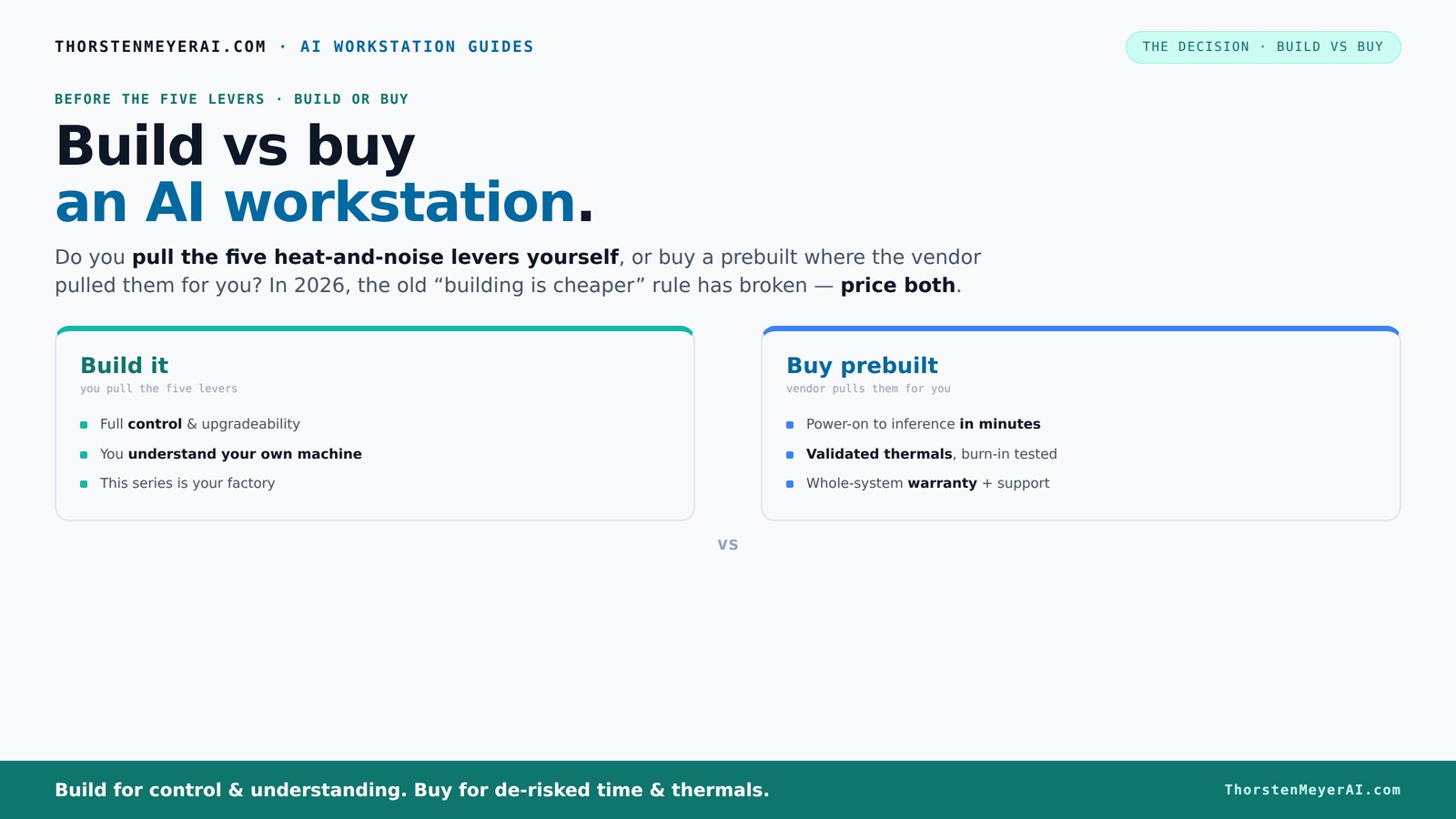
Build vs buy
an AI workstation.
The real question behind this whole series: do you pull the five heat-and-noise levers yourself, or buy a prebuilt where the vendor pulled them for you? And in 2026, the old “building is cheaper” rule has broken. Match your situation in Part 3.
Key Takeaways
- Component shortages in 2026 make prebuilt systems competitive or even cheaper than DIY builds for many configurations.
- Controlling heat and noise in AI workstations is easier if you build, but vendors now validate and tune thermal performance at the factory.
- Decide based on your workload: custom builds suit niche or sensitive tasks; prebuilts excel in speed, support, and reliability.
- Hybrid setups can give you quick deployment with some level of customization, ideal for teams with specific needs.
- Always compare total cost of ownership today—initial price is just part of the story.
As an affiliate, we earn on qualifying purchases.
Why the 'Build is Cheaper' Myth Is Breaking in 2026
For years, building your own AI rig was a no-brainer for saving money. But the 2026 component shortages and price spikes have changed the game. GPUs, DDR5 RAM, SSDs—prices soared, sometimes by 30-50%. Meanwhile, vendors like Lambda and Puget bought in bulk before the shortages and now offer systems at prices that are hard to beat.
For example, a DIY build that once cost under $1,000 now easily hits $1,250 or more. A prebuilt system with similar specs? It might cost the same or even less, thanks to bulk discounts and optimized manufacturing.
So, the classic mantra—build cheap, buy expensive—no longer applies universally. You need to price both options today, not rely on old assumptions. Cost is now a complex equation involving component scarcity, time, and risk. Making this comparison is crucial because a seemingly cheaper DIY build might require more time, troubleshooting, and ongoing maintenance, which adds hidden costs. Conversely, prebuilt systems often include factory testing and warranties that can save money in the long run, especially for those without deep hardware expertise. This shift emphasizes the importance of comprehensive cost analysis—what looks cheaper upfront may not be cheaper over the life of the system.
As an affiliate, we earn on qualifying purchases.
The Real Heat and Noise: Who Controls the Cooling Levers?
Building your own AI workstation puts you in charge of managing heat, noise, and thermal performance. Learn more about hardware customization at coderfacts.com. You can undervolt your GPU, choose quiet cooling solutions, and tweak airflow to create a near-silent, cool rig. For example, selecting a quiet GPU like the RTX 4080 with custom undervolt settings can cut noise by 30% while maintaining peak performance. This level of control allows enthusiasts and professionals to tailor their systems precisely, optimizing for silent operation or maximum cooling efficiency based on their environment and workload. However, this also means investing time in understanding thermal dynamics, selecting appropriate components, and fine-tuning settings, which can be complex and time-consuming.
Prebuilt vendors, on the other hand, tune these levers at the factory. They run 24–48 hours of stress testing, optimize fan curves, and often include water-cooling setups to keep noise levels low and temperatures stable. BIZON claims their systems achieve up to 30% lower noise and temperature without throttling. This approach ensures a balanced, reliable system out of the box, reducing the need for end-user tinkering and minimizing the risk of thermal issues that can degrade performance or shorten hardware lifespan.
This means you get a machine tested for thermal stability right out of the box—no guesswork. For professional-grade systems, see prebuilt workstation options. If you love fiddling, building gives you control; if you prefer a quiet, reliable system, a prebuilt has already done the work for you. The tradeoff lies in whether you value customization and control over the initial setup effort or prefer the convenience and assurance of factory-optimized performance.
professional AI workstation build kit
As an affiliate, we earn on qualifying purchases.
As an affiliate, we earn on qualifying purchases.
Cost Comparison Table: Build vs Buy in 2026
| Feature | Build Your Own | Buy Prebuilt |
|---|---|---|
| Initial Cost | $1,200 – $1,500 (hardware + OS + setup) | $1,200 – $1,500 (system + warranty) |
| Time to Deploy | 2–4 weeks (parts sourcing, assembly, tuning) | 1–2 weeks (plug and play) |
| Thermal Validation | You tune and test yourself, which requires technical knowledge and time to ensure optimal cooling and stability. This process can reveal hidden issues like thermal throttling or inadequate airflow that could impact long-term performance. | Factory validated with extensive stress testing, warranty included, and often with thermal management optimized through professional tuning. This reduces the risk of unexpected overheating or noise problems after deployment, saving time and potential troubleshooting costs. |
| Customization | Full control over parts, cooling, airflow, and layout—ideal for niche requirements or performance tuning. | Limited to vendor options, but some vendors allow component upgrades or custom configurations. Still, the level of control is generally less than DIY, so understanding tradeoffs is key. |
| Support & Warranty | Self-managed, parts warranty. You’re responsible for troubleshooting hardware issues, which can be time-consuming but offers learning opportunities and control over repairs. | Vendor support, often up to 5-year warranty, with quick replacements and service. This reduces downtime and provides peace of mind, especially important for mission-critical applications or teams without hardware expertise. |
As an affiliate, we earn on qualifying purchases.
When Building Is the Right Choice
If you love the process of fine-tuning, building your own AI workstation makes sense. For guidance on choosing components, visit build vs buy guides. Suppose you need a very specific setup—say, a super-quiet rig with a custom cooling loop or a unique GPU configuration for specialized models. This is where control matters most. Building allows you to select high-quality, specialized components that may not be available in preconfigured systems, and to optimize thermal and acoustic performance to your exact standards. This tailored approach can result in a system that perfectly fits niche requirements, improves longevity, and provides educational value for those interested in hardware and system tuning.
Take Sarah, a researcher working on niche AI models. She built her own rig, undervolted her GPU, and optimized airflow, resulting in a machine that’s quieter than her old workstation and tailored precisely to her workflow. She also learned how to fix issues when something went wrong, giving her confidence and control. This experience underscores how building can be a rewarding investment when customization, learning, and long-term control are priorities.
Building suits hobbyists, students, or teams with internal expertise who want total control and are prepared for troubleshooting. It’s a long-term investment of time and knowledge but pays off in customization, understanding, and potential performance gains that are difficult to achieve with prebuilt systems.
When Buying Is the Smarter Move
If your priority is speed, minimal hassle, and reliable support, buying prebuilt makes more sense. Imagine a startup needing a system ready in weeks to start training models or run inference. The vendor’s validation, warranty, and support cut down downtime and risk. Prebuilts are especially valuable for teams lacking deep hardware expertise, as they eliminate the guesswork and potential compatibility issues inherent in custom builds. Additionally, prebuilt systems often come with optimized thermal solutions tested by professionals, ensuring stability and longevity without extensive user intervention.
For example, Mike’s team bought a prebuilt system from Lambda. It arrived fully tested, with CUDA and deep learning frameworks installed. When a GPU failed after six months, Lambda replaced it swiftly, saving hours of troubleshooting and downtime. This demonstrates how prebuilt systems can significantly reduce operational headaches and accelerate project timelines, especially when uptime and support are critical.
Prebuilts are ideal for those who want a machine that works right out of the box, with less internal engineering effort—perfect for fast deployment, support, and peace of mind. They allow teams to focus on their core work rather than hardware management, making them suitable for fast-paced environments where reliability and quick turnaround are essential.
Hybrid Approach: The Best of Both Worlds
Sometimes, the best choice isn’t all or nothing. Hybrid setups combine buying a solid base system with custom upgrades—like swapping in a quieter GPU, adding more RAM, or installing advanced cooling. This approach offers speed and reliability with room for tweaks, enabling teams to quickly deploy a system that can be fine-tuned later for specific needs. For instance, a company might purchase a preconfigured workstation and then upgrade the cooling system or replace stock fans with quieter, higher-quality alternatives. This method reduces initial setup time while still granting some level of control, allowing for iterative improvements based on workload demands.
Hybrid strategies work well for teams that want quick deployment but still need specific tweaks for their workloads. They strike a balance between the time-consuming process of building from scratch and the limited customization of prebuilt systems, providing a flexible, scalable solution that adapts over time.
This approach is particularly beneficial when immediate needs are pressing, but future upgrades are anticipated. It enables organizations to start with a reliable foundation and incrementally enhance performance or noise characteristics as their project evolves, ensuring cost-effective scalability and control.
Frequently Asked Questions
Is a prebuilt AI workstation worth it?
Yes, especially if you prioritize quick deployment, minimal setup, and support. Prebuilts come tested and validated, reducing risk and downtime, which is perfect for fast-paced projects or those without deep hardware expertise.Is it cheaper to build or buy in 2026?
It depends. Due to component shortages and bulk buying, prebuilts often match or beat DIY costs today. Always compare exact configurations and consider total ownership costs before deciding.How much faster is a prebuilt system to deploy?
Prebuilts can be up and running in a week or two, while building from scratch takes 2–4 weeks. For urgent needs, prebuilt is often the clear winner.What are the hidden costs of building a workstation?
Hidden costs include time spent sourcing parts, troubleshooting compatibility issues, tuning thermal settings, and ongoing maintenance. These can add up and outweigh initial savings.Can a prebuilt workstation be upgraded later?
Yes, but upgrade options depend on the system. Many vendors design their systems for future expansion, but some proprietary parts or cooling solutions may limit your options.Conclusion
In 2026, the choice between build and buy isn’t just about saving money. It’s about your priorities—control, speed, and risk. If you crave total customization and enjoy tinkering, building remains a rewarding challenge. But if you need reliable, ready-to-run power with support, a prebuilt might be your best move.
Remember, component prices aren’t what they used to be. Always run the numbers today, not last year’s assumptions. Your perfect AI workstation isn’t just a build or a buy—it’s the right fit for your workflow, your skills, and your timeline.
Halloween Picks
halloween
As an affiliate, we earn on qualifying purchases.