A personal safety device that calls emergency contacts can summon help with a button press, but the right choice depends on where it must work and who receives the alert. My best overall pick is the SecuLife Medical Alert Pendant for its combination of GPS tracking, fall detection, and two-way calling. The Silent Beacon Panic Button is a flexible alternative for people who want calls and messages through a paired phone, while the Daytech caregiver call system suits home use with a receiver and multiple call buttons. The main tradeoffs are mobile coverage versus home-only range, discreet wear versus easy access, and direct emergency calling versus alerts routed to chosen contacts. Read on for the full breakdown and help matching a device to your routine.

Get the latest gadgets delivered free with Prime
- Fast, free delivery on millions of items
- Prime Video, Amazon Music and more included
- Member-only deals all year
Complete the kit



Key Takeaways
- SecuLife’s GPS pendant ranks first for mobile medical-alert needs because it combines location tracking, fall detection, and two-way calling; those features matter most when the wearer spends time away from home.
- Silent Beacon and invisaWear take different approaches to discreet alerts: Silent Beacon pairs a wearable button with a phone and offers several alert modes, while invisaWear is designed to be worn as an everyday accessory.
- Daytech and Life Alert System are home-centered choices, with caregiver notifications and household alerting taking priority over location tracking while out.
- Direct 911 calling is not the same as contacting a personal emergency contact: the 911 Help Now pendant centers on emergency services, while other devices may alert caregivers or selected contacts.
- Power, connection, and alert routing shape the real-world fit: check whether a device depends on Wi-Fi, a landline, a paired phone, or a cellular connection before choosing it for someone who may not be able to troubleshoot.
| Daytech Wi-Fi Wireless Caregiver Call Button for Elderly and Patients (1 SOS Watch + 2 Call Buttons + 1 Receiver) |  | Best for Shared Household Care | Included components: 1 SOS alert watch, 2 wireless call buttons, 1 receiver | Connectivity: Wi-Fi | Notifications: App alerts, phone notifications, optional text message alerts | VIEW ON AMAZON | See Our Full Breakdown |
| Safely & invisaWear SOS Sidekick 6-in-1 Personal Safety Device |  | Best for Multiple On-the-Go Safety Tools | Dimensions: 2.5 in W x 6 in H | Weight: 4 ounces | Alarm volume: 130 dB | VIEW ON AMAZON | See Our Full Breakdown |
| 911 Help Now Medical Alert Pendant with Direct 911 Calling |  | Best for Direct 911 Calling Without a Subscription | Connectivity: 4G cellular | Emergency calling: Direct call to 911 | Activation: Press and hold the SOS button for 3 seconds | VIEW ON AMAZON | See Our Full Breakdown |
| SecuLife Medical Alert Pendant with Fall Detection, GPS Tracking, and Two-Way Calling |  | Best for Fall Alerts and Location Tracking | Connectivity: 4G LTE cellular | Features: Fall alerts, GPS tracking, geofencing, SOS calling, two-way calling | Water resistance: IP67 | VIEW ON AMAZON | See Our Full Breakdown |
| TRYONIX SOS Personal Safety Alarm with Strobe Light and USB-C Charging |  | Best Compact Phone-Linked Alarm | Alarm volume: 130 dB | Battery: Rechargeable lithium-ion | Charging: USB-C | VIEW ON AMAZON | See Our Full Breakdown |
| SecuLife SOS Medical Alert Wristband with Fall Detection |  | Best for Fall Alerts and Caregiver Tracking | Connectivity: Cellular | Safety features: Fall alerts, GPS tracking, geofencing, SOS, and two-way calling | Battery capacity: 680 mAh | VIEW ON AMAZON | See Our Full Breakdown |
| Silent Beacon Panic Button for Personal Safety – Bluetooth Emergency Alert with 2‑Way Calls, Text & Email, Wearable Rechargeable Key Finder (5 Modes) |  | Best for Smartphone-Connected Alerts | Model: SB2.0 | Connectivity: Bluetooth | Battery life: Up to 42 days | VIEW ON AMAZON | See Our Full Breakdown |
| Life Alert System No Monthly Fee with Caregiver Pager and App Notification for Seniors |  | Best No-Fee Choice for Home Use | Frequency: 2.4GHz Wi-Fi | Included components: Call button, SOS watch button, and receiver | Waterproof: Yes | VIEW ON AMAZON | See Our Full Breakdown |
| Freedom Alert Landline Personal Emergency Device with Two-Way Calling |  | Best for Landline-Based Voice Contact | Connection: Landline phone service required | Communication: Two-way voice calling | Battery: Rechargeable with 24-hour backup | VIEW ON AMAZON | See Our Full Breakdown |
| personal safety device that calls emergency contact | Connectivity |
|---|---|
| Daytech Wi-Fi Wireless Caregiv | Wi-Fi |
| Safely & invisaWear SOS Sideki | — |
| 911 Help Now Medical Alert Pen | 4G cellular |
| SecuLife Medical Alert Pendant | 4G LTE cellular |
| TRYONIX SOS Personal Safety Al | Bluetooth |
| SecuLife SOS Medical Alert Wri | Cellular |
| Silent Beacon Panic Button for | Bluetooth |
| Life Alert System No Monthly F | App notifications |
| Freedom Alert Landline Persona | — |
More Details on Our Top Picks
Daytech Wi-Fi Wireless Caregiver Call Button for Elderly and Patients (1 SOS Watch + 2 Call Buttons + 1 Receiver)
I’d choose the Daytech Wi-Fi system when the goal is to alert family caregivers at home rather than call emergency services directly. Its watch and two call buttons give someone several ways to request help, while app alerts and phone notifications can notify multiple relatives instead of relying on one person to hear a receiver. Custom sounds and adjustable volume help tailor the alert to the household. Compared with the 911 Help Now Medical Alert Pendant, Daytech is designed to reach caregivers, not place a direct 911 call or provide a spoken connection to a dispatcher. That makes it a better fit for routine assistance, but a weaker choice when emergency-service access is the priority. It also depends on Wi-Fi, and its receiver needs an outlet, so it is less suitable for outages or care beyond the home.
Pros:- Includes an SOS watch and two call buttons, giving the wearer several ways to request assistance.
- Shared app alerts and phone notifications can inform more than one caregiver.
- Customizable sounds and volume help fit different household needs.
- Supports optional text message alerts as well as app and phone notifications.
Cons:- Requires Wi-Fi, limiting usefulness during connectivity problems.
- The receiver must remain plugged into an outlet.
- Battery life and long-term durability details are not provided.
Best for: Families caring for an older or ill person at home who want multiple relatives to receive alerts when a call button is pressed.
Not ideal for: People who need a device to call 911 directly, or households without reliable Wi-Fi and a convenient outlet for the receiver.
- Included components:1 SOS alert watch, 2 wireless call buttons, 1 receiver
- Connectivity:Wi-Fi
- Notifications:App alerts, phone notifications, optional text message alerts
- App features:Shared alerts, customizable sounds, volume control
- Receiver power:Requires outlet power
- Intended use:Caregiver alerts for elderly, disabled, or ill family members
Our verdict“Choose Daytech for shared, Wi-Fi-based caregiver alerts at home, but pick the 911 Help Now pendant if direct emergency-service calling matters more.”
Safely & invisaWear SOS Sidekick 6-in-1 Personal Safety Device
The Safely & invisaWear SOS Sidekick suits someone who wants an emergency-contact button alongside tools for drawing attention or defending themselves. Its SOS feature can send GPS location to up to five contacts, while the 130 dB alarm, pepper spray, flashlight, safety spike, and strap grip give it a broader self-protection role than the phone-linked TRYONIX SOS Personal Safety Alarm. That range comes with a tradeoff: the Sidekick is larger than a simple keychain alarm, and its SOS connection depends on Bluetooth pairing with a phone. ADT-backed live support and possible 911 dispatch are included for 30 days; continued live support requires a monthly fee. I’d favor it over the TRYONIX when the extra physical tools matter, but skip it if a phone-independent alert or a small, unobtrusive device is the main need.
Pros:- SOS alerts can share GPS location with up to five emergency contacts.
- Combines an SOS button with pepper spray, a 130 dB alarm, flashlight, safety spike, and strap grip.
- Lightweight at 4 ounces for a device with several safety tools.
- Includes 30 days of ADT-backed live support.
Cons:- SOS functionality requires Bluetooth connection to a phone.
- ADT-backed live support is included for only 30 days; ongoing service costs extra.
- Its combined tools make it bulkier than the TRYONIX keychain alarm.
Best for: People who want an on-the-go safety device that combines contact alerts with an alarm, flashlight, and defensive tools.
Not ideal for: Anyone who needs SOS alerts to work without a nearby paired phone, or who does not want to manage pepper spray and a larger device.
- Dimensions:2.5 in W x 6 in H
- Weight:4 ounces
- Alarm volume:130 dB
- Bluetooth:Requires connection to a phone
- Emergency contacts:Up to 5
- Included components:SOS Sidekick, pepper spray, charger
- ADT-backed live support:30 days included; continued service is $14.99 per month
- Warranty:1 year
Our verdict“Pick the Sidekick if you want GPS contact alerts plus several physical safety tools and can keep a paired phone nearby.”
911 Help Now Medical Alert Pendant with Direct 911 Calling
I’d shortlist the 911 Help Now pendant for someone who wants to speak directly with emergency services rather than route an alert through family or a monitoring plan. Pressing and holding SOS for three seconds starts a 4G cellular call to 911, and the built-in microphone and speaker let the wearer talk with the dispatcher. Unlike the Daytech Wi-Fi caregiver system, it is not designed to notify a circle of relatives when help is needed; its destination is 911. That direct path and the absence of a monthly subscription simplify ongoing use, but also mean there is no intermediary monitoring center to help assess the situation or contact caregivers first. Coverage depends on compatible cellular service, so this is a poor fit where that service is unavailable. The included lanyard and clip offer flexible carrying options.
Pros:- Places a direct 911 call over compatible 4G cellular service.
- Built-in microphone and speaker support conversation with a dispatcher.
- No monthly fee or subscription is required.
- Includes a protective cover, removable lanyard, clip, and three AAA batteries.
Cons:- Requires compatible cellular service in the area.
- Calls 911 directly rather than first notifying a caregiver or monitoring center.
- The wearer must hold the SOS button for three seconds to activate a call.
Best for: People who want a simple wearable that calls 911 directly, supports two-way conversation, and does not require a monthly subscription.
Not ideal for: People whose priority is alerting family contacts first, or who live or travel where compatible cellular coverage is unavailable.
- Connectivity:4G cellular
- Emergency calling:Direct call to 911
- Activation:Press and hold the SOS button for 3 seconds
- Audio:Built-in microphone and speaker
- Power source:3 included AAA alkaline batteries
- Dimensions:2.8 x 1.75 x 0.6 inches
- Weight:2.4 oz
- Coverage:United States where compatible cellular service is available
- Fees:No monthly fees or subscription
Our verdict“Choose this pendant if direct, subscription-free 911 calling is your priority; choose Daytech if alerts to family caregivers are the goal.”
SecuLife Medical Alert Pendant with Fall Detection, GPS Tracking, and Two-Way Calling
The SecuLife Medical Alert Pendant is the strongest match here for someone who wants an always-worn alert device with fall detection and location features, not just a button to press. It can notify preselected contacts, provide GPS tracking and geofencing, and support two-way calls. Compared with the 911 Help Now pendant, SecuLife focuses on contact alerts and ongoing location tools rather than a direct call to 911 without a subscription. Its IP67 water resistance also makes it more suited to everyday wear around water than the simpler 911 Help Now model. The tradeoff is a required monthly subscription, and the listed battery estimates differ: the product information gives up to six days while also citing an average of five. I’d pick it for ongoing monitoring features, but not for buyers seeking a no-fee device.
Pros:- Fall detection can send alerts to preselected contacts.
- GPS tracking, geofencing, and location history support location awareness.
- Two-way calling and hands-free call answering support communication through the pendant.
- IP67 water resistance suits regular daily wear.
Cons:- A monthly subscription is required.
- Battery information varies between up to six days and an average of five days.
- Unlike the 911 Help Now pendant, it is presented as a contact-alert system rather than a direct 911-only device.
Best for: Older adults or caregivers who want fall alerts, location tracking, geofencing, and two-way contact calling in one wearable.
Not ideal for: Buyers who do not want a recurring subscription, or who need a clearly consistent battery-life estimate before choosing a device.
- Connectivity:4G LTE cellular
- Features:Fall alerts, GPS tracking, geofencing, SOS calling, two-way calling
- Water resistance:IP67
- Battery life:Up to 6 days; product information also lists an average of 5 days
- Battery capacity:1000 mAh
- Compatible devices:Android and iOS smartphones
- Subscription:$20 per month
- Included items:Charging cable, SIM card, user manual
Our verdict“Choose SecuLife for fall detection and location features with contact calling, provided you are comfortable with the subscription and variable battery estimate.”
TRYONIX SOS Personal Safety Alarm with Strobe Light and USB-C Charging
The TRYONIX SOS Personal Safety Alarm keeps the physical device simple: pull the pin for a 130 dB siren and LED strobe, or use its phone-linked SOS features for calls, texts, and location sharing when a compatible phone is configured. That makes it a more compact choice than the Safely & invisaWear SOS Sidekick, which adds pepper spray and several other tools but is larger. TRYONIX also offers a quiet SOS mode for situations where sounding an alarm may not be wanted. Its key limitation is that contact alerts rely on Bluetooth, phone setup, and network availability; the alarm itself is not a substitute for an independent cellular emergency device like the 911 Help Now pendant. The rechargeable battery supports up to 90 minutes of continuous alarm operation, so charging and phone compatibility belong in the buying decision.
Pros:- Pull-pin activation sounds a 130 dB siren and triggers an LED strobe.
- Phone-linked SOS can support calls, texts, and location sharing when configured.
- Quiet SOS mode provides an alternative to a loud alarm.
- Compact keychain design includes a flashlight and USB-C charging.
Cons:- Phone-linked SOS depends on Bluetooth pairing, network availability, and prior phone setup.
- Emergency SOS features vary by phone model and settings.
- Continuous alarm operation is limited to up to 90 minutes per charge.
Best for: People who want a small keychain alarm with a loud pull-pin siren and phone-linked emergency contact features.
Not ideal for: Anyone who needs emergency calling to work independently of a smartphone, or who wants a clearly specified cellular connection to emergency services.
- Alarm volume:130 dB
- Battery:Rechargeable lithium-ion
- Charging:USB-C
- Continuous alarm operation:Up to 90 minutes
- Connectivity:Bluetooth
- Compatible devices:Smartphones
- Dimensions:1.38 x 0.75 x 3.9 inches
- Activation:Pull pin
- Additional features:LED flashlight, strobe, quiet SOS mode, low-battery reminder
Our verdict“Choose TRYONIX for a compact pull-pin alarm with optional phone-linked contact alerts, not as a phone-independent emergency caller.”
SecuLife SOS Medical Alert Wristband with Fall Detection
Automatic fall alerts, one-button SOS, and GPS make this wristband a strong fit for someone who may need help without being able to reach a phone. Its caregiver app, location history, and geofence alerts give family members more ways to check on a wearer than the home-focused Life Alert System No Monthly Fee. Two-way calling also lets the wearer speak through the band after an alert, while its IP67 rating suits everyday handwashing and splashes.
The tradeoff is ongoing service and upkeep: the listed subscription is $25 per month, and battery life is only one day, so regular charging is part of the routine. Compared with the Bluetooth-based Silent Beacon, SecuLife is better suited to ongoing medical monitoring and location tracking, but less appealing to buyers who want a longer interval between charges or no monthly fee.
Pros:- One-button SOS and automatic fall alerts can summon help when the wearer cannot operate a phone.
- GPS, geofencing, and location history give caregivers additional ways to monitor whereabouts.
- Two-way calling supports a direct conversation after an alert.
- IP67-rated construction suits handwashing and everyday splashes.
Cons:- Requires a listed $25 monthly subscription.
- Listed battery life is one day, requiring frequent charging.
Best for: Older adults who may fall, live alone, and have caregivers who want location updates and geofence alerts.
Not ideal for: People who want to avoid recurring service fees or cannot reliably charge a wearable every day.
- Connectivity:Cellular
- Safety features:Fall alerts, GPS tracking, geofencing, SOS, and two-way calling
- Battery capacity:680 mAh
- Average battery life:1 day
- Water resistance:IP67
- Subscription:$25 per month
- Warranty:1 year
- Compatible devices:Android and iOS smartphones
Our verdict“Choose this wristband if fall detection and caregiver location tracking matter more than avoiding a subscription and daily charging.”
Silent Beacon Panic Button for Personal Safety – Bluetooth Emergency Alert with 2‑Way Calls, Text & Email, Wearable Rechargeable Key Finder (5 Modes)
Multiple alert channels and customizable modes make Silent Beacon the most adaptable smartphone-linked option in this group. It can send GPS details through text, email, and push notifications, while its built-in speaker and microphone support two-way calls. That gives it a broader set of contact routes than the Freedom Alert Landline Personal Emergency Device, which relies on landline service for calls. Check-in and silent modes also offer options beyond a standard emergency button.
The key limitation is that this is a Bluetooth device tied to a compatible smartphone and app, not a self-contained cellular medical alert. Some features require a paid subscription, and the stated 42-day battery life may shorten with heavy use. Compared with the GPS-equipped SecuLife SOS Medical Alert Wristband, Silent Beacon has more alert modes and a longer stated battery interval, but it lacks automatic fall detection.
Pros:- Can send GPS location through text, email, and push notifications.
- Built-in speaker and microphone enable two-way calls through a connected phone.
- Five alert modes include emergency, silent, check-in, low-battery, and footstep tracking.
- Listed battery life is up to 42 days.
Cons:- Depends on a compatible smartphone and the Silent Beacon app.
- Some features require a paid subscription.
- Heavy use may mean charging more often than the listed battery life suggests.
Best for: Smartphone users who want wearable alerts sent to multiple contacts and value flexible modes such as silent alerts and check-ins.
Not ideal for: People without a compatible smartphone nearby, or those who need automatic fall detection or an independent cellular connection.
- Model:SB2.0
- Connectivity:Bluetooth
- Battery life:Up to 42 days
- Battery capacity:180 mAh
- Water resistance:IPX4
- Dimensions:1.41 x 1.69 x 0.62 inches
- Weight:19.01 g
- Alert modes:5
- Warranty:1 year
Our verdict“Pick Silent Beacon if you want flexible phone-linked alerts and two-way calls, but skip it if you need fall detection or phone-independent coverage.”
Life Alert System No Monthly Fee with Caregiver Pager and App Notification for Seniors
No monthly fee and simple button-based alerts are the main reasons to choose this system. A wearer can use the pendant or wrist button to notify caregivers through the receiver and app, making it a straightforward home setup for families who want a basic way to call for assistance. Unlike the cellular SecuLife SOS Medical Alert Wristband, it does not depend on a recurring service plan, and it offers both necklace and wrist-worn options.
Its home-only design is also its biggest limit: operation requires 2.4GHz Wi-Fi, and the system is not intended to follow the wearer outdoors. The product details do not specify two-way voice calling, GPS tracking, or automatic fall detection, so it offers less follow-up and location support than SecuLife or the phone-linked Silent Beacon. I’d choose it for caregiver notifications around the home, not as an all-day personal alert device.
Pros:- No monthly fee or subscription is required.
- Includes pendant and wrist-button wear options.
- Caregivers can receive app notifications, alongside alerts through the receiver.
- Waterproof buttons suit everyday household use.
Cons:- Requires a 2.4GHz Wi-Fi connection.
- Designed for home use rather than portable coverage outdoors.
- Product details do not specify GPS, fall detection, or two-way voice calling.
Best for: Seniors who spend most of their time at home and want caregivers notified by a wearable button without a monthly fee.
Not ideal for: People who leave home alone, need GPS or automatic fall alerts, or cannot depend on a working Wi-Fi connection.
- Frequency:2.4GHz Wi-Fi
- Included components:Call button, SOS watch button, and receiver
- Waterproof:Yes
- Connectivity:App notifications
- Monthly fee:None
- Intended use:Home use
Our verdict“Choose this for no-fee caregiver alerts inside a Wi-Fi-connected home, not for outdoor protection or location-based help.”
Freedom Alert Landline Personal Emergency Device with Two-Way Calling
Direct two-way voice calling over a landline makes Freedom Alert a practical choice for someone who wants to speak with family or emergency personnel after pressing the pendant. Unlike the app-notification approach of the Life Alert System No Monthly Fee, this device is built around a voice connection, which can make it easier to explain what is happening. It also has no monthly fee and a rechargeable pendant with a 24-hour battery backup.
The deciding constraint is access: the system requires an existing landline, so it is a poor fit for households that have moved entirely to mobile service. It also lacks the GPS and caregiver location features listed for the SecuLife SOS Medical Alert Wristband, and the supplied details do not describe automatic fall detection. I’d rank it for landline homes that value conversation over location tracking, rather than for people who need protection away from home.
Pros:- Supports two-way voice communication with family and emergency personnel.
- No monthly fee is required.
- Rechargeable system includes a 24-hour battery backup.
- Pendant can be worn or kept on its mount.
Cons:- Requires existing landline phone service.
- Product details do not specify GPS tracking or automatic fall detection.
- Landline-based design is not suited to portable coverage away from home.
Best for: People in a landline-equipped home who want to speak directly with family or emergency personnel after pressing a wearable pendant.
Not ideal for: Households without landline service, or users seeking GPS location tracking, outdoor coverage, or automatic fall alerts.
- Connection:Landline phone service required
- Communication:Two-way voice calling
- Battery:Rechargeable with 24-hour backup
- Monthly fee:None
- Pendant use:Can be worn or kept on its mount
Our verdict“Choose Freedom Alert if you have a landline and want direct voice contact without a monthly fee; skip it if you need mobile coverage or GPS.”
How We Picked
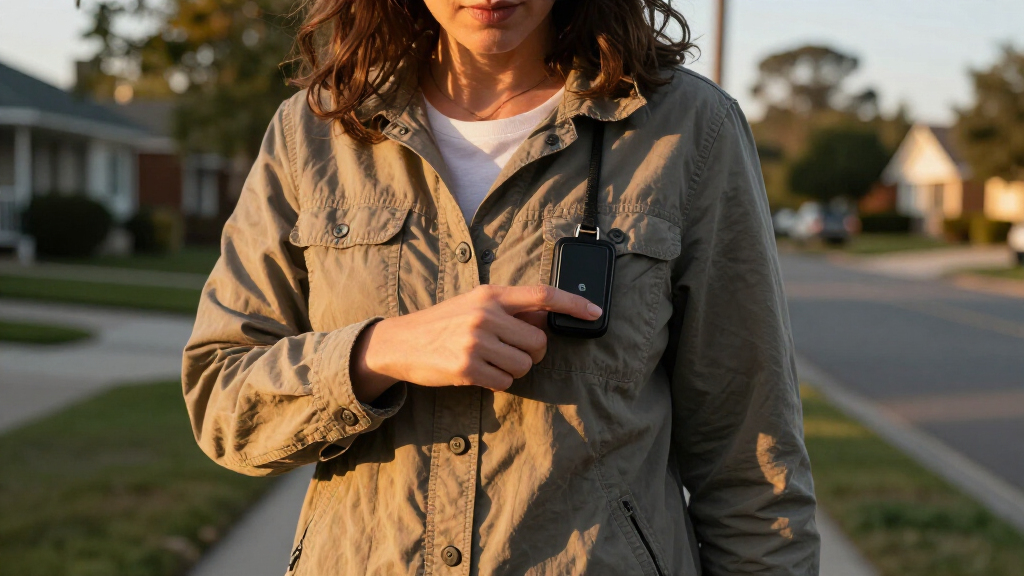
I compared these devices by how directly they meet the promise of a personal safety device that calls emergency contacts: how an alert is started, who receives it, and whether the wearer can speak with someone after pressing the button. I also weighed coverage and connection requirements, since a Wi-Fi caregiver button, a landline unit, and a GPS-enabled mobile pendant serve different situations. Other criteria included wearing comfort and access, fall detection, location sharing, two-way communication, power and charging needs, and the likely effort required from a caregiver.
The ranking favors devices that offer a clear response path beyond simply making noise, while distinguishing mobile protection from home alerting rather than treating them as interchangeable. SecuLife’s pendant leads for its mix of location and communication features; Silent Beacon earns a strong position for flexible phone-linked alerts. Home-focused systems and single-purpose alarms rank lower for this particular use case, not because they cannot help, but because their alert coverage or destination is more limited. Buyers should confirm current service, network, and contact requirements with the manufacturer before relying on any device.
Factors to Consider When Choosing Personal Safety Device That Calls Emergency Contacts
Before choosing a device, I’d work backward from the moment help may be needed: where the person will be, what they can press or wear, and who must respond. The following factors help separate a reassuring feature list from a setup that fits daily life.
Decide Who Must Receive the Alert
“Calls emergency contacts” can mean different things: a call to 911, a call or message to family, an alert through an app, or a connection to a monitoring service. Those routes do not provide the same response, so check the exact sequence after an SOS press. Ask whether the device contacts people in order, alerts several people at once, or requires someone to acknowledge the message. A caregiver notification can be useful when family members are nearby, but it may not bring immediate help if no one answers. Direct 911 calling may suit urgent situations, though it does not automatically notify family unless the device also supports that. Choose the alert destination first, then compare devices that can deliver it.
Match Coverage to Daily Routines
Home-based systems and mobile alert devices solve different problems, even when both have a button. Wi-Fi or receiver-based caregiver buttons can make sense in a house where the wearer stays within the system’s range, while a GPS or cellular pendant is better suited to errands and outdoor activity. A landline device may depend on an available telephone connection, and a phone-linked wearable may depend on the paired phone being charged, nearby, and connected. A common mistake is buying for the most reassuring scenario rather than the wearer’s usual routine. Map regular destinations and ask what happens if the person leaves the home, loses signal, or forgets the phone. Coverage claims should be checked against the manufacturer’s requirements and the actual service area.
Choose a Form the Person Will Actually Wear
A capable device cannot help if it stays in a drawer or is difficult to activate. Pendants can be easier to reach and may include medical-alert features, while wristbands and discreet accessory-style devices may feel more natural to someone who resists a visible pendant. Buttons need to be large and easy to press for the wearer’s dexterity, vision, and strength. Consider whether the device can be worn in the shower or during sleep, and verify water-resistance claims rather than assuming them. Caregivers should also check whether a user can tell that an alert has been sent. A comfortable, familiar design often matters more than adding features the wearer will not use.
Treat Fall Detection as a Backup, Not a Guarantee
Automatic fall detection can add a layer of support if someone cannot press a button, but it should not replace a reachable SOS control. Detection may not identify every fall, and a false alert can also occur; buyers should ask how the device handles both cases. Check whether the feature is included with the device, requires a service, or depends on a particular wearing position. If the person can reliably press a button, the priority may be clear two-way communication and dependable contact routing. If falls are a primary concern, ask the manufacturer what happens when detection triggers and whether a person can cancel an accidental alert. Build a response plan around the limitations, not just the feature name.
Check Setup, Power, and Ongoing Responsibilities
Some devices need a companion app, Wi-Fi credentials, a landline, or a phone pairing; others rely on a separate receiver or charging routine. Before buying, identify who will set it up, test it, and keep it powered. Ask how often charging is expected, what low-battery warnings look like, and whether alerts still work during an internet or power outage. A no-monthly-fee label does not by itself explain how alerts are routed or what functions require an app or connection. Schedule regular test alerts using the maker’s instructions and tell contacts what to do when they receive one. The easiest system to maintain is often the safer choice for households with limited technical support.
Pay for Capabilities That Match the Risk
More features can be worthwhile when they solve a real gap: location tracking for someone who goes out alone, two-way calling for a wearer who needs to explain what happened, or multiple call buttons for a home with several rooms. Extra functions add little if the wearer will not carry or charge the device, or if no one is prepared to respond. Buyers should compare the full operating requirements, including any service or connectivity needs, rather than judging by the feature list alone. For a household focused on indoor caregiver notification, a simpler receiver system may be a better fit than a mobile pendant. For someone living independently outside the home, location and communication may justify a more capable device. Match spending to the coverage, response, and ease-of-use needs that cannot be met by a simpler option.
Frequently Asked Questions
Will these devices call family members, 911, or both?
It depends on the model and its setup, so do not assume that every SOS button calls both family and emergency services. The 911 Help Now pendant is explicitly centered on direct 911 calling, while other products may alert caregivers, send app notifications, or use a paired phone for calls and messages. Before choosing, ask for the exact alert sequence and whether contacts need to install an app or answer a call. Confirm whether two-way conversation is available after an alert. If you need both family notification and emergency-service access, verify that the device supports both paths rather than relying on a general “SOS” description.
Can a home caregiver button protect someone when they go outside?
A home caregiver button is generally meant to alert within its receiver or network setup, not to provide location-based help everywhere. Daytech and Life Alert System are more naturally suited to household monitoring than to someone who regularly walks or runs errands alone. Check the stated operating range and whether the system needs Wi-Fi, a landline, or a nearby receiver. If outdoor coverage is part of the need, compare mobile options with GPS or phone-based connectivity instead. A home unit can still be useful as one part of a safety plan, but it should not be mistaken for a mobile medical alert.
Is automatic fall detection enough if the wearer cannot press a button?
No automatic system should be treated as a guarantee that every fall will trigger an alert. Fall detection can provide a useful backup, but the device may miss some events or send an alert when no assistance is needed. Ask how the model detects falls, how it signals a triggered alert, and whether the wearer can cancel a false alarm. Also check whether the feature requires a particular wearing position or separate service. If the person may be unable to call for help, choose a device with a clear response path and discuss additional support with their caregiver or clinician.
What should I choose if the wearer may forget to carry a phone?
Start by checking whether the device depends on a paired phone for its core alert functions. A phone-linked wearable can be convenient, but its safety value may fall if the phone is left behind, uncharged, or disconnected. A dedicated medical alert pendant or a home system with its own receiver may reduce that dependency, depending on the model’s coverage and connection needs. Ask the maker what still works when the phone is absent and whether calls, location sharing, and notifications all depend on it. The best fit is the device the wearer can keep accessible and use consistently.
How do I choose between a discreet SOS device and a medical alert pendant?
Prioritize wearability and the kind of help needed. A discreet device such as invisaWear may appeal to someone who prefers an everyday accessory, while a medical alert pendant can make the SOS function more recognizable and may pair with features such as fall detection or two-way calling. Check the activation method, connection requirements, and whether the device can contact the right people without a nearby phone. Consider whether the wearer would be more likely to keep one style on throughout the day. If a device is not worn consistently, its extra features cannot make up for that gap.
Conclusion
For a broad mix of mobile medical-alert features, I’d choose the SecuLife Medical Alert Pendant as the best overall pick. The Daytech caregiver call system is my best value-style choice for a home where a receiver and multiple call buttons meet the need, while the Silent Beacon is the strongest fit for buyers who want a flexible, phone-linked wearable. For beginners, I’d start with the system whose alert route is easiest for the wearer and caregiver to understand—often a straightforward home setup if protection is only needed indoors. For a discreet everyday option, consider invisaWear; for direct emergency-service calling, compare the 911 Help Now pendant; and for landline-based two-way communication, look at Freedom Alert. Before deciding, confirm coverage, contact routing, power needs, and any service requirements so the chosen device fits the person’s actual routine.
Halloween Picks
halloween
As an affiliate, we earn on qualifying purchases.